Simple Legacy Formats#
The legacy VTK file formats consist of five basic parts.
The first part is the file version and identifier. This part contains the single line:
vtk DataFile Version x.x.This line must be exactly as shown with the exception of the version number x.x, which will vary with different releases of VTK. (Note: the current version number is 3.0. Version 1.0 and 2.0 files are compatible with version 3.0 files.)The second part is the header. The header consists of a character string terminated by the newline character \n. The header has a maximum length of 256 characters. The header can be used to describe the data and include any other pertinent information.
The next part is the file format. The file format describes the type of file, either ASCII or binary. On this line, the single word ASCII or BINARY must appear.
The fourth part is the dataset structure, which describes the geometry and topology of the dataset. This part begins with a line containing the keyword DATASET followed by a keyword describing the type of dataset. Then, depending upon the type of dataset, other keyword/data combinations define the actual data.
The final part describes the dataset attributes. This part begins with the keywords POINT_DATA or CELL_DATA, followed by an integer number specifying the number of points or cells, respectively. (It does not matter whether POINT_DATA or CELL_DATA comes first.) Other keyword/data combinations then define the actual dataset attribute values (i.e., scalars, vectors, tensors, normals, texture coordinates, or field data).
An overview of the file format is shown in Figure 1:
| vtk DataFile Version 2.0 | (1) |
| Really cool data | (2) |
| ASCII | BINARY | (3) |
| DATASET type ... | (4) |
| POINT_DATA type ... CELL_DATA type ... | (5) |
| Part 1: File version and identifier | Part 4: Dataset structure: Geometry/Topology. type is one of:
|
| Part 2: Header (256 characters maximum, terminated with the newline \n character) | |
| Part 3: File format, either ASCII or BINARY | Part 5: Dataset attributes. The number of data items n of each type must match the number of points or cells in the dataset. (If type is FIELD, point and cell data should be omitted.) |
Figure 1: Overview of five parts of VTK data file format.
The first three parts are mandatory, but the other two are optional. Thus you have the flexibility of mixing and matching dataset attributes and geometry, either by operating system file manipulation or using VTK filters to merge data. Keywords are case insensitive, and may be separated by whitespace. Before describing the data file formats, please note the following:
dataType is one of the types bit, unsigned_char, char, unsigned_short, short, unsigned_int, int, unsigned_long, long, float, or double. These keywords are used to describe the form of the data, both for reading from the file, as well as constructing the appropriate internal objects. Not all data types are supported for all classes.
All keyword phrases are written in ASCII form whether the file is binary or ASCII. The binary section of the file (if in binary form) is the data proper; i.e., the numbers that define points coordinates, scalars, cell indices, and so forth.
Indices are zero-based. Thus, the first point has index 0.
If both the data attribute and geometry/topology part are present in the file, then the number of data values defined in the data attribute part must exactly match the number of points or cells defined in the geometry/topology part.
Cell types and indices are of type int.
Binary data must immediately follow the newline character (\n) from the previous ASCII keyword and parameter sequence.
The geometry/topology description must occur prior to the data attribute description.
Binary Files#
Binary files in VTK are portable across different computer systems as long as you observe two conditions. First, make sure that the byte ordering of the data is correct, and second, make sure that the length of each data type is consistent.
Most of the time VTK manages the byte ordering of binary files for you. When you write a binary file on one computer and read it in from another computer, the bytes representing the data will be automatically swapped as necessary. For example, binary files written on a Sun are stored in big endian order, while those on a PC are stored in little endian order. As a result, files written on a Sun workstation require byte swapping when read on a PC. (See the class vtkByteSwap for implementation details.) The VTK data files described here are written in big endian form.
Some file formats, however, do not explicitly define a byte ordering form. You will find that data read or written by external programs, or the classes vtkVolume16Reader, vtkMCubesReader, and vtkMCubesWriter may have a different byte order depending on the system of origin. In such cases, VTK allows you to specify the byte order by using these methods:
SetDataByteOrderToBigEndian()
SetDataByteOrderToLittleEndian()
Another problem with binary files is that systems may use a different number of bytes to represent an integer or other native type. For example, some 64-bit systems will represent an integer with 8 bytes, while others represent an integer with 4 bytes. Currently, the Visualization Toolkit cannot handle transporting binary files across systems with incompatible data length. In this case, use ASCII file formats instead.
Dataset Format#
The Visualization Toolkit supports five different dataset formats: structured points, structured grid, rectilinear grid, unstructured grid, and polygonal data. Data with implicit topology (structured data such as vtkImageData and vtkStructuredGrid) are ordered with x increasing fastest, then y, then z. These formats are as follows.
Structured Points. The file format supports 1D, 2D, and 3D structured point datasets. The dimensions nx, ny, nz must be greater than or equal to 1. The data spacing sx, sy, sz must be greater than 0. (Note: in the version 1.0 data file, spacing was referred to as “aspect ratio”. ASPECT_RATIO can still be used in version 2.0 data files, but is discouraged.)
  DATASET STRUCTURED_POINTS
  DIMENSIONS nx ny nz
  ORIGIN x y z
  SPACING sx sy sz
Structured Grid. The file format supports 1D, 2D, and 3D structured grid datasets. The dimensions nx, ny, nz must be greater than or equal to 1. The point coordinates are defined by the data in the POINTS section. This consists of x-y-z data values for each point.
  DATASET STRUCTURED_GRID
  DIMENSIONS nx ny nz
  POINTS n dataType
  p0x p0y p0z
  p1x p1y p1z
  ...
  p(n-1)x p(n-1)y p(n-1)z
Rectilinear Grid. A rectilinear grid defines a dataset with regular topology, and semi-regular geometry aligned along the x-y-z coordinate axes. The geometry is defined by three lists of monotonically increasing coordinate values, one list for each of the x-y-z coordinate axes. The topology is defined by specifying the grid dimensions, which must be greater than or equal to 1.
  DATASET RECTILINEAR_GRID
  DIMENSIONS nx ny nz
  X_COORDINATES nx dataType
  x0 x1 ... x(nx-1)
  Y_COORDINATES ny dataType
  y0 y1 ... y(ny-1)
  Z_COORDINATES nz dataType
  z0 z1 ... z(nz-1)
Polygonal Data. The polygonal dataset consists of arbitrary combinations of surface graphics primitives vertices (and polyvertices), lines (and polylines), polygons (of various types), and triangle strips. Polygonal data is defined by the POINTS, VERTICES, LINES, POLYGONS, or TRIANGLE_STRIPS sections. The POINTS definition is the same as that for structured grid datasets. The VERTICES, LINES, POLYGONS, or TRIANGLE_STRIPS keywords define the polygonal dataset topology. Each of these keywords requires two parameters: the number of cells n and the size of the cell list. The cell list size is the total number of integer values required to represent the list (i.e., sum of numPoints and connectivity indices over each cell). None of the keywords VERTICES, LINES, POLYGONS, or TRIANGLE_STRIPS is required.
  DATASET POLYDATA
  POINTS n dataType
  p0x p0y p0z
  p1x p1y p1z
  ...
  p(n-1)x p(n-1)y p(n-1)z
  VERTICES n size
  numPoints0, i0, j0, k0, ...
  numPoints1, i1, j1, k1, ...
  ...
  numPointsn-1, in-1, jn-1, kn-1, ...

  LINES n size
  numPoints0, i0, j0, k0, ...
  numPoints1, i1, j1, k1, ...
  ...
  numPointsn-1, in-1, jn-1, kn-1, ...

  POLYGONS n size
  numPoints0, i0, j0, k0, ...
  numPoints1, i1, j1, k1, ...
  ...
  numPointsn-1, in-1, jn-1, kn-1, ...

  TRIANGLE_STRIPS n size
  numPoints0, i0, j0, k0, ...
  numPoints1, i1, j1, k1, ...
  ...
  numPointsn-1, in-1, jn-1, kn-1, ...
Unstructured Grid. The unstructured grid dataset consists of arbitrary combinations of any possible cell type. Unstructured grids are defined by points, cells, and cell types. The CELLS keyword requires two parameters: the number of cells n and the size of the cell list. The cell list size is the total number of integer values required to represent the list (i.e., sum of numPoints and connectivity indices over each cell). The CELL_TYPES keyword requires a single parameter: the number of cells n. This value should match the value specified by the CELLS keyword. The cell types data consists of a single integer value per cell that specifies the cell type (see vtkCell.h or Figure 2).
  DATASET UNSTRUCTURED_GRID
  POINTS n dataType
  p0x p0y p0z
  p1x p1y p1z
  ...
  p(n-1)x p(n-1)y p(n-1)z

  CELLS n size
  numPoints0, i0, j0, k0, ...
  numPoints1, i1, j1, k1, ...
  numPoints2, i2, j2, k2, ...
  ...
  numPointsn-1, in-1, jn-1, kn-1, ...

  CELL_TYPES n
  type0
  type1
  type2
  ...
  typen-1
Field. Field data is a general format without topological and geometric structure, and without a particular dimensionality. Typically field data is associated with the points or cells of a dataset. However, if the FIELD type is specified as the dataset type (see Figure 1), then a general VTK data object is defined. Use the format described in the next section to define a field. Also see “Working With Field Data” on page 249 and the fourth example in this chapter Legacy File Examples.
Dataset Attribute Format#
The Visualization Toolkit supports the following dataset attributes: scalars (one to four components), vectors, normals, texture coordinates (1D, 2D, and 3D), tensors, and field data. In addition, a lookup table using the RGBA color specification, associated with the scalar data, can be defined as well. Dataset attributes are supported for both points and cells.
Each type of attribute data has a dataName associated with it. This is a character string (without embedded whitespace) used to identify the specific dataset attribute. The dataName is used by the VTK readers to extract data. As a result, more than one attribute data of the same type can be included in a file. For example, two different scalar fields defined on the dataset points, pressure and temperature, can be contained in the same file. (If the appropriate dataName is not specified in the VTK reader, then the first dataset attribute of that type is extracted from the file.)
Scalars. Scalar definition includes specification of a lookup table. The definition of a lookup table is optional. If not specified, the default VTK table will be used (and tableName should be “default”). Also note that the numComp variable is optional—by default the number of components is equal to one. (The parameter numComp must range between 1 and 4 inclusive; in versions of VTK prior to 2.3 this parameter was not supported.)
  SCALARS dataName dataType numComp
  LOOKUP_TABLE tableName
  s0
  s1
  ...
  sn-1
The definition of color scalars (i.e., unsigned char values directly mapped to color) varies depending upon the number of values (nValues) per scalar. If the file format is ASCII, the color scalars are defined using nValues float values between 0 and 1. If the file format is BINARY, the stream of data consists of nValues unsigned char values per scalar value.
  COLOR_SCALARS dataName nValues
  c00 c01 ... c0(nValues-1)
  c10 c11 ... c1(nValues-1)
  ...
  c(n-1)0 c(n-1)1 ... c(n-1)(nValues-1)
Lookup Table. The tableName field is a character string (without embedded whitespace) used to identify the lookup table. This label is used by the VTK reader to extract a specific table. Each entry in the lookup table is a rgba[4] (red-green-blue-alpha) array (alpha is opacity where alpha=0 is transparent). If the file format is ASCII, the lookup table values must be float values between 0 and 1. If the file format is BINARY, the stream of data must be four unsigned char values per table entry.
  LOOKUP_TABLE tableName size
  r0 g0 b0 a0
  r1 g1 b1 a1
  ...
  rsize-1 gsize-1 bsize-1 asize-1
Vectors.
  VECTORS dataName dataType
  v0x v0y v0z
  v1x v1y v1z
  ...
  v(n-1)x v(n-1)y v(n-1)z
Normals. Normals are assumed to be normalized (|n| = 1).
  NORMALS dataName dataType
  n0x n0y n0z
  n1x n1y n1z
  ...
  n(n-1)x n(n-1)y n(n-1)z
Texture Coordinates. Texture coordinates of 1, 2, and 3 dimensions are supported.
  TEXTURE_COORDINATES dataName dim dataType
  t00 t01 ... t0(dim-1)
  t10 t11 ... t1(dim-1)
  ...
  t(n-1)0 t(n-1)1 ... t(n-1)(dim-1)
Tensors. Currently only real-valued, symmetric tensors are supported.
  TENSORS dataName dataType
  t000 t001 t002
  t010 t011 t012
  t020 t021 t022

  t100 t101 t102
  t110 t111 t112
  t120 t121 t122
  ...

  tn-100 tn-101 tn-102
  tn-110 tn-111 tn-112
  tn-120 tn-121 tn-122
Field Data. Field data is essentially an array of data arrays. Defining field data means giving a name to the field and specifying the number of arrays it contains. For each array, define its name (arrayName(i)), the number of components (numComponents), the number of tuples (numTuples), and the data type (dataType).
  FIELD dataName numArrays
  arrayName0 numComponents numTuples dataType
  f00 f01 ... f0(numComponents-1)
  f10 f11 ... f1(numComponents-1)
  ...
  f(numTuples-1)0 f(numTuples-1)1 ... f(numTuples-1)(numComponents-1)
  arrayName1 numComponents numTuples dataType
  f00 f01 ... f0(numComponents-1)
  f10 f11 ... f1(numComponents-1)
  ...
  f(numTuples-1)0 f(numTuples-1)1 ... f(numTuples-1)(numComponents-1)
  ...
  arrayName(numArrays-1) numComponents numTuples dataType
  f00 f01 ... f0(numComponents-1)
  f10 f11 ... f1(numComponents-1)
  ...
  f(numTuples-1)0 f(numTuples-1)1 ... f(numTuples-1)(numComponents-1)
Legacy File Examples#
The first example is a cube represented by six polygonal faces. We define a single-component scalar, normals, and field data on the six faces. There are scalar data associated with the eight vertices. A lookup table of eight colors, associated with the point scalars, is also defined.
# vtk DataFile Version 2.0
Cube example
ASCII
DATASET POLYDATA
POINTS 8 float
0.0 0.0 0.0
1.0 0.0 0.0
1.0 1.0 0.0
0.0 1.0 0.0
0.0 0.0 1.0
1.0 0.0 1.0
1.0 1.0 1.0
0.0 1.0 1.0
POLYGONS 6 30
4 0 1 2 3
4 4 5 6 7
4 0 1 5 4
4 2 3 7 6
4 0 4 7 3
4 1 2 6 5
CELL_DATA 6
SCALARS cell_scalars int 1
LOOKUP_TABLE default
0
1
2
3
4
5
NORMALS cell_normals float
0 0 -1
0 0 1
0 -1 0
0 1 0
-1 0 0
1 0 0
FIELD FieldData 2
cellIds 1 6 int
0 1 2 3 4 5
faceAttributes 2 6 float
0.0 1.0 1.0 2.0 2.0 3.0 3.0 4.0 4.0 5.0 5.0 6.0
POINT_DATA 8
SCALARS sample_scalars float 1
LOOKUP_TABLE my_table
0.0
1.0
2.0
3.0
4.0
5.0
6.0
7.0
LOOKUP_TABLE my_table 8
0.0 0.0 0.0 1.0
1.0 0.0 0.0 1.0
0.0 1.0 0.0 1.0
1.0 1.0 0.0 1.0
0.0 0.0 1.0 1.0
1.0 0.0 1.0 1.0
0.0 1.0 1.0 1.0
1.0 1.0 1.0 1.0
The next example is a volume of dimension 3 by 4 by 6. Since no lookup table is defined, either the user must create one in VTK or the default lookup table will be used.
# vtk DataFile Version 2.0
Volume example
ASCII
DATASET STRUCTURED_POINTS
DIMENSIONS 3 4 6
ASPECT_RATIO 1 1 1
ORIGIN 0 0 0
POINT_DATA 72
SCALARS volume_scalars char 1
LOOKUP_TABLE default
0 0 0 0 0 0 0 0 0 0 0 0
0 5 10 15 20 25 25 20 15 10 5 0
0 10 20 30 40 50 50 40 30 20 10 0
0 10 20 30 40 50 50 40 30 20 10 0
0 5 10 15 20 25 25 20 15 10 5 0
0 0 0 0 0 0 0 0 0 0 0 0
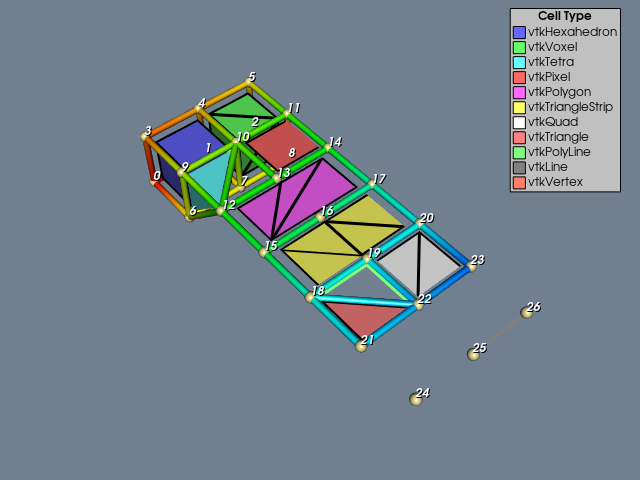
The third example is an unstructured grid containing twelve of the nineteen VTK cell types (see Figure 2 and Figure 3). Figure 2 shows all 16 of the linear cell types and was generated with the LinearCellDemo.
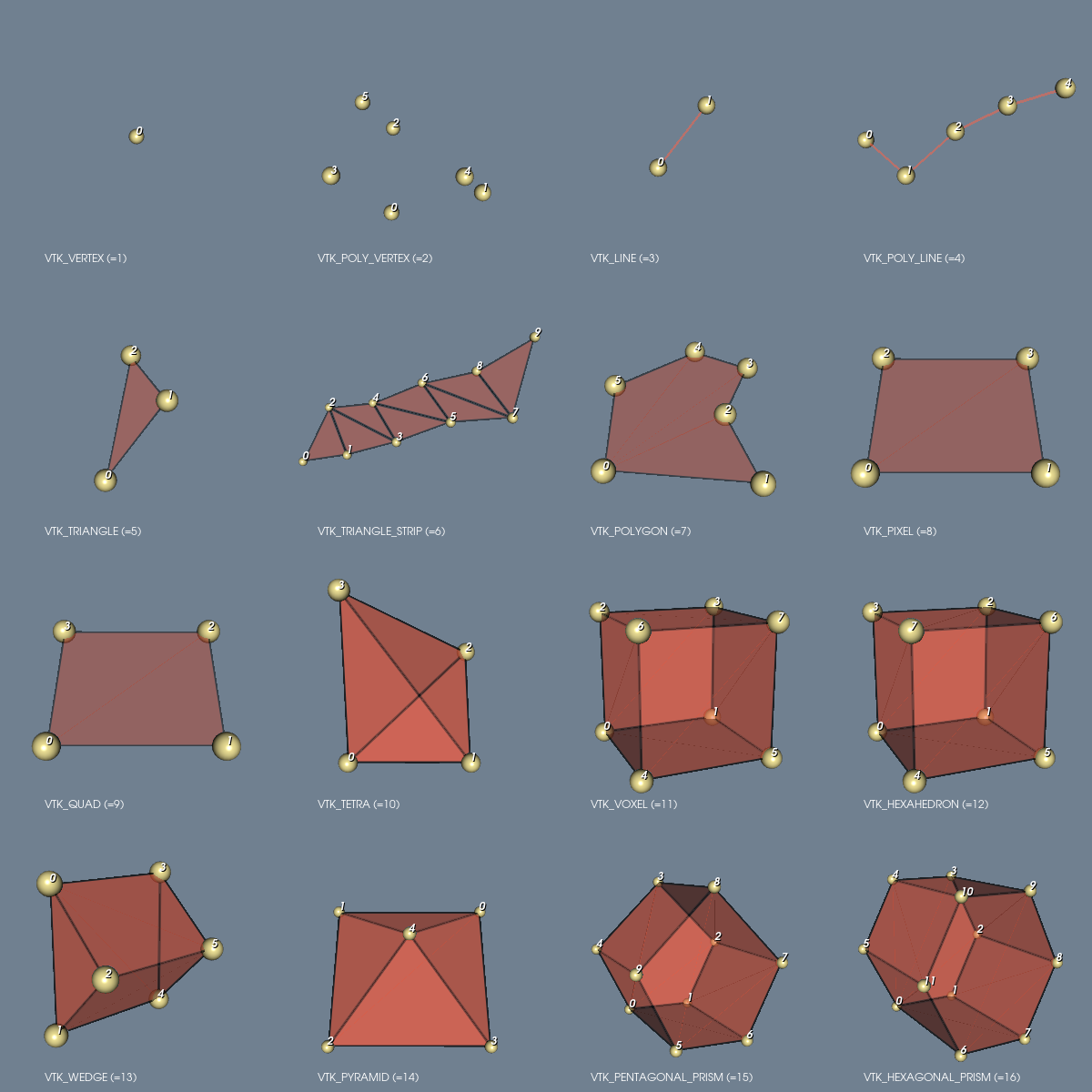
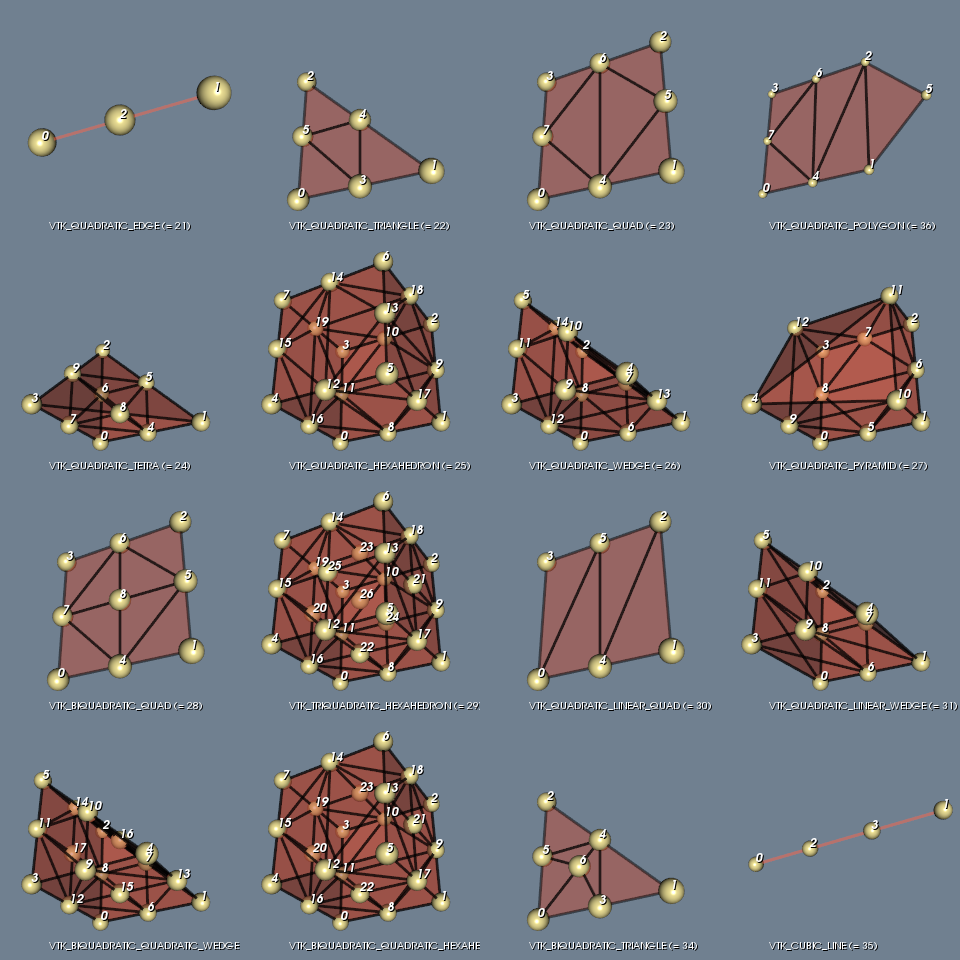
Figure 3 shows 16 of the non-linear cells and was generated with the IsoparametricCellsDemo.
The file contains scalar and vector data. Figure 4 shows a presentation of this file generated by ReadLegacyUnstructuredGrid.
# vtk DataFile Version 2.0
Unstructured Grid Example
ASCII
DATASET UNSTRUCTURED_GRID

POINTS 27 float
0 0 0  1 0 0  2 0 0  0 1 0  1 1 0  2 1 0
0 0 1  1 0 1  2 0 1  0 1 1  1 1 1  2 1 1
0 1 2  1 1 2  2 1 2  0 1 3  1 1 3  2 1 3
0 1 4  1 1 4  2 1 4  0 1 5  1 1 5  2 1 5
0 1 6  1 1 6  2 1 6

CELLS 11 60
8 0 1 4 3 6 7 10 9
8 1 2 4 5 7 8 10 11
4 6 10 9 12
4 11 14 10 13
6 15 16 17 14 13 12
6 18 15 19 16 20 17
4 22 23 20 19
3 21 22 18
3 22 19 18
2 26 25
1 24

CELL_TYPES 11
12
11
10
8
7
6
9
5
4
3
1

POINT_DATA 27
SCALARS scalars float 1
LOOKUP_TABLE default
0.0 1.0 2.0 3.0 4.0 5.0
6.0 7.0 8.0 9.0 10.0 11.0
12.0 13.0 14.0 15.0 16.0 17.0
18.0 19.0 20.0 21.0 22.0 23.0
24.0 25.0 26.0

VECTORS vectors float
1 0 0  1 1 0  0 2 0  1 0 0  1 1 0  0 2 0
1 0 0  1 1 0  0 2 0  1 0 0  1 1 0  0 2 0
0 0 1  0 0 1  0 0 1  0 0 1  0 0 1  0 0 1
0 0 1  0 0 1  0 0 1  0 0 1  0 0 1  0 0 1
0 0 1  0 0 1  0 0 1

CELL_DATA 11
SCALARS scalars float 1
LOOKUP_TABLE CellColors
0.0 1.0 2.0 3.0 4.0 5.0
6.0 7.0 8.0 9.0 10.0

LOOKUP_TABLE CellColors 11
.4 .4 1 1
.4 1 .4 1
.4 1 1 1
1 .4 .4 1
1 .4 1 1
1 1 .4 1
1 1 1 1
1 .5 .5 1
.5 1 .5 1
.5 .5 .5 1
1 .5 .4 1
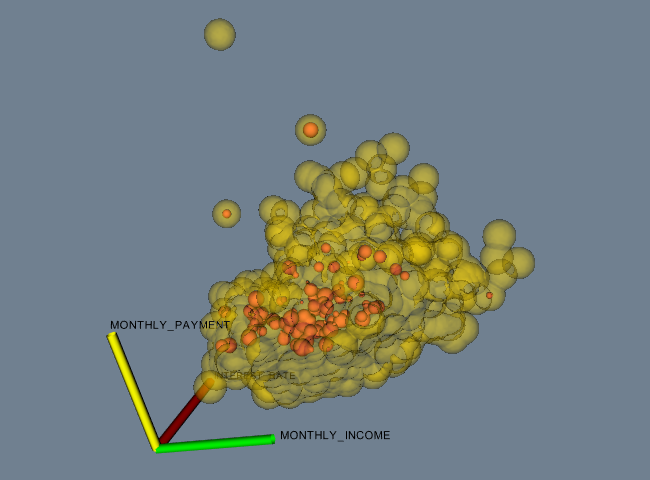
The fourth and final example is data represented as a field. You may also wish to see “Working With Field Data” on page 249 to see how to manipulate this data. The data file shown below can be found in its entirety here. The example FinanceFieldData generated Figure 5.
# vtk DataFile Version 2.0
Financial data in vtk field format
ASCII
FIELD financialData 6
TIME_LATE 1 3188 float
29.14 0.00 0.00 11.71 0.00 0.00 0.00 0.00
...(more stuff — 3188 total values)...
MONTHLY_PAYMENT 1 3188 float
7.26 5.27 8.01 16.84 8.21 15.75 10.62 15.47
...(more stuff)...
UNPAID_PRINCIPAL 1 3188 float
430.70 380.88 516.22 1351.23 629.66 1181.97 888.91 1437.83
...(more stuff)...
LOAN_AMOUNT 1 3188 float
441.50 391.00 530.00 1400.00 650.00 1224.00 920.00 1496.00
...(more stuff)...
INTEREST_RATE 1 3188 float
13.875 13.875 13.750 11.250 11.875 12.875 10.625 10.500
...(more stuff)...
MONTHLY_INCOME 1 3188 unsigned_short
39 51 51 38 35 49 45 56
...(more stuff)...
In this example, a field is represented using six arrays. Each array has a single component and 3,188 tuples. Five of the six arrays are of type float, while the last array is of type unsigned_short. Additional examples are available in the data directory.