
DeepSeek V3/V3.1/R1 Usage#
SGLang provides many optimizations specifically designed for the DeepSeek models, making it the inference engine recommended by the official DeepSeek team from Day 0.
This document outlines current optimizations for DeepSeek. For an overview of the implemented features see the completed Roadmap.
Launch DeepSeek V3.1/V3/R1 with SGLang#
To run DeepSeek V3.1/V3/R1 models, the recommended settings are as follows:
Weight Type |
Configuration |
|---|---|
Full precision FP8 |
8 x H200 |
8 x B200 |
|
8 x MI300X |
|
2 x 8 x H100/800/20 |
|
Xeon 6980P CPU |
|
Full precision (BF16) (upcast from original FP8) |
2 x 8 x H200 |
2 x 8 x MI300X |
|
4 x 8 x H100/800/20 |
|
4 x 8 x A100/A800 |
|
Quantized weights (INT8) |
16 x A100/800 |
32 x L40S |
|
Xeon 6980P CPU |
|
4 x Atlas 800I A3 |
|
Quantized weights (W4A8) |
8 x H20/100, 4 x H200 |
Quantized weights (AWQ) |
8 x H100/800/20 |
8 x A100/A800 |
|
Quantized weights (MXFP4) |
8, 4 x MI355X/350X |
Quantized weights (NVFP4) |
8, 4 x B200 |
Important
The official DeepSeek V3 is already in FP8 format, so you should not run it with any quantization arguments like --quantization fp8.
Detailed commands for reference:
Download Weights#
If you encounter errors when starting the server, ensure the weights have finished downloading. It’s recommended to download them beforehand or restart multiple times until all weights are downloaded. Please refer to DeepSeek V3 official guide to download the weights.
Launch with one node of 8 x H200#
Please refer to the example.
Running examples on Multi-Node#
Deploying DeepSeek on GB200 NVL72 with PD and Large Scale EP (Part I, Part II) - Comprehensive guide on GB200 optimizations.
Deploying DeepSeek with PD Disaggregation and Large-Scale Expert Parallelism on 96 H100 GPUs - Guide on PD disaggregation and large-scale EP.
Best Practices for Serving DeepSeek-R1 on H20 - Comprehensive guide on H20 optimizations, deployment and performance.
Optimizations#
Multi-head Latent Attention (MLA) Throughput Optimizations#
Description: MLA is an innovative attention mechanism introduced by the DeepSeek team, aimed at improving inference efficiency. SGLang has implemented specific optimizations for this, including:
Weight Absorption: By applying the associative law of matrix multiplication to reorder computation steps, this method balances computation and memory access and improves efficiency in the decoding phase.
MLA Attention Backends: Currently SGLang supports different optimized MLA attention backends, including FlashAttention3, Flashinfer, FlashMLA, CutlassMLA, TRTLLM MLA (optimized for Blackwell architecture), and Triton backends. The default FA3 provides good performance across wide workloads.
FP8 Quantization: W8A8 FP8 and KV Cache FP8 quantization enables efficient FP8 inference. Additionally, we have implemented Batched Matrix Multiplication (BMM) operator to facilitate FP8 inference in MLA with weight absorption.
CUDA Graph & Torch.compile: Both MLA and Mixture of Experts (MoE) are compatible with CUDA Graph and Torch.compile, which reduces latency and accelerates decoding speed for small batch sizes.
Chunked Prefix Cache: Chunked prefix cache optimization can increase throughput by cutting prefix cache into chunks, processing them with multi-head attention and merging their states. Its improvement can be significant when doing chunked prefill on long sequences. Currently this optimization is only available for FlashAttention3 backend.
Overall, with these optimizations, we have achieved up to 7x acceleration in output throughput compared to the previous version.
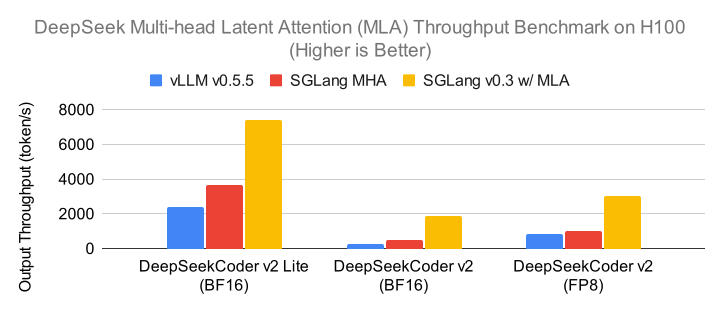
Usage: MLA optimization is enabled by default.
Data Parallelism Attention#
Description: This optimization involves data parallelism (DP) for the MLA attention mechanism of DeepSeek Series Models, which allows for a significant reduction in the KV cache size, enabling larger batch sizes. Each DP worker independently handles different types of batches (prefill, decode, idle), which are then synchronized before and after processing through the Mixture-of-Experts (MoE) layer. If you do not use DP attention, KV cache will be duplicated among all TP ranks.

With data parallelism attention enabled, we have achieved up to 1.9x decoding throughput improvement compared to the previous version.
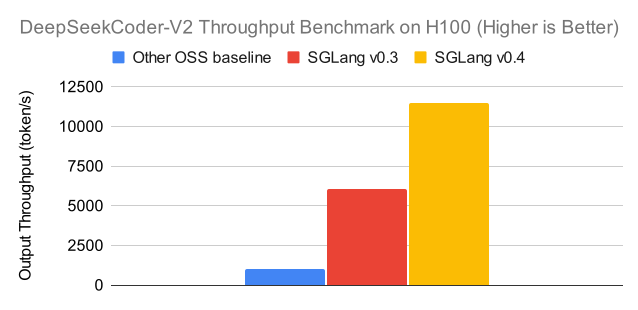
Usage:
Append
--enable-dp-attention --tp 8 --dp 8to the server arguments when using 8 H200 GPUs. This optimization improves peak throughput in high batch size scenarios where the server is limited by KV cache capacity.DP and TP attention can be flexibly combined. For example, to deploy DeepSeek-V3/R1 on 2 nodes with 8 H100 GPUs each, you can specify
--enable-dp-attention --tp 16 --dp 2. This configuration runs attention with 2 DP groups, each containing 8 TP GPUs.
Caution
Data parallelism attention is not recommended for low-latency, small-batch use cases. It is optimized for high-throughput scenarios with large batch sizes.
Reference: Check Blog.
Multi-Node Tensor Parallelism#
Description: For users with limited memory on a single node, SGLang supports serving DeepSeek Series Models, including DeepSeek V3, across multiple nodes using tensor parallelism. This approach partitions the model parameters across multiple GPUs or nodes to handle models that are too large for one node’s memory.
Usage: Check here for usage examples.
Block-wise FP8#
Description: SGLang implements block-wise FP8 quantization with two key optimizations:
Activation: E4M3 format using per-token-per-128-channel sub-vector scales with online casting.
Weight: Per-128x128-block quantization for better numerical stability.
DeepGEMM: The DeepGEMM kernel library optimized for FP8 matrix multiplications.
Usage: The activation and weight optimization above are turned on by default for DeepSeek V3 models. DeepGEMM is enabled by default on NVIDIA Hopper/Blackwell GPUs and disabled by default on other devices. DeepGEMM can also be manually turned off by setting the environment variable SGLANG_ENABLE_JIT_DEEPGEMM=0.
Tip
Before serving the DeepSeek model, precompile the DeepGEMM kernels to improve first-run performance. The precompilation process typically takes around 10 minutes to complete.
python3 -m sglang.compile_deep_gemm --model deepseek-ai/DeepSeek-V3 --tp 8 --trust-remote-code
Multi-token Prediction#
Description: SGLang implements DeepSeek V3 Multi-Token Prediction (MTP) based on EAGLE speculative decoding. With this optimization, the decoding speed can be improved by 1.8x for batch size 1 and 1.5x for batch size 32 respectively on H200 TP8 setting.
Usage:
Add --speculative-algorithm EAGLE. Other flags, like --speculative-num-steps, --speculative-eagle-topk and --speculative-num-draft-tokens are optional. For example:
python3 -m sglang.launch_server \
  --model-path deepseek-ai/DeepSeek-V3-0324 \
  --speculative-algorithm EAGLE \
  --trust-remote-code \
  --tp 8
The default configuration for DeepSeek models is
--speculative-num-steps 3 --speculative-eagle-topk 1 --speculative-num-draft-tokens 4. The best configuration for--speculative-num-steps,--speculative-eagle-topkand--speculative-num-draft-tokenscan be searched with bench_speculative.py script for given batch size. The minimum configuration is--speculative-num-steps 1 --speculative-eagle-topk 1 --speculative-num-draft-tokens 2, which can achieve speedup for larger batch sizes.Most MLA attention backends fully support MTP usage. See MLA Backends for details.
Note
To enable DeepSeek MTP for large batch sizes (>48), you need to adjust some parameters (Reference this discussion):
Adjust
--max-running-requeststo a larger number. The default value is48for MTP. For larger batch sizes, you should increase this value beyond the default value.Set
--cuda-graph-bs. It’s a list of batch sizes for cuda graph capture. The default captured batch sizes for speculative decoding is 48. You can customize this by including more batch sizes.
Tip
To enable the experimental overlap scheduler for EAGLE speculative decoding, set the environment variable SGLANG_ENABLE_SPEC_V2=1. This can improve performance by enabling overlap scheduling between draft and verification stages.
Reasoning Content for DeepSeek R1 & V3.1#
See Reasoning Parser and Thinking Parameter for DeepSeek V3.1.
Function calling for DeepSeek Models#
Add arguments --tool-call-parser deepseekv3 and --chat-template ./examples/chat_template/tool_chat_template_deepseekv3.jinja(recommended) to enable this feature. For example (running on 1 * H20 node):
python3 -m sglang.launch_server \
  --model deepseek-ai/DeepSeek-V3-0324 \
  --tp 8 \
  --port 30000 \
  --host 0.0.0.0 \
  --mem-fraction-static 0.9 \
  --tool-call-parser deepseekv3 \
  --chat-template ./examples/chat_template/tool_chat_template_deepseekv3.jinja
Sample Request:
curl "http://127.0.0.1:30000/v1/chat/completions" \
-H "Content-Type: application/json" \
-d '{"temperature": 0, "max_tokens": 100, "model": "deepseek-ai/DeepSeek-V3-0324", "tools": [{"type": "function", "function": {"name": "query_weather", "description": "Get weather of a city, the user should supply a city first", "parameters": {"type": "object", "properties": {"city": {"type": "string", "description": "The city, e.g. Beijing"}}, "required": ["city"]}}}], "messages": [{"role": "user", "content": "How'\''s the weather like in Qingdao today"}]}'
Expected Response
{"id":"6501ef8e2d874006bf555bc80cddc7c5","object":"chat.completion","created":1745993638,"model":"deepseek-ai/DeepSeek-V3-0324","choices":[{"index":0,"message":{"role":"assistant","content":null,"reasoning_content":null,"tool_calls":[{"id":"0","index":null,"type":"function","function":{"name":"query_weather","arguments":"{\"city\": \"Qingdao\"}"}}]},"logprobs":null,"finish_reason":"tool_calls","matched_stop":null}],"usage":{"prompt_tokens":116,"total_tokens":138,"completion_tokens":22,"prompt_tokens_details":null}}
Sample Streaming Request:
curl "http://127.0.0.1:30000/v1/chat/completions" \
-H "Content-Type: application/json" \
-d '{"temperature": 0, "max_tokens": 100, "model": "deepseek-ai/DeepSeek-V3-0324","stream":true,"tools": [{"type": "function", "function": {"name": "query_weather", "description": "Get weather of a city, the user should supply a city first", "parameters": {"type": "object", "properties": {"city": {"type": "string", "description": "The city, e.g. Beijing"}}, "required": ["city"]}}}], "messages": [{"role": "user", "content": "How'\''s the weather like in Qingdao today"}]}'
Expected Streamed Chunks (simplified for clarity):
data: {"choices":[{"delta":{"tool_calls":[{"function":{"arguments":"{\""}}]}}]}
data: {"choices":[{"delta":{"tool_calls":[{"function":{"arguments":"city"}}]}}]}
data: {"choices":[{"delta":{"tool_calls":[{"function":{"arguments":"\":\""}}]}}]}
data: {"choices":[{"delta":{"tool_calls":[{"function":{"arguments":"Q"}}]}}]}
data: {"choices":[{"delta":{"tool_calls":[{"function":{"arguments":"ing"}}]}}]}
data: {"choices":[{"delta":{"tool_calls":[{"function":{"arguments":"dao"}}]}}]}
data: {"choices":[{"delta":{"tool_calls":[{"function":{"arguments":"\"}"}}]}}]}
data: {"choices":[{"delta":{"tool_calls":null}}], "finish_reason": "tool_calls"}
data: [DONE]
The client needs to concatenate all arguments fragments to reconstruct the complete tool call:
{"city": "Qingdao"}
Important
Use a lower
"temperature"value for better results.To receive more consistent tool call results, it is recommended to use
--chat-template examples/chat_template/tool_chat_template_deepseekv3.jinja. It provides an improved unified prompt.
Thinking Budget for DeepSeek R1#
In SGLang, we can implement thinking budget with CustomLogitProcessor.
Launch a server with --enable-custom-logit-processor flag on.
python3 -m sglang.launch_server --model deepseek-ai/DeepSeek-R1 --tp 8 --port 30000 --host 0.0.0.0 --mem-fraction-static 0.9 --disable-cuda-graph --reasoning-parser deepseek-r1 --enable-custom-logit-processor
Sample Request:
import openai
from rich.pretty import pprint
from sglang.srt.sampling.custom_logit_processor import DeepSeekR1ThinkingBudgetLogitProcessor


client = openai.Client(base_url="http://127.0.0.1:30000/v1", api_key="*")
response = client.chat.completions.create(
    model="deepseek-ai/DeepSeek-R1",
    messages=[
        {
            "role": "user",
            "content": "Question: Is Paris the Capital of France?",
        }
    ],
    max_tokens=1024,
    extra_body={
        "custom_logit_processor": DeepSeekR1ThinkingBudgetLogitProcessor().to_str(),
        "custom_params": {
            "thinking_budget": 512,
        },
    },
)
pprint(response)
FAQ#
Q: Model loading is taking too long, and I’m encountering an NCCL timeout. What should I do?
A: If you’re experiencing extended model loading times and an NCCL timeout, you can try increasing the timeout duration. Add the argument --dist-timeout 3600 when launching your model. This will set the timeout to one hour, which often resolves the issue.