介紹
歡迎來到《嵌入式 Rust 手冊》:一本介紹如何在「裸機」嵌入式系統(如微控制器)上使用 Rust 程式語言的入門書。
嵌入式 Rust 的適用對象
嵌入式 Rust 適合想進行嵌入式開發、同時享受 Rust 語言提供的高階概念與安全保證的人。(另見 Rust 的適用對象)
範疇
本書的目標是:
-
讓開發者快速上手嵌入式 Rust 開發。例如:如何設定開發環境。
-
分享使用 Rust 進行嵌入式開發的_當前_最佳實務。例如:如何善用 Rust 語言特性來寫出更正確的嵌入式軟體。
-
在某些情況下作為食譜。例如:如何在單一專案中混用 C 與 Rust?
本書力求通用,但為了讓讀者與作者更容易上手,所有範例都採用 ARM Cortex-M 架構。不過,本書不假設讀者熟悉該架構,並在需要時解釋其特定細節。
本書的讀者
本書面向具備嵌入式或 Rust 背景的人,但我們相信所有對嵌入式 Rust 感到好奇的人都能從本書中有所收穫。若你沒有相關先備知識,我們建議先閱讀「假設與先備條件」章節並補足不足,讓你從本書獲益更多並提升閱讀體驗。你也可查看「其他資源」章節,尋找你想補充的主題。
假設與先備條件
-
你已能熟練使用 Rust 程式語言,並在桌面環境撰寫、執行與除錯 Rust 應用程式。你也應熟悉 2018 edition 的慣例,因為本書以 Rust 2018 為目標。
-
你能以 C、C++ 或 Ada 等其他語言進行嵌入式系統開發與除錯,並熟悉以下概念:
- 交叉編譯
- 記憶體對映周邊
- 中斷
- I2C、SPI、序列埠等常見介面
其他資源
如果你對上述內容不熟悉,或想了解本書提及的特定主題,以下資源可能會有幫助。
| 話題 | 資源 | 描述 |
|---|---|---|
| Rust | Rust 手冊 | 若你尚未熟悉 Rust,我們強烈建議先閱讀此書。 |
| Rust、嵌入式 | Discovery 手冊 | 若你從未做過嵌入式開發,這本書可能是更好的起點 |
| Rust、嵌入式 | Embedded Rust Bookshelf | 在這裡可以找到 Rust 嵌入式工作群提供的其他資源。 |
| Rust、嵌入式 | Embedonomicon | 使用 Rust 進行嵌入式開發時的繁瑣細節。 |
| Rust、嵌入式 | 嵌入式 FAQ | 關於嵌入式情境中的 Rust 常見問題。 |
| Rust、嵌入式 | Comprehensive Rust 🦀:裸機 | 裸機 Rust 開發 1 日課程的教學教材 |
| 中斷 | 中斷 | - |
| 記憶體對映 I/O/周邊 | 記憶體對映 I/O | - |
| SPI、UART、RS232、USB、I2C、TTL | 關於 SPI、UART 與其他介面的 Stack Exchange 討論 | - |
翻譯
本書由熱心志工翻譯完成。若你希望你的翻譯列在此處,請開 PR 加入。
如何使用這本手冊
該手冊一般假設你從前往後閱讀。後續章節會建立在前面章節的概念之上,而前面章節可能不會深入某些話題,並在後續章節再回頭詳述。
本書多數範例會使用 STMicroelectronics 的 STM32F3DISCOVERY 開發板。此開發板基於 ARM Cortex-M 架構,雖然此架構的多數 CPU 基本功能相同,但不同廠商的微控制器周邊與其他實作細節各不相同,甚至同一廠商不同家族也可能不同。
因此,我們建議購買 STM32F3DISCOVERY 開發板來跟著本書範例操作。
為本書做出貢獻
如果你在跟著本書指引時遇到困難,或發現某些章節不夠清楚或難以理解,那就是問題,應在本書的議題追蹤器 回報。
非常歡迎修正錯字與新增內容的 Pull Request!
重複使用本資料
本書以以下授權條款釋出:
- 本書包含的程式碼範例與獨立的 Cargo 專案同時採用 MIT 授權 與 Apache License v2.0 授權。
- 本書的文字、圖片與圖表採用 Creative Commons CC-BY-SA v4.0 授權。
TL;DR:若你想在作品中使用我們的文字或圖片,你需要:
- 給予適當的引用(例如在投影片中提到本書,並提供相關頁面的連結)
- 提供 CC-BY-SA v4.0 授權連結
- 說明是否對素材做過任何變更,並將你對素材的修改以相同授權釋出
如果你覺得本書有幫助,也請務必讓我們知道!
Meet Your Hardware
Let’s get familiar with the hardware we’ll be working with.
STM32F3DISCOVERY (the “F3”)
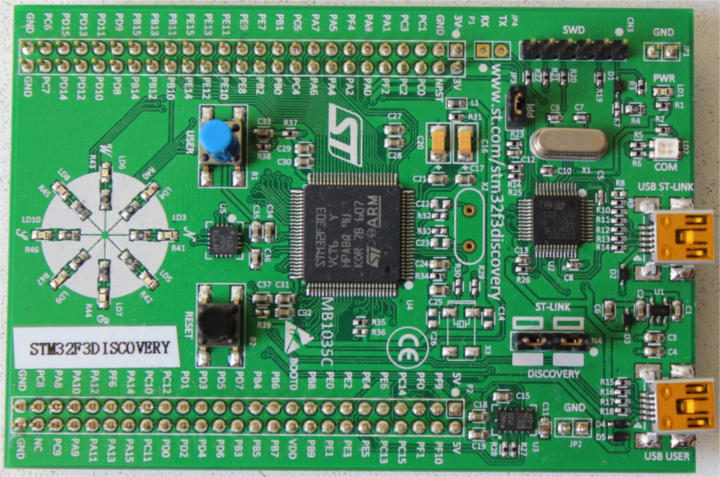
What does this board contain?
-
A STM32F303VCT6 microcontroller. This microcontroller has
-
A single-core ARM Cortex-M4F processor with hardware support for single-precision floating point operations and a maximum clock frequency of 72 MHz.
-
256 KiB of “Flash” memory. (1 KiB = 1024 bytes)
-
48 KiB of RAM.
-
A variety of integrated peripherals such as timers, I2C, SPI and USART.
-
General purpose Input Output (GPIO) and other types of pins accessible through the two rows of headers along side the board.
-
A USB interface accessible through the USB port labeled “USB USER”.
-
-
An accelerometer as part of the LSM303DLHC chip.
-
A magnetometer as part of the LSM303DLHC chip.
-
8 user LEDs arranged in the shape of a compass.
-
A second microcontroller: a STM32F103. This microcontroller is actually part of an on-board programmer / debugger and is connected to the USB port named “USB ST-LINK”.
For a more detailed list of features and further specifications of the board take a look at the STMicroelectronics website.
A word of caution: be careful if you want to apply external signals to the board. The microcontroller STM32F303VCT6 pins take a nominal voltage of 3.3 volts. For further information consult the 6.2 Absolute maximum ratings section in the manual
no_std Rust 環境
The term Embedded Programming is used for a wide range of different classes of programming. Ranging from programming 8-Bit MCUs (like the ST72325xx) with just a few KB of RAM and ROM, up to systems like the Raspberry Pi (Model B 3+) which has a 32/64-bit 4-core Cortex-A53 @ 1.4 GHz and 1GB of RAM. Different restrictions/limitations will apply when writing code depending on what kind of target and use case you have.
There are two general Embedded Programming classifications:
Hosted Environments
These kinds of environments are close to a normal PC environment. What this means is that you are provided with a System Interface E.G. POSIX that provides you with primitives to interact with various systems, such as file systems, networking, memory management, threads, etc. Standard libraries in turn usually depend on these primitives to implement their functionality. You may also have some sort of sysroot and restrictions on RAM/ROM-usage, and perhaps some special HW or I/Os. Overall it feels like coding on a special-purpose PC environment.
Bare Metal Environments
In a bare metal environment no code has been loaded before your program. Without the software provided by an OS we can not load the standard library. Instead the program, along with the crates it uses, can only use the hardware (bare metal) to run. To prevent rust from loading the standard library use no_std. The platform-agnostic parts of the standard library are available through libcore. libcore also excludes things which are not always desirable in an embedded environment. One of these things is a memory allocator for dynamic memory allocation. If you require this or any other functionalities there are often crates which provide these.
The libstd Runtime
As mentioned before using libstd requires some sort of system integration, but this is not only because libstd is just providing a common way of accessing OS abstractions, it also provides a runtime. This runtime, among other things, takes care of setting up stack overflow protection, processing command line arguments, and spawning the main thread before a program’s main function is invoked. This runtime also won’t be available in a no_std environment.
摘要
#![no_std] is a crate-level attribute that indicates that the crate will link to the core-crate instead of the std-crate. The libcore crate in turn is a platform-agnostic subset of the std crate which makes no assumptions about the system the program will run on. As such, it provides APIs for language primitives like floats, strings and slices, as well as APIs that expose processor features like atomic operations and SIMD instructions. However it lacks APIs for anything that involves platform integration. Because of these properties no_std and libcore code can be used for any kind of bootstrapping (stage 0) code like bootloaders, firmware or kernels.
概覽
| feature | no_std | std |
|---|---|---|
| heap (dynamic memory) | * | ✓ |
| collections (Vec, BTreeMap, etc) | ** | ✓ |
| stack overflow protection | ✘ | ✓ |
| runs init code before main | ✘ | ✓ |
| libstd available | ✘ | ✓ |
| libcore available | ✓ | ✓ |
| writing firmware, kernel, or bootloader code | ✓ | ✘ |
* Only if you use the alloc crate and use a suitable allocator like alloc-cortex-m.
** Only if you use the collections crate and configure a global default allocator.
** HashMap and HashSet are not available due to a lack of a secure random number generator.
See Also
工具
Dealing with microcontrollers involves using several different tools as we’ll be dealing with an architecture different than your laptop’s and we’ll have to run and debug programs on a remote device.
We’ll use all the tools listed below. Any recent version should work when a minimum version is not specified, but we have listed the versions we have tested.
- Rust 1.31, 1.31-beta, or a newer toolchain PLUS ARM Cortex-M compilation support.
cargo-binutils~0.1.4qemu-system-arm. Tested versions: 3.0.0- OpenOCD >=0.8. Tested versions: v0.9.0 and v0.10.0
- GDB with ARM support. Version 7.12 or newer highly recommended. Tested versions: 7.10, 7.11, 7.12 and 8.1
cargo-generateorgit. These tools are optional but will make it easier to follow along with the book.
The text below explains why we are using these tools. Installation instructions can be found on the next page.
cargo-generate 或 git
Bare metal programs are non-standard (no_std) Rust programs that require some adjustments to the linking process in order to get the memory layout of the program right. This requires some additional files (like linker scripts) and settings (like linker flags). We have packaged those for you in a template such that you only need to fill in the missing information (such as the project name and the characteristics of your target hardware).
Our template is compatible with cargo-generate: a Cargo subcommand for creating new Cargo projects from templates. You can also download the template using git, curl, wget, or your web browser.
cargo-binutils
cargo-binutils is a collection of Cargo subcommands that make it easy to use the LLVM tools that are shipped with the Rust toolchain. These tools include the LLVM versions of objdump, nm and size and are used for inspecting binaries.
The advantage of using these tools over GNU binutils is that (a) installing the LLVM tools is the same one-command installation (rustup component add llvm-tools) regardless of your OS and (b) tools like objdump support all the architectures that rustc supports – from ARM to x86_64 – because they both share the same LLVM backend.
qemu-system-arm
QEMU is an emulator. In this case we use the variant that can fully emulate ARM systems. We use QEMU to run embedded programs on the host. Thanks to this you can follow some parts of this book even if you don’t have any hardware with you!
Tooling for Embedded Rust Debugging
概覽
Debugging embedded systems in Rust requires specialized tools including software to manage the debugging process, debuggers to inspect and control program execution, and hardware probes to facilitate interaction between the host and the embedded device. This document outlines essential software tools like Probe-rs and OpenOCD, which simplify and support the debugging process, alongside prominent debuggers such as GDB and the Probe-rs Visual Studio Code extension. Additionally, it covers key hardware probes such as Rusty-probe, ST-Link, J-Link, and MCU-Link, which are integral for effective debugging and programming of embedded devices.
驅動除錯工具的軟體
Probe-rs
Probe-rs is a modern, Rust-focused software designed to work with debuggers in embedded systems. Unlike OpenOCD, Probe-rs is built with simplicity in mind and aims to reduce the configuration burden often found in other debugging solutions. It supports various probes and targets, providing a high-level interface for interacting with embedded hardware. Probe-rs integrates directly with Rust tooling, and integrates with Visual Studio Code through its extension, allowing developers to streamline their debugging workflow.
OpenOCD (Open On-Chip Debugger)
OpenOCD is an open-source software tool used for debugging, testing, and programming embedded systems. It provides an interface between the host system and embedded hardware, supporting various transport layers like JTAG and SWD (Serial Wire Debug). OpenOCD integrates with GDB, which is a debugger. OpenOCD is widely supported, with extensive documentation and a large community, but may require complex configuration, especially for custom embedded setups.
除錯器
A debugger allows developers to inspect and control the execution of a program in order to identify and correct errors or bugs. It provides functionalities such as setting breakpoints, stepping through code line by line, and examining the values of variables and memory states. Debuggers are essential for thorough software development and maintenance, enabling developers to ensure that their code behaves as intended under various conditions.
除錯器知道如何:
- Interact with the memory mapped registers.
- 設定中斷點/監看點。
- Read and write to the memory mapped registers.
- Detect when the MCU has been halted for a debug event.
- Continue MCU execution after a debug event has been encountered.
- Erase and write to the microcontroller’s FLASH.
Probe-rs Visual Studio Code Extension
Probe-rs has a Visual Studio Code extension, providing a seamless debugging experience without extensive setup. Through this connection, developers can use Rust-specific features like pretty printing and detailed error messages, ensuring that their debugging process aligns with the Rust ecosystem.
GDB (GNU Debugger)
GDB is a versatile debugging tool that allows developers to examine the state of programs while they run or after they crash. For embedded Rust, GDB connects to the target system via OpenOCD or other debugging servers to interact with the embedded code. GDB is highly configurable and supports features like remote debugging, variable inspection, and conditional breakpoints. It can be used on a variety of platforms, and has extensive support for Rust-specific debugging needs, such as pretty printing and integration with IDEs.
Probes
A hardware probe is a device used in the development and debugging of embedded systems to facilitate communication between a host computer and the target embedded device. It typically supports protocols like JTAG or SWD, enabling it to program, debug, and analyze the microcontroller or microprocessor on the embedded system. Hardware probes are crucial for developers to set breakpoints, step through code, and inspect memory and processor registers, effectively allowing them to diagnose and fix issues in real-time.
Rusty-probe
Rusty-probe is an open-sourced USB-based hardware debugging probe designed to work with probe-rs. The combination of Rusty-Probe and probe-rs provides an easy-to-use, cost-effective solution for developers working with embedded Rust applications.
ST-Link
The ST-Link is a popular debugging and programming probe developed by STMicroelectronics primarily for their STM32 and STM8 microcontroller series. It supports both debugging and programming via JTAG or SWD (Serial Wire Debug) interfaces. ST-Link is widely used due to its direct support from STMicroelectronics’ extensive range of development boards and its integration into major IDEs, making it a convenient choice for developers working with STM microcontrollers.
J-Link
J-Link, developed by SEGGER Microcontroller, is a robust and versatile debugger supporting a wide range of CPU cores and devices beyond just ARM, such as RISC-V. Known for its high performance and reliability, J-Link supports various communication interfaces, including JTAG, SWD, and fine-pitch JTAG interfaces. It is favored for its advanced features like unlimited breakpoints in flash memory and its compatibility with a multitude of development environments.
MCU-Link
MCU-Link is a debugging probe that also functions as a programmer, provided by NXP Semiconductors. It supports a variety of ARM Cortex microcontrollers and interfaces seamlessly with development tools like MCUXpresso IDE. MCU-Link is particularly notable for its versatility and affordability, making it an accessible option for hobbyists, educators, and professional developers alike.
安裝工具
This page contains OS-agnostic installation instructions for a few of the tools:
Rust 工具鏈
Install rustup by following the instructions at https://rustup.rs.
NOTE Make sure you have a compiler version equal to or newer than 1.31. rustc -V should return a date newer than the one shown below.
$ rustc -V
rustc 1.31.1 (b6c32da9b 2018-12-18)
For bandwidth and disk usage concerns the default installation only supports native compilation. To add cross compilation support for the ARM Cortex-M architectures choose one of the following compilation targets. For the STM32F3DISCOVERY board used for the examples in this book, use the thumbv7em-none-eabihf target. Find the best Cortex-M for you.
Cortex-M0, M0+, and M1 (ARMv6-M architecture):
rustup target add thumbv6m-none-eabi
Cortex-M3 (ARMv7-M architecture):
rustup target add thumbv7m-none-eabi
Cortex-M4 and M7 without hardware floating point (ARMv7E-M architecture):
rustup target add thumbv7em-none-eabi
Cortex-M4F and M7F with hardware floating point (ARMv7E-M architecture):
rustup target add thumbv7em-none-eabihf
Cortex-M23 (ARMv8-M architecture):
rustup target add thumbv8m.base-none-eabi
Cortex-M33 and M35P (ARMv8-M architecture):
rustup target add thumbv8m.main-none-eabi
Cortex-M33F and M35PF with hardware floating point (ARMv8-M architecture):
rustup target add thumbv8m.main-none-eabihf
cargo-binutils
cargo install cargo-binutils

rustup component add llvm-tools
WINDOWS: prerequisite C++ Build Tools for Visual Studio 2019 is installed. https://visualstudio.microsoft.com/thank-you-downloading-visual-studio/?sku=BuildTools&rel=16
cargo-generate
We’ll use this later to generate a project from a template.
cargo install cargo-generate
Note: on some Linux distros (e.g. Ubuntu) you may need to install the packages libssl-dev and pkg-config prior to installing cargo-generate.
OS-Specific Instructions
Now follow the instructions specific to the OS you are using:
Linux
Here are the installation commands for a few Linux distributions.
軟體包
- Ubuntu 18.04 or newer / Debian stretch or newer
NOTE
gdb-multiarchis the GDB command you’ll use to debug your ARM Cortex-M programs
sudo apt install gdb-multiarch openocd qemu-system-arm
- Ubuntu 14.04 and 16.04
NOTE
arm-none-eabi-gdbis the GDB command you’ll use to debug your ARM Cortex-M programs
sudo apt install gdb-arm-none-eabi openocd qemu-system-arm
- Fedora 27 or newer
sudo dnf install gdb openocd qemu-system-arm
- Arch Linux
NOTE
arm-none-eabi-gdbis the GDB command you’ll use to debug ARM Cortex-M programs
sudo pacman -S arm-none-eabi-gdb qemu-system-arm openocd
udev rules
This rule lets you use OpenOCD with the Discovery board without root privilege.
Create the file /etc/udev/rules.d/70-st-link.rules with the contents shown below.
# STM32F3DISCOVERY rev A/B - ST-LINK/V2
ATTRS{idVendor}=="0483", ATTRS{idProduct}=="3748", TAG+="uaccess"

# STM32F3DISCOVERY rev C+ - ST-LINK/V2-1
ATTRS{idVendor}=="0483", ATTRS{idProduct}=="374b", TAG+="uaccess"
Then reload all the udev rules with:
sudo udevadm control --reload-rules
If you had the board plugged to your laptop, unplug it and then plug it again.
You can check the permissions by running this command:
lsusb
Which should show something like
(..)
Bus 001 Device 018: ID 0483:374b STMicroelectronics ST-LINK/V2.1
(..)
Take note of the bus and device numbers. Use those numbers to create a path like /dev/bus/usb/<bus>/<device>. Then use this path like so:
ls -l /dev/bus/usb/001/018
crw-------+ 1 root root 189, 17 Sep 13 12:34 /dev/bus/usb/001/018
getfacl /dev/bus/usb/001/018 | grep user
user::rw-
user:you:rw-
The + appended to permissions indicates the existence of an extended permission. The getfacl command tells the user you can make use of this device.
Now, go to the next section.
macOS
All the tools can be installed using Homebrew or MacPorts:
Install tools with Homebrew
$ # GDB
$ brew install arm-none-eabi-gdb

$ # OpenOCD
$ brew install openocd

$ # QEMU
$ brew install qemu
NOTE If OpenOCD crashes you may need to install the latest version using:
$ brew install --HEAD openocd
Install tools with MacPorts
$ # GDB
$ sudo port install arm-none-eabi-gcc

$ # OpenOCD
$ sudo port install openocd

$ # QEMU
$ sudo port install qemu
That’s all! Go to the next section.
Windows
arm-none-eabi-gdb
ARM provides .exe installers for Windows. Grab one from here, and follow the instructions. Just before the installation process finishes tick/select the “Add path to environment variable” option. Then verify that the tools are in your %PATH%:
$ arm-none-eabi-gdb -v
GNU gdb (GNU Tools for Arm Embedded Processors 7-2018-q2-update) 8.1.0.20180315-git
(..)
OpenOCD
There’s no official binary release of OpenOCD for Windows but if you’re not in the mood to compile it yourself, the xPack project provides a binary distribution, here. Follow the provided installation instructions. Then update your %PATH% environment variable to include the path where the binaries were installed. (C:\Users\USERNAME\AppData\Roaming\xPacks\@xpack-dev-tools\openocd\0.10.0-13.1\.content\bin\, if you’ve been using the easy install)
Verify that OpenOCD is in your %PATH% with:
$ openocd -v
Open On-Chip Debugger 0.10.0
(..)
QEMU
Grab QEMU from the official website.
ST-LINK USB driver
You’ll also need to install this USB driver or OpenOCD won’t work. Follow the installer instructions and make sure you install the right version (32-bit or 64-bit) of the driver.
That’s all! Go to the next section.
驗證安裝
In this section we check that some of the required tools / drivers have been correctly installed and configured.
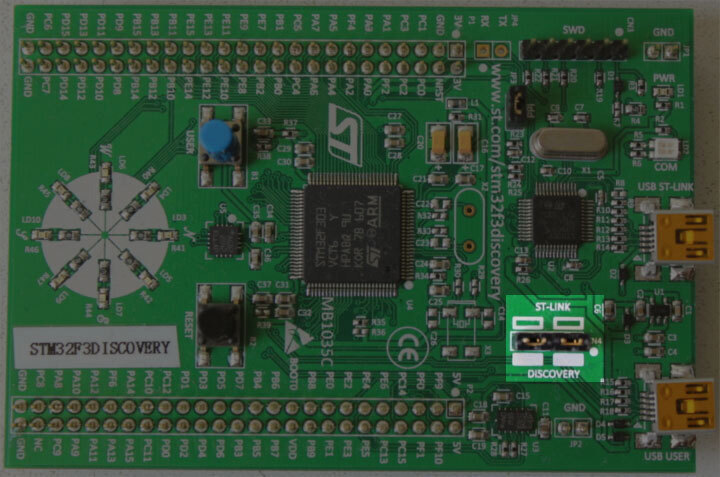
Connect your laptop / PC to the discovery board using a Mini-USB USB cable. The discovery board has two USB connectors; use the one labeled “USB ST-LINK” that sits on the center of the edge of the board.
Also check that the ST-LINK header is populated. See the picture below; the ST-LINK header is highlighted.
Now run the following command:
openocd -f interface/stlink.cfg -f target/stm32f3x.cfg
NOTE: Old versions of openocd, including the 0.10.0 release from 2017, do not contain the new (and preferable)
interface/stlink.cfgfile; instead you may need to useinterface/stlink-v2.cfgorinterface/stlink-v2-1.cfg.
You should get the following output and the program should block the console:
Open On-Chip Debugger 0.10.0
Licensed under GNU GPL v2
For bug reports, read
        http://openocd.org/doc/doxygen/bugs.html
Info : auto-selecting first available session transport "hla_swd". To override use 'transport select <transport>'.
adapter speed: 1000 kHz
adapter_nsrst_delay: 100
Info : The selected transport took over low-level target control. The results might differ compared to plain JTAG/SWD
none separate
Info : Unable to match requested speed 1000 kHz, using 950 kHz
Info : Unable to match requested speed 1000 kHz, using 950 kHz
Info : clock speed 950 kHz
Info : STLINK v2 JTAG v27 API v2 SWIM v15 VID 0x0483 PID 0x374B
Info : using stlink api v2
Info : Target voltage: 2.919881
Info : stm32f3x.cpu: hardware has 6 breakpoints, 4 watchpoints
The contents may not match exactly but you should get the last line about breakpoints and watchpoints. If you got it then terminate the OpenOCD process and move to the next section.
If you didn’t get the “breakpoints” line then try one of the following commands.
openocd -f interface/stlink-v2.cfg -f target/stm32f3x.cfg
openocd -f interface/stlink-v2-1.cfg -f target/stm32f3x.cfg
If one of those commands works it means you got an old hardware revision of the discovery board. That won’t be a problem but commit that fact to memory as you’ll need to configure things a bit differently later on. You can move to the next section.
If none of the commands work as a normal user then try to run them with root permission (e.g. sudo openocd ..). If the commands do work with root permission then check that the udev rules have been correctly set.
If you have reached this point and OpenOCD is not working please open an issue and we’ll help you out!
開始上手
在本節中,我們將帶你走過撰寫、建置、燒錄與除錯嵌入式程式的流程。你可以在不需特殊硬體的情況下嘗試大多數範例,因為我們會使用 QEMU(常見的開源硬體模擬器)展示基礎。唯有硬體章節需要實體硬體,我們會使用 OpenOCD 對 STM32F3DISCOVERY 進行燒錄。
QEMU
We’ll start writing a program for the LM3S6965, a Cortex-M3 microcontroller. We have chosen this as our initial target because it can be emulated using QEMU so you don’t need to fiddle with hardware in this section and we can focus on the tooling and the development process.
IMPORTANT We’ll use the name “app” for the project name in this tutorial. Whenever you see the word “app” you should replace it with the name you selected for your project. Or, you could also name your project “app” and avoid the substitutions.
Creating a non standard Rust program
We’ll use the cortex-m-quickstart project template to generate a new project from it. The created project will contain a barebone application: a good starting point for a new embedded rust application. In addition, the project will contain an examples directory, with several separate applications, highlighting some of the key embedded rust functionality.
使用 cargo-generate
首先安裝 cargo-generate
cargo install cargo-generate
接著生成新專案
cargo generate --git https://github.com/rust-embedded/cortex-m-quickstart
 Project Name: app
 Creating project called `app`...
 Done! New project created /tmp/app
cd app
使用 git
Clone the repository
git clone https://github.com/rust-embedded/cortex-m-quickstart app
cd app
And then fill in the placeholders in the Cargo.toml file
[package]
authors = ["{{authors}}"] # "{{authors}}" -> "John Smith"
edition = "2018"
name = "{{project-name}}" # "{{project-name}}" -> "app"
version = "0.1.0"

# ..

[[bin]]
name = "{{project-name}}" # "{{project-name}}" -> "app"
test = false
bench = false
Using neither
Grab the latest snapshot of the cortex-m-quickstart template and extract it.
curl -LO https://github.com/rust-embedded/cortex-m-quickstart/archive/master.zip
unzip master.zip
mv cortex-m-quickstart-master app
cd app
Or you can browse to cortex-m-quickstart, click the green “Clone or download” button and then click “Download ZIP”.
Then fill in the placeholders in the Cargo.toml file as done in the second part of the “Using git” version.
Program Overview
For convenience here are the most important parts of the source code in src/main.rs:
#![no_std]
#![no_main]

use panic_halt as _;

use cortex_m_rt::entry;

#[entry]
fn main() -> ! {
    loop {
        // your code goes here
    }
}
This program is a bit different from a standard Rust program so let’s take a closer look.
#![no_std] indicates that this program will not link to the standard crate, std. Instead it will link to its subset: the core crate.
#![no_main] indicates that this program won’t use the standard main interface that most Rust programs use. The main (no pun intended) reason to go with no_main is that using the main interface in no_std context requires nightly.
use panic_halt as _;. This crate provides a panic_handler that defines the panicking behavior of the program. We will cover this in more detail in the Panicking chapter of the book.
#[entry] is an attribute provided by the cortex-m-rt crate that’s used to mark the entry point of the program. As we are not using the standard main interface we need another way to indicate the entry point of the program and that’d be #[entry].
fn main() -> !. Our program will be the only process running on the target hardware so we don’t want it to end! We use a divergent function (the -> ! bit in the function signature) to ensure at compile time that’ll be the case.
交叉編譯
The next step is to cross compile the program for the Cortex-M3 architecture. That’s as simple as running cargo build --target $TRIPLE if you know what the compilation target ($TRIPLE) should be. Luckily, the .cargo/config.toml in the template has the answer:
tail -n6 .cargo/config.toml
[build]
# Pick ONE of these compilation targets
# target = "thumbv6m-none-eabi"    # Cortex-M0 and Cortex-M0+
target = "thumbv7m-none-eabi"    # Cortex-M3
# target = "thumbv7em-none-eabi"   # Cortex-M4 and Cortex-M7 (no FPU)
# target = "thumbv7em-none-eabihf" # Cortex-M4F and Cortex-M7F (with FPU)
To cross compile for the Cortex-M3 architecture we have to use thumbv7m-none-eabi. That target is not automatically installed when installing the Rust toolchain, it would now be a good time to add that target to the toolchain, if you haven’t done it yet:
rustup target add thumbv7m-none-eabi
Since the thumbv7m-none-eabi compilation target has been set as the default in your .cargo/config.toml file, the two commands below do the same:
cargo build --target thumbv7m-none-eabi
cargo build
Inspecting
Now we have a non-native ELF binary in target/thumbv7m-none-eabi/debug/app. We can inspect it using cargo-binutils.
With cargo-readobj we can print the ELF headers to confirm that this is an ARM binary.
cargo readobj --bin app -- --file-headers
Note that:
--bin appis sugar for inspect the binary attarget/$TRIPLE/debug/app--bin appwill also (re)compile the binary, if necessary
ELF Header:
  Magic:   7f 45 4c 46 01 01 01 00 00 00 00 00 00 00 00 00
  Class:                             ELF32
  Data:                              2's complement, little endian
  Version:                           1 (current)
  OS/ABI:                            UNIX - System V
  ABI Version:                       0x0
  Type:                              EXEC (Executable file)
  Machine:                           ARM
  Version:                           0x1
  Entry point address:               0x405
  Start of program headers:          52 (bytes into file)
  Start of section headers:          153204 (bytes into file)
  Flags:                             0x5000200
  Size of this header:               52 (bytes)
  Size of program headers:           32 (bytes)
  Number of program headers:         2
  Size of section headers:           40 (bytes)
  Number of section headers:         19
  Section header string table index: 18
cargo-size can print the size of the linker sections of the binary.
cargo size --bin app --release -- -A
we use --release to inspect the optimized version
app  :
section             size        addr
.vector_table       1024         0x0
.text                 92       0x400
.rodata                0       0x45c
.data                  0  0x20000000
.bss                   0  0x20000000
.debug_str          2958         0x0
.debug_loc            19         0x0
.debug_abbrev        567         0x0
.debug_info         4929         0x0
.debug_ranges         40         0x0
.debug_macinfo         1         0x0
.debug_pubnames     2035         0x0
.debug_pubtypes     1892         0x0
.ARM.attributes       46         0x0
.debug_frame         100         0x0
.debug_line          867         0x0
Total              14570
A refresher on ELF linker sections
.textcontains the program instructions.rodatacontains constant values like strings.datacontains statically allocated variables whose initial values are not zero.bssalso contains statically allocated variables whose initial values are zero.vector_tableis a non-standard section that we use to store the vector (interrupt) table.ARM.attributesand the.debug_*sections contain metadata and will not be loaded onto the target when flashing the binary.
IMPORTANT: ELF files contain metadata like debug information so their size on disk does not accurately reflect the space the program will occupy when flashed on a device. Always use cargo-size to check how big a binary really is.
cargo-objdump can be used to disassemble the binary.
cargo objdump --bin app --release -- --disassemble --no-show-raw-insn --print-imm-hex
NOTE if the above command complains about
Unknown command line argumentsee the following bug report: https://github.com/rust-embedded/book/issues/269
NOTE this output can differ on your system. New versions of rustc, LLVM and libraries can generate different assembly. We truncated some of the instructions to keep the snippet small.
app:  file format ELF32-arm-little

Disassembly of section .text:
main:
     400: bl  #0x256
     404: b #-0x4 <main+0x4>

Reset:
     406: bl  #0x24e
     40a: movw  r0, #0x0
     < .. truncated any more instructions .. >

DefaultHandler_:
     656: b #-0x4 <DefaultHandler_>

UsageFault:
     657: strb  r7, [r4, #0x3]

DefaultPreInit:
     658: bx  lr

__pre_init:
     659: strb  r7, [r0, #0x1]

__nop:
     65a: bx  lr

HardFaultTrampoline:
     65c: mrs r0, msp
     660: b #-0x2 <HardFault_>

HardFault_:
     662: b #-0x4 <HardFault_>

HardFault:
     663: <unknown>
Running
Next, let’s see how to run an embedded program on QEMU! This time we’ll use the hello example which actually does something.
For convenience here’s the source code of examples/hello.rs:
//! Prints "Hello, world!" on the host console using semihosting

#![no_main]
#![no_std]

use panic_halt as _;

use cortex_m_rt::entry;
use cortex_m_semihosting::{debug, hprintln};

#[entry]
fn main() -> ! {
    hprintln!("Hello, world!").unwrap();

    // exit QEMU
    // NOTE do not run this on hardware; it can corrupt OpenOCD state
    debug::exit(debug::EXIT_SUCCESS);

    loop {}
}
This program uses something called semihosting to print text to the host console. When using real hardware this requires a debug session but when using QEMU this Just Works.
Let’s start by compiling the example:
cargo build --example hello
The output binary will be located at target/thumbv7m-none-eabi/debug/examples/hello.
To run this binary on QEMU run the following command:
qemu-system-arm \
  -cpu cortex-m3 \
  -machine lm3s6965evb \
  -nographic \
  -semihosting-config enable=on,target=native \
  -kernel target/thumbv7m-none-eabi/debug/examples/hello
Hello, world!
The command should successfully exit (exit code = 0) after printing the text. On *nix you can check that with the following command:
echo $?
0
Let’s break down that QEMU command:
-
qemu-system-arm. This is the QEMU emulator. There are a few variants of these QEMU binaries; this one does full system emulation of ARM machines hence the name. -
-cpu cortex-m3. This tells QEMU to emulate a Cortex-M3 CPU. Specifying the CPU model lets us catch some miscompilation errors: for example, running a program compiled for the Cortex-M4F, which has a hardware FPU, will make QEMU error during its execution. -
-machine lm3s6965evb. This tells QEMU to emulate the LM3S6965EVB, an evaluation board that contains a LM3S6965 microcontroller. -
-nographic. This tells QEMU to not launch its GUI. -
-semihosting-config (..). This tells QEMU to enable semihosting. Semihosting lets the emulated device, among other things, use the host stdout, stderr and stdin and create files on the host. -
-kernel $file. This tells QEMU which binary to load and run on the emulated machine.
Typing out that long QEMU command is too much work! We can set a custom runner to simplify the process. .cargo/config.toml has a commented out runner that invokes QEMU; let’s uncomment it:
head -n3 .cargo/config.toml
[target.thumbv7m-none-eabi]
# uncomment this to make `cargo run` execute programs on QEMU
runner = "qemu-system-arm -cpu cortex-m3 -machine lm3s6965evb -nographic -semihosting-config enable=on,target=native -kernel"
This runner only applies to the thumbv7m-none-eabi target, which is our default compilation target. Now cargo run will compile the program and run it on QEMU:
cargo run --example hello --release
   Compiling app v0.1.0 (file:///tmp/app)
    Finished release [optimized + debuginfo] target(s) in 0.26s
     Running `qemu-system-arm -cpu cortex-m3 -machine lm3s6965evb -nographic -semihosting-config enable=on,target=native -kernel target/thumbv7m-none-eabi/release/examples/hello`
Hello, world!
除錯
Debugging is critical to embedded development. Let’s see how it’s done.
Debugging an embedded device involves remote debugging as the program that we want to debug won’t be running on the machine that’s running the debugger program (GDB or LLDB).
Remote debugging involves a client and a server. In a QEMU setup, the client will be a GDB (or LLDB) process and the server will be the QEMU process that’s also running the embedded program.
In this section we’ll use the hello example we already compiled.
The first debugging step is to launch QEMU in debugging mode:
qemu-system-arm \
  -cpu cortex-m3 \
  -machine lm3s6965evb \
  -nographic \
  -semihosting-config enable=on,target=native \
  -gdb tcp::3333 \
  -S \
  -kernel target/thumbv7m-none-eabi/debug/examples/hello
This command won’t print anything to the console and will block the terminal. We have passed two extra flags this time:
-
-gdb tcp::3333. This tells QEMU to wait for a GDB connection on TCP port 3333. -
-S. This tells QEMU to freeze the machine at startup. Without this the program would have reached the end of main before we had a chance to launch the debugger!
Next we launch GDB in another terminal and tell it to load the debug symbols of the example:
gdb-multiarch -q target/thumbv7m-none-eabi/debug/examples/hello
NOTE: you might need another version of gdb instead of gdb-multiarch depending on which one you installed in the installation chapter. This could also be arm-none-eabi-gdb or just gdb.
Then within the GDB shell we connect to QEMU, which is waiting for a connection on TCP port 3333.
target remote :3333
Remote debugging using :3333
Reset () at $REGISTRY/cortex-m-rt-0.6.1/src/lib.rs:473
473     pub unsafe extern "C" fn Reset() -> ! {
You’ll see that the process is halted and that the program counter is pointing to a function named Reset. That is the reset handler: what Cortex-M cores execute upon booting.
Note that on some setup, instead of displaying the line
Reset () at $REGISTRY/cortex-m-rt-0.6.1/src/lib.rs:473as shown above, gdb may print some warnings like :
core::num::bignum::Big32x40::mul_small () at src/libcore/num/bignum.rs:254src/libcore/num/bignum.rs: No such file or directory.That’s a known glitch. You can safely ignore those warnings, you’re most likely at Reset().
This reset handler will eventually call our main function. Let’s skip all the way there using a breakpoint and the continue command. To set the breakpoint, let’s first take a look where we would like to break in our code, with the list command.
list main
This will show the source code, from the file examples/hello.rs.
6       use panic_halt as _;
7
8       use cortex_m_rt::entry;
9       use cortex_m_semihosting::{debug, hprintln};
10
11      #[entry]
12      fn main() -> ! {
13          hprintln!("Hello, world!").unwrap();
14
15          // exit QEMU
We would like to add a breakpoint just before the “Hello, world!”, which is on line 13. We do that with the break command:
break 13
We can now instruct gdb to run up to our main function, with the continue command:
continue
Continuing.

Breakpoint 1, hello::__cortex_m_rt_main () at examples\hello.rs:13
13          hprintln!("Hello, world!").unwrap();
We are now close to the code that prints “Hello, world!”. Let’s move forward using the next command.
next
16 debug::exit(debug::EXIT_SUCCESS);
At this point you should see “Hello, world!” printed on the terminal that’s running qemu-system-arm.
$ qemu-system-arm (..)
Hello, world!
Calling next again will terminate the QEMU process.
next
[Inferior 1 (Remote target) exited normally]
You can now exit the GDB session.
quit
硬體
By now you should be somewhat familiar with the tooling and the development process. In this section we’ll switch to real hardware; the process will remain largely the same. Let’s dive in.
Know your hardware
Before we begin you need to identify some characteristics of the target device as these will be used to configure the project:
-
The ARM core. e.g. Cortex-M3.
-
Does the ARM core include an FPU? Cortex-M4F and Cortex-M7F cores do.
-
How much Flash memory and RAM does the target device have? e.g. 256 KiB of Flash and 32 KiB of RAM.
-
Where are Flash memory and RAM mapped in the address space? e.g. RAM is commonly located at address
0x2000_0000.
You can find this information in the data sheet or the reference manual of your device.
In this section we’ll be using our reference hardware, the STM32F3DISCOVERY. This board contains an STM32F303VCT6 microcontroller. This microcontroller has:
-
A Cortex-M4F core that includes a single precision FPU
-
256 KiB of Flash located at address 0x0800_0000.
-
40 KiB of RAM located at address 0x2000_0000. (There’s another RAM region but for simplicity we’ll ignore it).
Configuring
We’ll start from scratch with a fresh template instance. Refer to the previous section on QEMU for a refresher on how to do this without cargo-generate.
$ cargo generate --git https://github.com/rust-embedded/cortex-m-quickstart
 Project Name: app
 Creating project called `app`...
 Done! New project created /tmp/app

$ cd app
Step number one is to set a default compilation target in .cargo/config.toml.
tail -n5 .cargo/config.toml
# Pick ONE of these compilation targets
# target = "thumbv6m-none-eabi"    # Cortex-M0 and Cortex-M0+
# target = "thumbv7m-none-eabi"    # Cortex-M3
# target = "thumbv7em-none-eabi"   # Cortex-M4 and Cortex-M7 (no FPU)
target = "thumbv7em-none-eabihf" # Cortex-M4F and Cortex-M7F (with FPU)
We’ll use thumbv7em-none-eabihf as that covers the Cortex-M4F core.
NOTE: As you may remember from the previous chapter, we have to install all targets and this is a new one. So don’t forget to run the installation process
rustup target add thumbv7em-none-eabihffor this target.
The second step is to enter the memory region information into the memory.x file.
$ cat memory.x
/* Linker script for the STM32F303VCT6 */
MEMORY
{
  /* NOTE 1 K = 1 KiBi = 1024 bytes */
  FLASH : ORIGIN = 0x08000000, LENGTH = 256K
  RAM : ORIGIN = 0x20000000, LENGTH = 40K
}
NOTE: If you for some reason changed the
memory.xfile after you had made the first build of a specific build target, then docargo cleanbeforecargo build, becausecargo buildmay not track updates ofmemory.x.
We’ll start with the hello example again, but first we have to make a small change.
In examples/hello.rs, make sure the debug::exit() call is commented out or removed. It is used only for running in QEMU.
#[entry]
fn main() -> ! {
    hprintln!("Hello, world!").unwrap();

    // exit QEMU
    // NOTE do not run this on hardware; it can corrupt OpenOCD state
    // debug::exit(debug::EXIT_SUCCESS);

    loop {}
}
You can now cross compile programs using cargo build and inspect the binaries using cargo-binutils as you did before. The cortex-m-rt crate handles all the magic required to get your chip running, as helpfully, pretty much all Cortex-M CPUs boot in the same fashion.
cargo build --example hello
除錯
Debugging will look a bit different. In fact, the first steps can look different depending on the target device. In this section we’ll show the steps required to debug a program running on the STM32F3DISCOVERY. This is meant to serve as a reference; for device specific information about debugging check out the Debugonomicon.
As before we’ll do remote debugging and the client will be a GDB process. This time, however, the server will be OpenOCD.
As done during the verify section connect the discovery board to your laptop / PC and check that the ST-LINK header is populated.
On a terminal run openocd to connect to the ST-LINK on the discovery board. Run this command from the root of the template; openocd will pick up the openocd.cfg file which indicates which interface file and target file to use.
cat openocd.cfg
# Sample OpenOCD configuration for the STM32F3DISCOVERY development board

# Depending on the hardware revision you got you'll have to pick ONE of these
# interfaces. At any time only one interface should be commented out.

# Revision C (newer revision)
source [find interface/stlink.cfg]

# Revision A and B (older revisions)
# source [find interface/stlink-v2.cfg]

source [find target/stm32f3x.cfg]
NOTE If you found out that you have an older revision of the discovery board during the verify section then you should modify the
openocd.cfgfile at this point to useinterface/stlink-v2.cfg.
$ openocd
Open On-Chip Debugger 0.10.0
Licensed under GNU GPL v2
For bug reports, read
        http://openocd.org/doc/doxygen/bugs.html
Info : auto-selecting first available session transport "hla_swd". To override use 'transport select <transport>'.
adapter speed: 1000 kHz
adapter_nsrst_delay: 100
Info : The selected transport took over low-level target control. The results might differ compared to plain JTAG/SWD
none separate
Info : Unable to match requested speed 1000 kHz, using 950 kHz
Info : Unable to match requested speed 1000 kHz, using 950 kHz
Info : clock speed 950 kHz
Info : STLINK v2 JTAG v27 API v2 SWIM v15 VID 0x0483 PID 0x374B
Info : using stlink api v2
Info : Target voltage: 2.913879
Info : stm32f3x.cpu: hardware has 6 breakpoints, 4 watchpoints
On another terminal run GDB, also from the root of the template.
gdb-multiarch -q target/thumbv7em-none-eabihf/debug/examples/hello
NOTE: like before you might need another version of gdb instead of gdb-multiarch depending on which one you installed in the installation chapter. This could also be arm-none-eabi-gdb or just gdb.
Next connect GDB to OpenOCD, which is waiting for a TCP connection on port 3333.
(gdb) target remote :3333
Remote debugging using :3333
0x00000000 in ?? ()
Now proceed to flash (load) the program onto the microcontroller using the load command.
(gdb) load
Loading section .vector_table, size 0x400 lma 0x8000000
Loading section .text, size 0x1518 lma 0x8000400
Loading section .rodata, size 0x414 lma 0x8001918
Start address 0x08000400, load size 7468
Transfer rate: 13 KB/sec, 2489 bytes/write.
The program is now loaded. This program uses semihosting so before we do any semihosting call we have to tell OpenOCD to enable semihosting. You can send commands to OpenOCD using the monitor command.
(gdb) monitor arm semihosting enable
semihosting is enabled
You can see all the OpenOCD commands by invoking the
monitor helpcommand.
Like before we can skip all the way to main using a breakpoint and the continue command.
(gdb) break main
Breakpoint 1 at 0x8000490: file examples/hello.rs, line 11.
Note: automatically using hardware breakpoints for read-only addresses.

(gdb) continue
Continuing.

Breakpoint 1, hello::__cortex_m_rt_main_trampoline () at examples/hello.rs:11
11      #[entry]
NOTE If GDB blocks the terminal instead of hitting the breakpoint after you issue the
continuecommand above, you might want to double check that the memory region information in thememory.xfile is correctly set up for your device (both the starts and lengths).
Step into the main function with step.
(gdb) step
halted: PC: 0x08000496
hello::__cortex_m_rt_main () at examples/hello.rs:13
13          hprintln!("Hello, world!").unwrap();
After advancing the program with next you should see “Hello, world!” printed on the OpenOCD console, among other stuff.
$ openocd
(..)
Info : halted: PC: 0x08000502
Hello, world!
Info : halted: PC: 0x080004ac
Info : halted: PC: 0x080004ae
Info : halted: PC: 0x080004b0
Info : halted: PC: 0x080004b4
Info : halted: PC: 0x080004b8
Info : halted: PC: 0x080004bc
The message is only displayed once as the program is about to enter the infinite loop defined in line 19: loop {}
您現在可以使用 quit 命令退出 GDB。
(gdb) quit
A debugging session is active.

        Inferior 1 [Remote target] will be detached.

Quit anyway? (y or n)
Debugging now requires a few more steps so we have packed all those steps into a single GDB script named openocd.gdb. The file was created during the cargo generate step, and should work without any modifications. Let’s have a peek:
cat openocd.gdb
target extended-remote :3333

# print demangled symbols
set print asm-demangle on

# detect unhandled exceptions, hard faults and panics
break DefaultHandler
break HardFault
break rust_begin_unwind

monitor arm semihosting enable

load

# start the process but immediately halt the processor
stepi
Now running <gdb> -x openocd.gdb target/thumbv7em-none-eabihf/debug/examples/hello will immediately connect GDB to OpenOCD, enable semihosting, load the program and start the process.
Alternatively, you can turn <gdb> -x openocd.gdb into a custom runner to make cargo run build a program and start a GDB session. This runner is included in .cargo/config.toml but it’s commented out.
head -n10 .cargo/config.toml
[target.thumbv7m-none-eabi]
# uncomment this to make `cargo run` execute programs on QEMU
# runner = "qemu-system-arm -cpu cortex-m3 -machine lm3s6965evb -nographic -semihosting-config enable=on,target=native -kernel"

[target.'cfg(all(target_arch = "arm", target_os = "none"))']
# uncomment ONE of these three option to make `cargo run` start a GDB session
# which option to pick depends on your system
runner = "arm-none-eabi-gdb -x openocd.gdb"
# runner = "gdb-multiarch -x openocd.gdb"
# runner = "gdb -x openocd.gdb"
$ cargo run --example hello
(..)
Loading section .vector_table, size 0x400 lma 0x8000000
Loading section .text, size 0x1e70 lma 0x8000400
Loading section .rodata, size 0x61c lma 0x8002270
Start address 0x800144e, load size 10380
Transfer rate: 17 KB/sec, 3460 bytes/write.
(gdb)
Memory Mapped Registers
Embedded systems can only get so far by executing normal Rust code and moving data around in RAM. If we want to get any information into or out of our system (be that blinking an LED, detecting a button press or communicating with an off-chip peripheral on some sort of bus) we’re going to have to dip into the world of Peripherals and their ‘memory mapped registers’.
You may well find that the code you need to access the peripherals in your micro-controller has already been written, at one of the following levels:
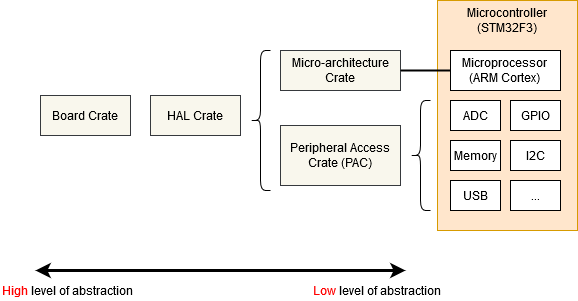
- Micro-architecture Crate - This sort of crate handles any useful routines common to the processor core your microcontroller is using, as well as any peripherals that are common to all micro-controllers that use that particular type of processor core. For example the cortex-m crate gives you functions to enable and disable interrupts, which are the same for all Cortex-M based micro-controllers. It also gives you access to the ‘SysTick’ peripheral included with all Cortex-M based micro-controllers.
- Peripheral Access Crate (PAC) - This sort of crate is a thin wrapper over the various memory-wrapper registers defined for your particular part-number of micro-controller you are using. For example, tm4c123x for the Texas Instruments Tiva-C TM4C123 series, or stm32f30x for the ST-Micro STM32F30x series. Here, you’ll be interacting with the registers directly, following each peripheral’s operating instructions given in your micro-controller’s Technical Reference Manual.
- HAL Crate - These crates offer a more user-friendly API for your particular processor, often by implementing some common traits defined in embedded-hal. For example, this crate might offer a
Serialstruct, with a constructor that takes an appropriate set of GPIO pins and a baud rate, and offers some sort ofwrite_bytefunction for sending data. See the chapter on Portability for more information on embedded-hal. - Board Crate - These crates go one step further than a HAL Crate by pre-configuring various peripherals and GPIO pins to suit the specific developer kit or board you are using, such as stm32f3-discovery for the STM32F3DISCOVERY board.
Board Crate
A board crate is the perfect starting point, if you’re new to embedded Rust. They nicely abstract the HW details that might be overwhelming when starting studying this subject, and makes standard tasks easy, like turning a LED on or off. The functionality it exposes varies a lot between boards. Since this book aims at staying hardware agnostic, the board crates won’t be covered by this book.
If you want to experiment with the STM32F3DISCOVERY board, it is highly recommended to take a look at the stm32f3-discovery board crate, which provides functionality to blink the board LEDs, access its compass, bluetooth and more. The Discovery book offers a great introduction to the use of a board crate.
But if you’re working on a system that doesn’t yet have dedicated board crate, or you need functionality not provided by existing crates, read on as we start from the bottom, with the micro-architecture crates.
Micro-architecture crate
Let’s look at the SysTick peripheral that’s common to all Cortex-M based micro-controllers. We can find a pretty low-level API in the cortex-m crate, and we can use it like this:
#![no_std]
#![no_main]
use cortex_m::peripheral::{syst, Peripherals};
use cortex_m_rt::entry;
use panic_halt as _;

#[entry]
fn main() -> ! {
    let peripherals = Peripherals::take().unwrap();
    let mut systick = peripherals.SYST;
    systick.set_clock_source(syst::SystClkSource::Core);
    systick.set_reload(1_000);
    systick.clear_current();
    systick.enable_counter();
    while !systick.has_wrapped() {
        // Loop
    }

    loop {}
}
The functions on the SYST struct map pretty closely to the functionality defined by the ARM Technical Reference Manual for this peripheral. There’s nothing in this API about ‘delaying for X milliseconds’ - we have to crudely implement that ourselves using a while loop. Note that we can’t access our SYST struct until we have called Peripherals::take() - this is a special routine that guarantees that there is only one SYST structure in our entire program. For more on that, see the Peripherals section.
Using a Peripheral Access Crate (PAC)
We won’t get very far with our embedded software development if we restrict ourselves to only the basic peripherals included with every Cortex-M. At some point, we’re going to need to write some code that’s specific to the particular micro-controller we’re using. In this example, let’s assume we have an Texas Instruments TM4C123 - a middling 80MHz Cortex-M4 with 256 KiB of Flash. We’re going to pull in the tm4c123x crate to make use of this chip.
#![no_std]
#![no_main]

use panic_halt as _; // panic handler

use cortex_m_rt::entry;
use tm4c123x;

#[entry]
pub fn init() -> (Delay, Leds) {
    let cp = cortex_m::Peripherals::take().unwrap();
    let p = tm4c123x::Peripherals::take().unwrap();

    let pwm = p.PWM0;
    pwm.ctl.write(|w| w.globalsync0().clear_bit());
    // Mode = 1 => Count up/down mode
    pwm._2_ctl.write(|w| w.enable().set_bit().mode().set_bit());
    pwm._2_gena.write(|w| w.actcmpau().zero().actcmpad().one());
    // 528 cycles (264 up and down) = 4 loops per video line (2112 cycles)
    pwm._2_load.write(|w| unsafe { w.load().bits(263) });
    pwm._2_cmpa.write(|w| unsafe { w.compa().bits(64) });
    pwm.enable.write(|w| w.pwm4en().set_bit());
}
We’ve accessed the PWM0 peripheral in exactly the same way as we accessed the SYST peripheral earlier, except we called tm4c123x::Peripherals::take(). As this crate was auto-generated using svd2rust, the access functions for our register fields take a closure, rather than a numeric argument. While this looks like a lot of code, the Rust compiler can use it to perform a bunch of checks for us, but then generate machine-code which is pretty close to hand-written assembler! Where the auto-generated code isn’t able to determine that all possible arguments to a particular accessor function are valid (for example, if the SVD defines the register as 32-bit but doesn’t say if some of those 32-bit values have a special meaning), then the function is marked as unsafe. We can see this in the example above when setting the load and compa sub-fields using the bits() function.
Reading
The read() function returns an object which gives read-only access to the various sub-fields within this register, as defined by the manufacturer’s SVD file for this chip. You can find all the functions available on special R return type for this particular register, in this particular peripheral, on this particular chip, in the tm4c123x documentation.
if pwm.ctl.read().globalsync0().is_set() {
    // Do a thing
}
Writing
The write() function takes a closure with a single argument. Typically we call this w. This argument then gives read-write access to the various sub-fields within this register, as defined by the manufacturer’s SVD file for this chip. Again, you can find all the functions available on the ‘w’ for this particular register, in this particular peripheral, on this particular chip, in the tm4c123x documentation. Note that all of the sub-fields that we do not set will be set to a default value for us - any existing content in the register will be lost.
pwm.ctl.write(|w| w.globalsync0().clear_bit());Modifying
If we wish to change only one particular sub-field in this register and leave the other sub-fields unchanged, we can use the modify function. This function takes a closure with two arguments - one for reading and one for writing. Typically we call these r and w respectively. The r argument can be used to inspect the current contents of the register, and the w argument can be used to modify the register contents.
pwm.ctl.modify(|r, w| w.globalsync0().clear_bit());The modify function really shows the power of closures here. In C, we’d have to read into some temporary value, modify the correct bits and then write the value back. This means there’s considerable scope for error:
uint32_t temp = pwm0.ctl.read();
temp |= PWM0_CTL_GLOBALSYNC0;
pwm0.ctl.write(temp);
uint32_t temp2 = pwm0.enable.read();
temp2 |= PWM0_ENABLE_PWM4EN;
pwm0.enable.write(temp); // Uh oh! Wrong variable!
Using a HAL crate
The HAL crate for a chip typically works by implementing a custom Trait for the raw structures exposed by the PAC. Often this trait will define a function called constrain() for single peripherals or split() for things like GPIO ports with multiple pins. This function will consume the underlying raw peripheral structure and return a new object with a higher-level API. This API may also do things like have the Serial port new function require a borrow on some Clock structure, which can only be generated by calling the function which configures the PLLs and sets up all the clock frequencies. In this way, it is statically impossible to create a Serial port object without first having configured the clock rates, or for the Serial port object to misconvert the baud rate into clock ticks. Some crates even define special traits for the states each GPIO pin can be in, requiring the user to put a pin into the correct state (say, by selecting the appropriate Alternate Function Mode) before passing the pin into Peripheral. All with no run-time cost!
Let’s see an example:
#![no_std]
#![no_main]

use panic_halt as _; // panic handler

use cortex_m_rt::entry;
use tm4c123x_hal as hal;
use tm4c123x_hal::prelude::*;
use tm4c123x_hal::serial::{NewlineMode, Serial};
use tm4c123x_hal::sysctl;

#[entry]
fn main() -> ! {
    let p = hal::Peripherals::take().unwrap();
    let cp = hal::CorePeripherals::take().unwrap();

    // Wrap up the SYSCTL struct into an object with a higher-layer API
    let mut sc = p.SYSCTL.constrain();
    // Pick our oscillation settings
    sc.clock_setup.oscillator = sysctl::Oscillator::Main(
        sysctl::CrystalFrequency::_16mhz,
        sysctl::SystemClock::UsePll(sysctl::PllOutputFrequency::_80_00mhz),
    );
    // Configure the PLL with those settings
    let clocks = sc.clock_setup.freeze();

    // Wrap up the GPIO_PORTA struct into an object with a higher-layer API.
    // Note it needs to borrow `sc.power_control` so it can power up the GPIO
    // peripheral automatically.
    let mut porta = p.GPIO_PORTA.split(&sc.power_control);

    // Activate the UART.
    let uart = Serial::uart0(
        p.UART0,
        // The transmit pin
        porta
            .pa1
            .into_af_push_pull::<hal::gpio::AF1>(&mut porta.control),
        // The receive pin
        porta
            .pa0
            .into_af_push_pull::<hal::gpio::AF1>(&mut porta.control),
        // No RTS or CTS required
        (),
        (),
        // The baud rate
        115200_u32.bps(),
        // Output handling
        NewlineMode::SwapLFtoCRLF,
        // We need the clock rates to calculate the baud rate divisors
        &clocks,
        // We need this to power up the UART peripheral
        &sc.power_control,
    );

    loop {
        writeln!(uart, "Hello, World!\r\n").unwrap();
    }
}
半主機
Semihosting is a mechanism that lets embedded devices do I/O on the host and is mainly used to log messages to the host console. Semihosting requires a debug session and pretty much nothing else (no extra wires!) so it’s super convenient to use. The downside is that it’s super slow: each write operation can take several milliseconds depending on the hardware debugger (e.g. ST-Link) you use.
The cortex-m-semihosting crate provides an API to do semihosting operations on Cortex-M devices. The program below is the semihosting version of “Hello, world!”:
#![no_main]
#![no_std]

use panic_halt as _;

use cortex_m_rt::entry;
use cortex_m_semihosting::hprintln;

#[entry]
fn main() -> ! {
    hprintln!("Hello, world!").unwrap();

    loop {}
}
If you run this program on hardware you’ll see the “Hello, world!” message within the OpenOCD logs.
$ openocd
(..)
Hello, world!
(..)
You do need to enable semihosting in OpenOCD from GDB first:
(gdb) monitor arm semihosting enable
semihosting is enabled
QEMU understands semihosting operations so the above program will also work with qemu-system-arm without having to start a debug session. Note that you’ll need to pass the -semihosting-config flag to QEMU to enable semihosting support; these flags are already included in the .cargo/config.toml file of the template.
$ # this program will block the terminal
$ cargo run
     Running `qemu-system-arm (..)
Hello, world!
There’s also an exit semihosting operation that can be used to terminate the QEMU process. Important: do not use debug::exit on hardware; this function can corrupt your OpenOCD session and you will not be able to debug more programs until you restart it.
#![no_main]
#![no_std]

use panic_halt as _;

use cortex_m_rt::entry;
use cortex_m_semihosting::debug;

#[entry]
fn main() -> ! {
    let roses = "blue";

    if roses == "red" {
        debug::exit(debug::EXIT_SUCCESS);
    } else {
        debug::exit(debug::EXIT_FAILURE);
    }

    loop {}
}
$ cargo run
Running `qemu-system-arm (..)
$ echo $?
1
One last tip: you can set the panicking behavior to exit(EXIT_FAILURE). This will let you write no_std run-pass tests that you can run on QEMU.
For convenience, the panic-semihosting crate has an “exit” feature that when enabled invokes exit(EXIT_FAILURE) after logging the panic message to the host stderr.
#![no_main]
#![no_std]

use panic_semihosting as _; // features = ["exit"]

use cortex_m_rt::entry;
use cortex_m_semihosting::debug;

#[entry]
fn main() -> ! {
    let roses = "blue";

    assert_eq!(roses, "red");

    loop {}
}
$ cargo run
Running `qemu-system-arm (..)
panicked at 'assertion failed: `(left == right)`
left: `"blue"`,
right: `"red"`', examples/hello.rs:15:5
$ echo $?
1
NOTE: To enable this feature on panic-semihosting, edit your Cargo.toml dependencies section where panic-semihosting is specified with:
panic-semihosting = { version = "VERSION", features = ["exit"] }
where VERSION is the version desired. For more information on dependencies features check the specifying dependencies section of the Cargo book.
恐慌處理
Panicking is a core part of the Rust language. Built-in operations like indexing are runtime checked for memory safety. When out of bounds indexing is attempted this results in a panic.
In the standard library panicking has a defined behavior: it unwinds the stack of the panicking thread, unless the user opted for aborting the program on panics.
In programs without standard library, however, the panicking behavior is left undefined. A behavior can be chosen by declaring a #[panic_handler] function. This function must appear exactly once in the dependency graph of a program, and must have the following signature: fn(&PanicInfo) -> !, where PanicInfo is a struct containing information about the location of the panic.
Given that embedded systems range from user facing to safety critical (cannot crash) there’s no one size fits all panicking behavior but there are plenty of commonly used behaviors. These common behaviors have been packaged into crates that define the #[panic_handler] function. Some examples include:
panic-abort. A panic causes the abort instruction to be executed.panic-halt. A panic causes the program, or the current thread, to halt by entering an infinite loop.panic-itm. The panicking message is logged using the ITM, an ARM Cortex-M specific peripheral.panic-semihosting. The panicking message is logged to the host using the semihosting technique.
You may be able to find even more crates searching for the panic-handler keyword on crates.io.
A program can pick one of these behaviors simply by linking to the corresponding crate. The fact that the panicking behavior is expressed in the source of an application as a single line of code is not only useful as documentation but can also be used to change the panicking behavior according to the compilation profile. For example:
#![no_main]
#![no_std]

// dev profile: easier to debug panics; can put a breakpoint on `rust_begin_unwind`
#[cfg(debug_assertions)]
use panic_halt as _;

// release profile: minimize the binary size of the application
#[cfg(not(debug_assertions))]
use panic_abort as _;

// ..
In this example the crate links to the panic-halt crate when built with the dev profile (cargo build), but links to the panic-abort crate when built with the release profile (cargo build --release).
The
use panic_abort as _;form of theusestatement is used to ensure thepanic_abortpanic handler is included in our final executable while making it clear to the compiler that we won’t explicitly use anything from the crate. Without theas _rename, the compiler would warn that we have an unused import. Sometimes you might seeextern crate panic_abortinstead, which is an older style used before the 2018 edition of Rust, and should now only be used for “sysroot” crates (those distributed with Rust itself) such asproc_macro,alloc,std, andtest.
An example
Here’s an example that tries to index an array beyond its length. The operation results in a panic.
#![no_main]
#![no_std]

use panic_semihosting as _;

use cortex_m_rt::entry;

#[entry]
fn main() -> ! {
    let xs = [0, 1, 2];
    let i = xs.len();
    let _y = xs[i]; // out of bounds access

    loop {}
}
This example chose the panic-semihosting behavior which prints the panic message to the host console using semihosting.
$ cargo run
     Running `qemu-system-arm -cpu cortex-m3 -machine lm3s6965evb (..)
panicked at 'index out of bounds: the len is 3 but the index is 4', src/main.rs:12:13
You can try changing the behavior to panic-halt and confirm that no message is printed in that case.
例外
Exceptions, and interrupts, are a hardware mechanism by which the processor handles asynchronous events and fatal errors (e.g. executing an invalid instruction). Exceptions imply preemption and involve exception handlers, subroutines executed in response to the signal that triggered the event.
The cortex-m-rt crate provides an exception attribute to declare exception handlers.
// Exception handler for the SysTick (System Timer) exception
#[exception]
fn SysTick() {
    // ..
}
Other than the exception attribute exception handlers look like plain functions but there’s one more difference: exception handlers can not be called by software. Following the previous example, the statement SysTick(); would result in a compilation error.
This behavior is pretty much intended and it’s required to provide a feature: static mut variables declared inside exception handlers are safe to use.
#[exception]
fn SysTick() {
    static mut COUNT: u32 = 0;

    // `COUNT` has transformed to type `&mut u32` and it's safe to use
    *COUNT += 1;
}
As you may know, using static mut variables in a function makes it non-reentrant. It’s undefined behavior to call a non-reentrant function, directly or indirectly, from more than one exception / interrupt handler or from main and one or more exception / interrupt handlers.
Safe Rust must never result in undefined behavior so non-reentrant functions must be marked as unsafe. Yet I just told that exception handlers can safely use static mut variables. How is this possible? This is possible because exception handlers can not be called by software thus reentrancy is not possible. These handlers are called by the hardware itself which is assumed to be physically non-concurrent.
As a result, in the context of exception handlers in embedded systems, the absence of concurrent invocations of the same handler ensures that there are no reentrancy issues, even if the handler uses static mutable variables.
In a multicore system, where multiple processor cores are executing code concurrently, the potential for reentrancy issues becomes relevant again, even within exception handlers. While each core may have its own set of exception handlers, there can still be scenarios where multiple cores attempt to execute the same exception handler simultaneously.
To address this concern in a multicore environment, proper synchronization mechanisms need to be employed within the exception handlers to ensure that access to shared resources is properly coordinated among the cores. This typically involves the use of techniques such as locks, semaphores, or atomic operations to prevent data races and maintain data integrity
Note that the
exceptionattribute transforms definitions of static variables inside the function by wrapping them intounsafeblocks and providing us with new appropriate variables of type&mutof the same name. Thus we can dereference the reference via*to access the values of the variables without needing to wrap them in anunsafeblock.
A complete example
Here’s an example that uses the system timer to raise a SysTick exception roughly every second. The SysTick exception handler keeps track of how many times it has been called in the COUNT variable and then prints the value of COUNT to the host console using semihosting.
NOTE: You can run this example on any Cortex-M device; you can also run it on QEMU
#![deny(unsafe_code)]
#![no_main]
#![no_std]

use panic_halt as _;

use core::fmt::Write;

use cortex_m::peripheral::syst::SystClkSource;
use cortex_m_rt::{entry, exception};
use cortex_m_semihosting::{
    debug,
    hio::{self, HostStream},
};

#[entry]
fn main() -> ! {
    let p = cortex_m::Peripherals::take().unwrap();
    let mut syst = p.SYST;

    // configures the system timer to trigger a SysTick exception every second
    syst.set_clock_source(SystClkSource::Core);
    // this is configured for the LM3S6965 which has a default CPU clock of 12 MHz
    syst.set_reload(12_000_000);
    syst.clear_current();
    syst.enable_counter();
    syst.enable_interrupt();

    loop {}
}

#[exception]
fn SysTick() {
    static mut COUNT: u32 = 0;
    static mut STDOUT: Option<HostStream> = None;

    *COUNT += 1;

    // Lazy initialization
    if STDOUT.is_none() {
        *STDOUT = hio::hstdout().ok();
    }

    if let Some(hstdout) = STDOUT.as_mut() {
        write!(hstdout, "{}", *COUNT).ok();
    }

    // IMPORTANT omit this `if` block if running on real hardware or your
    // debugger will end in an inconsistent state
    if *COUNT == 9 {
        // This will terminate the QEMU process
        debug::exit(debug::EXIT_SUCCESS);
    }
}
tail -n5 Cargo.toml
[dependencies]
cortex-m = "0.5.7"
cortex-m-rt = "0.6.3"
panic-halt = "0.2.0"
cortex-m-semihosting = "0.3.1"
$ cargo run --release
     Running `qemu-system-arm -cpu cortex-m3 -machine lm3s6965evb (..)
123456789
If you run this on the Discovery board you’ll see the output on the OpenOCD console. Also, the program will not stop when the count reaches 9.
The default exception handler
What the exception attribute actually does is override the default exception handler for a specific exception. If you don’t override the handler for a particular exception it will be handled by the DefaultHandler function, which defaults to:
fn DefaultHandler() {
    loop {}
}
This function is provided by the cortex-m-rt crate and marked as #[no_mangle] so you can put a breakpoint on “DefaultHandler” and catch unhandled exceptions.
It’s possible to override this DefaultHandler using the exception attribute:
#[exception]
fn DefaultHandler(irqn: i16) {
    // custom default handler
}
The irqn argument indicates which exception is being serviced. A negative value indicates that a Cortex-M exception is being serviced; and zero or a positive value indicate that a device specific exception, AKA interrupt, is being serviced.
The hard fault handler
The HardFault exception is a bit special. This exception is fired when the program enters an invalid state so its handler can not return as that could result in undefined behavior. Also, the runtime crate does a bit of work before the user defined HardFault handler is invoked to improve debuggability.
The result is that the HardFault handler must have the following signature: fn(&ExceptionFrame) -> !. The argument of the handler is a pointer to registers that were pushed into the stack by the exception. These registers are a snapshot of the processor state at the moment the exception was triggered and are useful to diagnose a hard fault.
Here’s an example that performs an illegal operation: a read to a nonexistent memory location.
NOTE: This program won’t work, i.e. it won’t crash, on QEMU because
qemu-system-arm -machine lm3s6965evbdoesn’t check memory loads and will happily return0on reads to invalid memory.
#![no_main]
#![no_std]

use panic_halt as _;

use core::fmt::Write;
use core::ptr;

use cortex_m_rt::{entry, exception, ExceptionFrame};
use cortex_m_semihosting::hio;

#[entry]
fn main() -> ! {
    // read a nonexistent memory location
    unsafe {
        ptr::read_volatile(0x3FFF_0000 as *const u32);
    }

    loop {}
}

#[exception]
fn HardFault(ef: &ExceptionFrame) -> ! {
    if let Ok(mut hstdout) = hio::hstdout() {
        writeln!(hstdout, "{:#?}", ef).ok();
    }

    loop {}
}
The HardFault handler prints the ExceptionFrame value. If you run this you’ll see something like this on the OpenOCD console.
$ openocd
(..)
ExceptionFrame {
    r0: 0x3fff0000,
    r1: 0x00000003,
    r2: 0x080032e8,
    r3: 0x00000000,
    r12: 0x00000000,
    lr: 0x080016df,
    pc: 0x080016e2,
    xpsr: 0x61000000,
}
The pc value is the value of the Program Counter at the time of the exception and it points to the instruction that triggered the exception.
If you look at the disassembly of the program:
$ cargo objdump --bin app --release -- -d --no-show-raw-insn --print-imm-hex
(..)
ResetTrampoline:
 8000942:       movw    r0, #0xfffe
 8000946:       movt    r0, #0x3fff
 800094a:       ldr     r0, [r0]
 800094c:       b       #-0x4 <ResetTrampoline+0xa>
You can lookup the value of the program counter 0x0800094a in the disassembly. You’ll see that a load operation (ldr r0, [r0] ) caused the exception. The r0 field of ExceptionFrame will tell you the value of register r0 was 0x3fff_fffe at that time.
中斷
Interrupts differ from exceptions in a variety of ways but their operation and use is largely similar and they are also handled by the same interrupt controller. Whereas exceptions are defined by the Cortex-M architecture, interrupts are always vendor (and often even chip) specific implementations, both in naming and functionality.
Interrupts do allow for a lot of flexibility which needs to be accounted for when attempting to use them in an advanced way. We will not cover those uses in this book, however it is a good idea to keep the following in mind:
- Interrupts have programmable priorities which determine their handlers’ execution order
- Interrupts can nest and preempt, i.e. execution of an interrupt handler might be interrupted by another higher-priority interrupt
- In general the reason causing the interrupt to trigger needs to be cleared to prevent re-entering the interrupt handler endlessly
The general initialization steps at runtime are always the same:
- Setup the peripheral(s) to generate interrupts requests at the desired occasions
- Set the desired priority of the interrupt handler in the interrupt controller
- Enable the interrupt handler in the interrupt controller
Similarly to exceptions, the cortex-m-rt crate exposes an interrupt attribute for declaring interrupt handlers. However, this attribute is only available when the device feature is enabled. That said, this attribute is not intended to be used directly—doing so will result in a compilation error.
Instead, you should use the re-exported version of the interrupt attribute provided by the device crate (usually generated using svd2rust). This ensures that the compiler can verify that the interrupt actually exists on the target device. The list of available interrupts—and their position in the interrupt vector table—is typically auto-generated from an SVD file by svd2rust.
use lm3s6965::interrupt; // Re-exported attribute from the device crate

// Interrupt handler for the Timer2 interrupt
#[interrupt]
fn TIMER2A() {
    // ..
    // Clear reason for the generated interrupt request
}
Interrupt handlers look like plain functions (except for the lack of arguments) similar to exception handlers. However they can not be called directly by other parts of the firmware due to the special calling conventions. It is however possible to generate interrupt requests in software to trigger a diversion to the interrupt handler.
Similar to exception handlers it is also possible to declare static mut variables inside the interrupt handlers for safe state keeping.
#[interrupt]
fn TIMER2A() {
    static mut COUNT: u32 = 0;

    // `COUNT` has type `&mut u32` and it's safe to use
    *COUNT += 1;
}
For a more detailed description about the mechanisms demonstrated here please refer to the exceptions section.
I/O
TODO Cover memory mapped I/O using registers.
周邊
什麼是周邊?
多數微控制器不只有 CPU、RAM 或快閃記憶體,還包含用於與微控制器外部系統互動的矽區塊,也會透過感測器、馬達控制器或顯示器、鍵盤等人機介面,直接或間接地與周遭環境互動。這些元件統稱為周邊。
這些周邊之所以有用,是因為它們讓開發者可以把處理工作卸載給周邊,避免所有事都由軟體處理。就像桌面開發者會把圖形處理交給顯示卡一樣,嵌入式開發者可把某些工作交給周邊,讓 CPU 可以去做更重要的事,或不做事以節省功耗。
如果你看看 1970 或 1980 年代老式家用電腦的主機板(其實昨日的桌機與今日的嵌入式系統並沒有太大差別),你大概會看到:
- 處理器
- RAM 晶片
- ROM 晶片
- I/O 控制器
RAM 晶片、ROM 晶片與 I/O 控制器(此系統中的周邊)會透過一組稱為「匯流排」的平行線路連接到處理器。匯流排負責攜帶位址資訊,用以選擇處理器想要溝通的裝置;以及資料匯流排,用以傳輸實際資料。在嵌入式微控制器中,同樣的原理適用——只是所有東西都被封裝在同一塊矽晶片上。
然而,不同於通常有 Vulkan、Metal 或 OpenGL 等軟體 API 的顯示卡,周邊會以硬體介面呈現給微控制器,並對映到一段記憶體。
線性與實體記憶體空間
在微控制器上,將資料寫入其他任意位址(如 0x4000_0000 或 0x0000_0000)可能也是完全合法的動作。
在桌面系統上,記憶體存取由 MMU(Memory Management Unit)嚴格控制。此元件有兩項主要責任:強制記憶體區段的存取權限(防止某行程讀取或修改另一行程的記憶體);以及將實體記憶體區段重新對映到軟體使用的虛擬記憶體範圍。微控制器通常沒有 MMU,而是只在軟體中使用實體位址。
雖然 32 位元微控制器擁有從 0x0000_0000 到 0xFFFF_FFFF 的實體線性位址空間,但實際記憶體通常只使用其中幾百 KB,留下大量位址空間。前面章節提到 RAM 位於 0x2000_0000。若 RAM 為 64 KiB(最大位址 0xFFFF),那麼 0x2000_0000 到 0x2000_FFFF 就對應到 RAM。當我們寫入位於 0x2000_1234 的變數時,內部會有邏輯偵測位址高位(此例為 0x2000),並啟用 RAM 以處理低位址部分(此例為 0x1234)。在 Cortex-M 上,Flash ROM 也會對映在 0x0000_0000 到例如 0x0007_FFFF(若有 512 KiB Flash ROM)。微控制器設計者不會忽略這兩個區域之間的空間,而是把周邊的介面對映到特定位址,結果看起來像這樣:
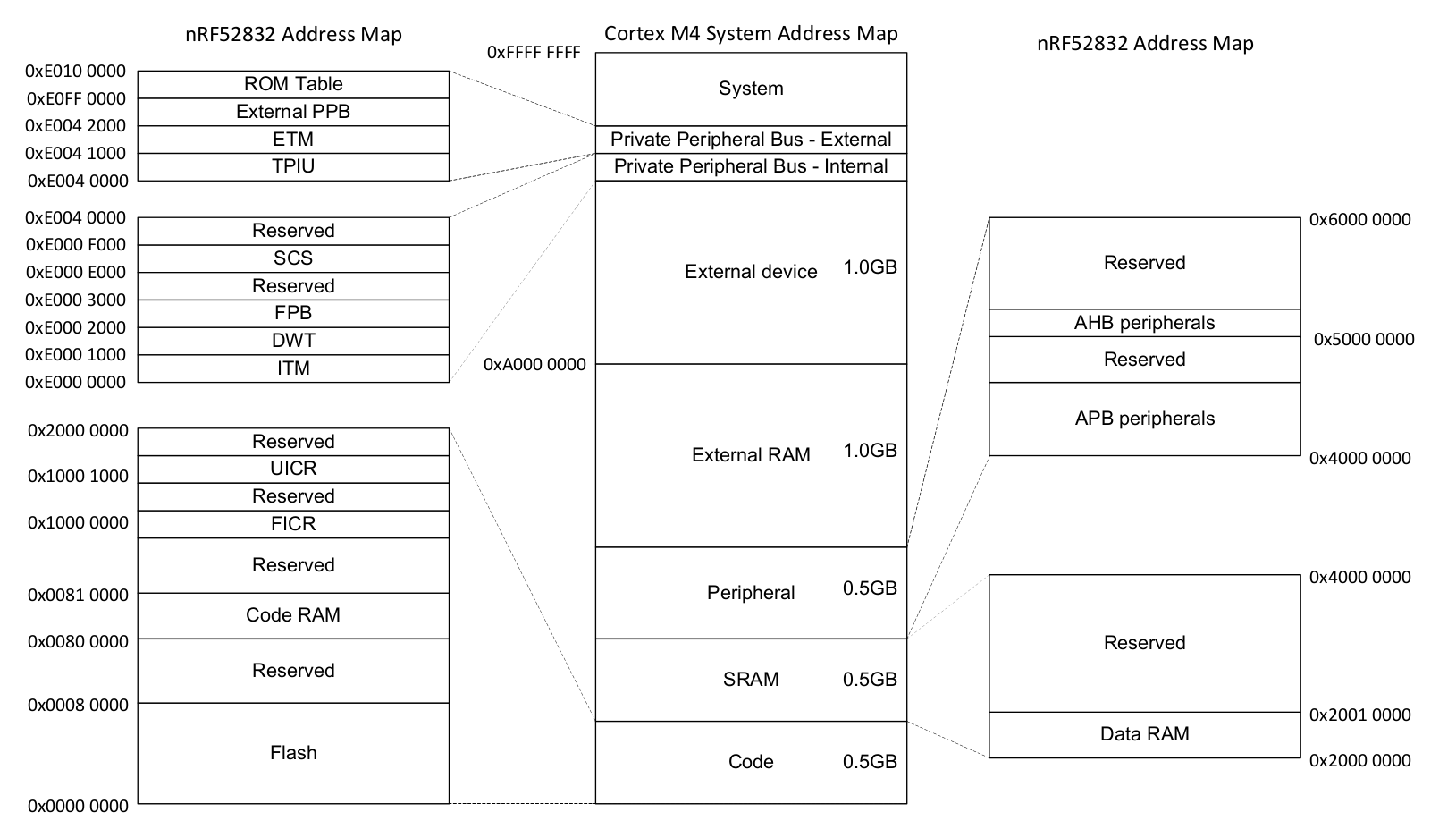
記憶體對映周邊
乍看之下,與這些周邊互動很簡單——把正確資料寫到正確位址。例如,透過序列埠送出一個 32 位元字,可能就只是將該 32 位元字寫入某個記憶體位址。序列埠周邊會接手並自動送出資料。
周邊的設定方式也類似。不是呼叫函式來設定周邊,而是有一塊記憶體作為硬體 API。把 0x8000_0000 寫到 SPI 頻率設定暫存器,SPI 就會以 8 Mbps 傳輸;把 0x0200_0000 寫到同一位址,SPI 就會以 125 Kbps 傳輸。這些設定暫存器看起來像這樣:
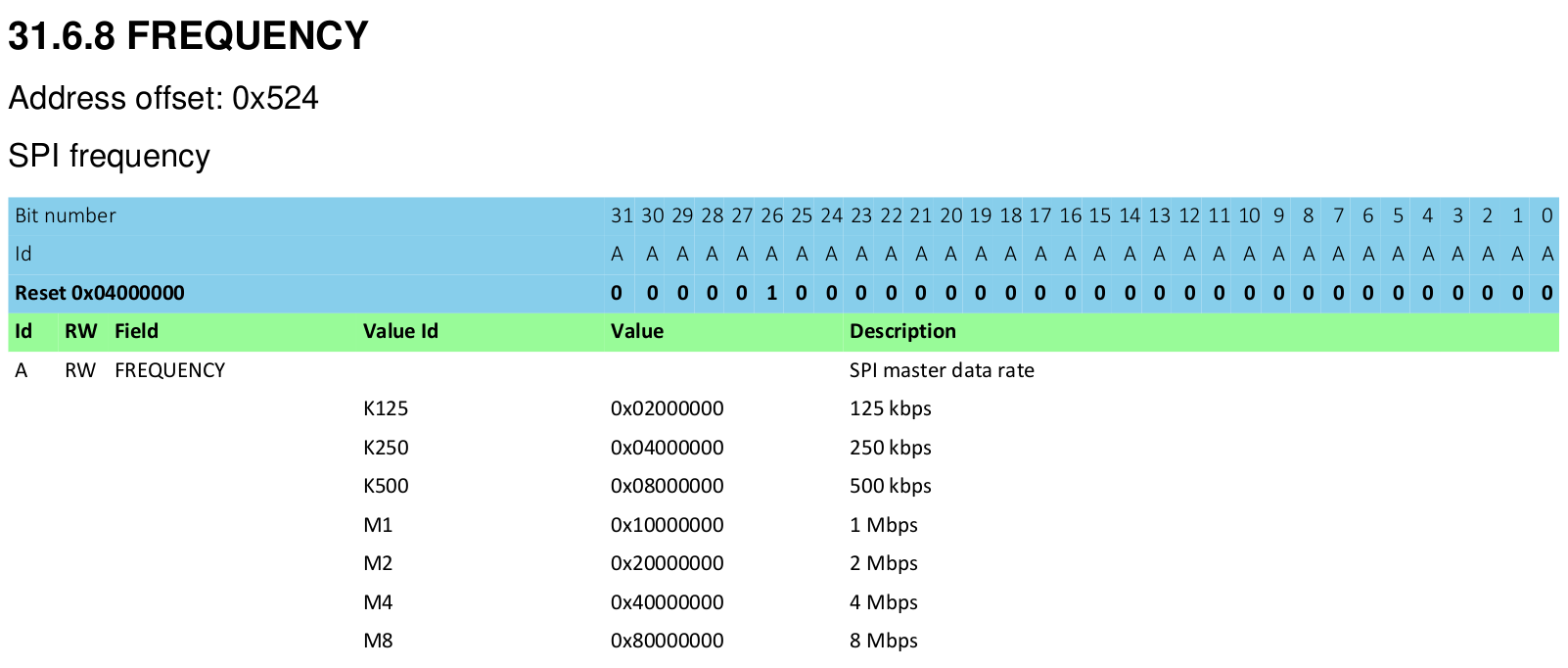
不論使用何種語言(組合語言、C 或 Rust),都必須透過此介面與硬體互動。
A First Attempt
The Registers
Let’s look at the ‘SysTick’ peripheral - a simple timer which comes with every Cortex-M processor core. Typically you’ll be looking these up in the chip manufacturer’s data sheet or Technical Reference Manual, but this example is common to all ARM Cortex-M cores, let’s look in the ARM reference manual. We see there are four registers:
| Offset | Name | 描述 | Width |
|---|---|---|---|
| 0x00 | SYST_CSR | Control and Status Register | 32 bits |
| 0x04 | SYST_RVR | Reload Value Register | 32 bits |
| 0x08 | SYST_CVR | Current Value Register | 32 bits |
| 0x0C | SYST_CALIB | Calibration Value Register | 32 bits |
The C Approach
In Rust, we can represent a collection of registers in exactly the same way as we do in C - with a struct.
#[repr(C)]
struct SysTick {
    pub csr: u32,
    pub rvr: u32,
    pub cvr: u32,
    pub calib: u32,
}
The qualifier #[repr(C)] tells the Rust compiler to lay this structure out like a C compiler would. That’s very important, as Rust allows structure fields to be re-ordered, while C does not. You can imagine the debugging we’d have to do if these fields were silently re-arranged by the compiler! With this qualifier in place, we have our four 32-bit fields which correspond to the table above. But of course, this struct is of no use by itself - we need a variable.
let systick = 0xE000_E010 as *mut SysTick;
let time = unsafe { (*systick).cvr };
Volatile Accesses
Now, there are a couple of problems with the approach above.
- We have to use unsafe every time we want to access our Peripheral.
- We’ve got no way of specifying which registers are read-only or read-write.
- Any piece of code anywhere in your program could access the hardware through this structure.
- Most importantly, it doesn’t actually work…
Now, the problem is that compilers are clever. If you make two writes to the same piece of RAM, one after the other, the compiler can notice this and just skip the first write entirely. In C, we can mark variables as volatile to ensure that every read or write occurs as intended. In Rust, we instead mark the accesses as volatile, not the variable.
let systick = unsafe { &mut *(0xE000_E010 as *mut SysTick) };
let time = unsafe { core::ptr::read_volatile(&mut systick.cvr) };
So, we’ve fixed one of our four problems, but now we have even more unsafe code! Fortunately, there’s a third party crate which can help - volatile_register.
use volatile_register::{RW, RO};

#[repr(C)]
struct SysTick {
    pub csr: RW<u32>,
    pub rvr: RW<u32>,
    pub cvr: RW<u32>,
    pub calib: RO<u32>,
}

fn get_systick() -> &'static mut SysTick {
    unsafe { &mut *(0xE000_E010 as *mut SysTick) }
}

fn get_time() -> u32 {
    let systick = get_systick();
    systick.cvr.read()
}
Now, the volatile accesses are performed automatically through the read and write methods. It’s still unsafe to perform writes, but to be fair, hardware is a bunch of mutable state and there’s no way for the compiler to know whether these writes are actually safe, so this is a good default position.
The Rusty Wrapper
We need to wrap this struct up into a higher-layer API that is safe for our users to call. As the driver author, we manually verify the unsafe code is correct, and then present a safe API for our users so they don’t have to worry about it (provided they trust us to get it right!).
One example might be:
use volatile_register::{RW, RO};

pub struct SystemTimer {
    p: &'static mut RegisterBlock
}

#[repr(C)]
struct RegisterBlock {
    pub csr: RW<u32>,
    pub rvr: RW<u32>,
    pub cvr: RW<u32>,
    pub calib: RO<u32>,
}

impl SystemTimer {
    pub fn new() -> SystemTimer {
        SystemTimer {
            p: unsafe { &mut *(0xE000_E010 as *mut RegisterBlock) }
        }
    }

    pub fn get_time(&self) -> u32 {
        self.p.cvr.read()
    }

    pub fn set_reload(&mut self, reload_value: u32) {
        unsafe { self.p.rvr.write(reload_value) }
    }
}

pub fn example_usage() -> String {
    let mut st = SystemTimer::new();
    st.set_reload(0x00FF_FFFF);
    format!("Time is now 0x{:08x}", st.get_time())
}
Now, the problem with this approach is that the following code is perfectly acceptable to the compiler:
fn thread1() {
    let mut st = SystemTimer::new();
    st.set_reload(2000);
}

fn thread2() {
    let mut st = SystemTimer::new();
    st.set_reload(1000);
}
Our &mut self argument to the set_reload function checks that there are no other references to that particular SystemTimer struct, but they don’t stop the user creating a second SystemTimer which points to the exact same peripheral! Code written in this fashion will work if the author is diligent enough to spot all of these ‘duplicate’ driver instances, but once the code is spread out over multiple modules, drivers, developers, and days, it gets easier and easier to make these kinds of mistakes.
借用檢查器
Mutable Global State
Unfortunately, hardware is basically nothing but mutable global state, which can feel very frightening for a Rust developer. Hardware exists independently from the structures of the code we write, and can be modified at any time by the real world.
What should our rules be?
How can we reliably interact with these peripherals?
- Always use
volatilemethods to read or write to peripheral memory, as it can change at any time - In software, we should be able to share any number of read-only accesses to these peripherals
- If some software should have read-write access to a peripheral, it should hold the only reference to that peripheral
借用檢查器
The last two of these rules sound suspiciously similar to what the Borrow Checker does already!
Imagine if we could pass around ownership of these peripherals, or offer immutable or mutable references to them?
Well, we can, but for the Borrow Checker, we need to have exactly one instance of each peripheral, so Rust can handle this correctly. Well, luckily in the hardware, there is only one instance of any given peripheral, but how can we expose that in the structure of our code?
單例
In software engineering, the singleton pattern is a software design pattern that restricts the instantiation of a class to one object.
Wikipedia: Singleton Pattern
But why can’t we just use global variable(s)?
We could make everything a public static, like this
static mut THE_SERIAL_PORT: SerialPort = SerialPort;

fn main() {
    let _ = unsafe {
        THE_SERIAL_PORT.read_speed();
    };
}
But this has a few problems. It is a mutable global variable, and in Rust, these are always unsafe to interact with. These variables are also visible across your whole program, which means the borrow checker is unable to help you track references and ownership of these variables.
How do we do this in Rust?
Instead of just making our peripheral a global variable, we might instead decide to make a structure, in this case called PERIPHERALS, which contains an Option<T> for each of our peripherals.
struct Peripherals {
    serial: Option<SerialPort>,
}
impl Peripherals {
    fn take_serial(&mut self) -> SerialPort {
        let p = replace(&mut self.serial, None);
        p.unwrap()
    }
}
static mut PERIPHERALS: Peripherals = Peripherals {
    serial: Some(SerialPort),
};
This structure allows us to obtain a single instance of our peripheral. If we try to call take_serial() more than once, our code will panic!
fn main() {
    let serial_1 = unsafe { PERIPHERALS.take_serial() };
    // This panics!
    // let serial_2 = unsafe { PERIPHERALS.take_serial() };
}
Although interacting with this structure is unsafe, once we have the SerialPort it contained, we no longer need to use unsafe, or the PERIPHERALS structure at all.
This has a small runtime overhead because we must wrap the SerialPort structure in an option, and we’ll need to call take_serial() once, however this small up-front cost allows us to leverage the borrow checker throughout the rest of our program.
Existing library support
Although we created our own Peripherals structure above, it is not necessary to do this for your code. the cortex_m crate contains a macro called singleton!() that will perform this action for you.
use cortex_m::singleton;

fn main() {
    // OK if `main` is executed only once
    let x: &'static mut bool =
        singleton!(: bool = false).unwrap();
}Additionally, if you use cortex-m-rtic, the entire process of defining and obtaining these peripherals are abstracted for you, and you are instead handed a Peripherals structure that contains a non-Option<T> version of all of the items you define.
// cortex-m-rtic v0.5.x
#[rtic::app(device = lm3s6965, peripherals = true)]
const APP: () = {
    #[init]
    fn init(cx: init::Context) {
        static mut X: u32 = 0;

        // Cortex-M peripherals
        let core: cortex_m::Peripherals = cx.core;

        // Device specific peripherals
        let device: lm3s6965::Peripherals = cx.device;
    }
}
But why?
But how do these Singletons make a noticeable difference in how our Rust code works?
impl SerialPort {
    const SER_PORT_SPEED_REG: *mut u32 = 0x4000_1000 as _;

    fn read_speed(
        &self // <------ This is really, really important
    ) -> u32 {
        unsafe {
            ptr::read_volatile(Self::SER_PORT_SPEED_REG)
        }
    }
}
There are two important factors in play here:
- Because we are using a singleton, there is only one way or place to obtain a
SerialPortstructure - To call the
read_speed()method, we must have ownership or a reference to aSerialPortstructure
These two factors put together means that it is only possible to access the hardware if we have appropriately satisfied the borrow checker, meaning that at no point do we have multiple mutable references to the same hardware!
fn main() {
    // missing reference to `self`! Won't work.
    // SerialPort::read_speed();

    let serial_1 = unsafe { PERIPHERALS.take_serial() };

    // you can only read what you have access to
    let _ = serial_1.read_speed();
}
Treat your hardware like data
Additionally, because some references are mutable, and some are immutable, it becomes possible to see whether a function or method could potentially modify the state of the hardware. For example,
This is allowed to change hardware settings:
fn setup_spi_port(
    spi: &mut SpiPort,
    cs_pin: &mut GpioPin
) -> Result<()> {
    // ...
}
This isn’t:
fn read_button(gpio: &GpioPin) -> bool {
    // ...
}
This allows us to enforce whether code should or should not make changes to hardware at compile time, rather than at runtime. As a note, this generally only works across one application, but for bare metal systems, our software will be compiled into a single application, so this is not usually a restriction.
靜態保證
Rust 的型別系統可在編譯期防止資料競爭(見 Send 與 Sync traits)。型別系統也可用來在編譯期檢查其他性質,在某些情況下減少執行期檢查的需求。
將這些_靜態檢查_應用在嵌入式程式時,可用來強制 I/O 介面正確設定。例如,可以設計一個 API,使得必須先設定將要使用的腳位,才能初始化序列介面。
也可在編譯期檢查像是將腳位設為低電位等操作,是否只能對已正確設定的周邊執行。例如,嘗試變更被設定為浮動輸入模式的腳位輸出狀態,會產生編譯錯誤。
此外,如前章所示,所有權概念可應用於周邊,以確保只有程式的特定部分能修改周邊。這種_存取控制_相較於把周邊視為全域可變狀態,更容易推理軟體行為。
型別狀態程式設計
The concept of typestates describes the encoding of information about the current state of an object into the type of that object. Although this can sound a little arcane, if you have used the Builder Pattern in Rust, you have already started using Typestate Programming!
pub mod foo_module {
    #[derive(Debug)]
    pub struct Foo {
        inner: u32,
    }

    pub struct FooBuilder {
        a: u32,
        b: u32,
    }

    impl FooBuilder {
        pub fn new(starter: u32) -> Self {
            Self {
                a: starter,
                b: starter,
            }
        }

        pub fn double_a(self) -> Self {
            Self {
                a: self.a * 2,
                b: self.b,
            }
        }

        pub fn into_foo(self) -> Foo {
            Foo {
                inner: self.a + self.b,
            }
        }
    }
}

fn main() {
    let x = foo_module::FooBuilder::new(10)
        .double_a()
        .into_foo();

    println!("{:#?}", x);
}
In this example, there is no direct way to create a Foo object. We must create a FooBuilder, and properly initialize it before we can obtain the Foo object we want.
This minimal example encodes two states:
FooBuilder, which represents an “unconfigured”, or “configuration in process” stateFoo, which represents a “configured”, or “ready to use” state.
強型別
Because Rust has a Strong Type System, there is no easy way to magically create an instance of Foo, or to turn a FooBuilder into a Foo without calling the into_foo() method. Additionally, calling the into_foo() method consumes the original FooBuilder structure, meaning it can not be reused without the creation of a new instance.
This allows us to represent the states of our system as types, and to include the necessary actions for state transitions into the methods that exchange one type for another. By creating a FooBuilder, and exchanging it for a Foo object, we have walked through the steps of a basic state machine.
將周邊視為狀態機
The peripherals of a microcontroller can be thought of as set of state machines. For example, the configuration of a simplified GPIO pin could be represented as the following tree of states:
- Disabled
- Enabled
- Configured as Output
- Output: High
- Output: Low
- Configured as Input
- Input: High Resistance
- Input: Pulled Low
- Input: Pulled High
- Configured as Output
If the peripheral starts in the Disabled mode, to move to the Input: High Resistance mode, we must perform the following steps:
- Disabled
- Enabled
- Configured as Input
- Input: High Resistance
If we wanted to move from Input: High Resistance to Input: Pulled Low, we must perform the following steps:
- Input: High Resistance
- Input: Pulled Low
Similarly, if we want to move a GPIO pin from configured as Input: Pulled Low to Output: High, we must perform the following steps:
- Input: Pulled Low
- Configured as Input
- Configured as Output
- Output: High
Hardware Representation
Typically the states listed above are set by writing values to given registers mapped to a GPIO peripheral. Let’s define an imaginary GPIO Configuration Register to illustrate this:
| Name | Bit Number(s) | Value | Meaning | Notes |
|---|---|---|---|---|
| enable | 0 | 0 | disabled | 停用 GPIO |
| 1 | enabled | 啟用 GPIO | ||
| direction | 1 | 0 | input | 設定輸入的方向 |
| 1 | output | 設定輸出的方向 | ||
| input_mode | 2..3 | 00 | hi-z | Sets the input as high resistance |
| 01 | pull-low | Input pin is pulled low | ||
| 10 | pull-high | Input pin is pulled high | ||
| 11 | n/a | Invalid state. Do not set | ||
| output_mode | 4 | 0 | set-low | Output pin is driven low |
| 1 | set-high | Output pin is driven high | ||
| input_status | 5 | x | in-val | 0 if input is < 1.5v, 1 if input >= 1.5v |
We could expose the following structure in Rust to control this GPIO:
/// GPIO interface
struct GpioConfig {
    /// GPIO Configuration structure generated by svd2rust
    periph: GPIO_CONFIG,
}

impl GpioConfig {
    pub fn set_enable(&mut self, is_enabled: bool) {
        self.periph.modify(|_r, w| {
            w.enable().set_bit(is_enabled)
        });
    }

    pub fn set_direction(&mut self, is_output: bool) {
        self.periph.modify(|_r, w| {
            w.direction().set_bit(is_output)
        });
    }

    pub fn set_input_mode(&mut self, variant: InputMode) {
        self.periph.modify(|_r, w| {
            w.input_mode().variant(variant)
        });
    }

    pub fn set_output_mode(&mut self, is_high: bool) {
        self.periph.modify(|_r, w| {
            w.output_mode.set_bit(is_high)
        });
    }

    pub fn get_input_status(&self) -> bool {
        self.periph.read().input_status().bit_is_set()
    }
}
However, this would allow us to modify certain registers that do not make sense. For example, what happens if we set the output_mode field when our GPIO is configured as an input?
In general, use of this structure would allow us to reach states not defined by our state machine above: e.g. an output that is pulled low, or an input that is set high. For some hardware, this may not matter. On other hardware, it could cause unexpected or undefined behavior!
Although this interface is convenient to write, it doesn’t enforce the design contracts set out by our hardware implementation.
設計契約
In our last chapter, we wrote an interface that didn’t enforce design contracts. Let’s take another look at our imaginary GPIO configuration register:
| Name | Bit Number(s) | Value | Meaning | Notes |
|---|---|---|---|---|
| enable | 0 | 0 | disabled | 停用 GPIO |
| 1 | enabled | 啟用 GPIO | ||
| direction | 1 | 0 | input | 設定輸入的方向 |
| 1 | output | 設定輸出的方向 | ||
| input_mode | 2..3 | 00 | hi-z | Sets the input as high resistance |
| 01 | pull-low | Input pin is pulled low | ||
| 10 | pull-high | Input pin is pulled high | ||
| 11 | n/a | Invalid state. Do not set | ||
| output_mode | 4 | 0 | set-low | Output pin is driven low |
| 1 | set-high | Output pin is driven high | ||
| input_status | 5 | x | in-val | 0 if input is < 1.5v, 1 if input >= 1.5v |
If we instead checked the state before making use of the underlying hardware, enforcing our design contracts at runtime, we might write code that looks like this instead:
/// GPIO interface
struct GpioConfig {
    /// GPIO Configuration structure generated by svd2rust
    periph: GPIO_CONFIG,
}

impl GpioConfig {
    pub fn set_enable(&mut self, is_enabled: bool) {
        self.periph.modify(|_r, w| {
            w.enable().set_bit(is_enabled)
        });
    }

    pub fn set_direction(&mut self, is_output: bool) -> Result<(), ()> {
        if self.periph.read().enable().bit_is_clear() {
            // Must be enabled to set direction
            return Err(());
        }

        self.periph.modify(|r, w| {
            w.direction().set_bit(is_output)
        });

        Ok(())
    }

    pub fn set_input_mode(&mut self, variant: InputMode) -> Result<(), ()> {
        if self.periph.read().enable().bit_is_clear() {
            // Must be enabled to set input mode
            return Err(());
        }

        if self.periph.read().direction().bit_is_set() {
            // Direction must be input
            return Err(());
        }

        self.periph.modify(|_r, w| {
            w.input_mode().variant(variant)
        });

        Ok(())
    }

    pub fn set_output_status(&mut self, is_high: bool) -> Result<(), ()> {
        if self.periph.read().enable().bit_is_clear() {
            // Must be enabled to set output status
            return Err(());
        }

        if self.periph.read().direction().bit_is_clear() {
            // Direction must be output
            return Err(());
        }

        self.periph.modify(|_r, w| {
            w.output_mode.set_bit(is_high)
        });

        Ok(())
    }

    pub fn get_input_status(&self) -> Result<bool, ()> {
        if self.periph.read().enable().bit_is_clear() {
            // Must be enabled to get status
            return Err(());
        }

        if self.periph.read().direction().bit_is_set() {
            // Direction must be input
            return Err(());
        }

        Ok(self.periph.read().input_status().bit_is_set())
    }
}
Because we need to enforce the restrictions on the hardware, we end up doing a lot of runtime checking which wastes time and resources, and this code will be much less pleasant for the developer to use.
Type States
But what if instead, we used Rust’s type system to enforce the state transition rules? Take this example:
/// GPIO interface
struct GpioConfig<ENABLED, DIRECTION, MODE> {
    /// GPIO Configuration structure generated by svd2rust
    periph: GPIO_CONFIG,
    enabled: ENABLED,
    direction: DIRECTION,
    mode: MODE,
}

// Type states for MODE in GpioConfig
struct Disabled;
struct Enabled;
struct Output;
struct Input;
struct PulledLow;
struct PulledHigh;
struct HighZ;
struct DontCare;

/// These functions may be used on any GPIO Pin
impl<EN, DIR, IN_MODE> GpioConfig<EN, DIR, IN_MODE> {
    pub fn into_disabled(self) -> GpioConfig<Disabled, DontCare, DontCare> {
        self.periph.modify(|_r, w| w.enable.disabled());
        GpioConfig {
            periph: self.periph,
            enabled: Disabled,
            direction: DontCare,
            mode: DontCare,
        }
    }

    pub fn into_enabled_input(self) -> GpioConfig<Enabled, Input, HighZ> {
        self.periph.modify(|_r, w| {
            w.enable.enabled()
             .direction.input()
             .input_mode.high_z()
        });
        GpioConfig {
            periph: self.periph,
            enabled: Enabled,
            direction: Input,
            mode: HighZ,
        }
    }

    pub fn into_enabled_output(self) -> GpioConfig<Enabled, Output, DontCare> {
        self.periph.modify(|_r, w| {
            w.enable.enabled()
             .direction.output()
             .input_mode.set_high()
        });
        GpioConfig {
            periph: self.periph,
            enabled: Enabled,
            direction: Output,
            mode: DontCare,
        }
    }
}

/// This function may be used on an Output Pin
impl GpioConfig<Enabled, Output, DontCare> {
    pub fn set_bit(&mut self, set_high: bool) {
        self.periph.modify(|_r, w| w.output_mode.set_bit(set_high));
    }
}

/// These methods may be used on any enabled input GPIO
impl<IN_MODE> GpioConfig<Enabled, Input, IN_MODE> {
    pub fn bit_is_set(&self) -> bool {
        self.periph.read().input_status.bit_is_set()
    }

    pub fn into_input_high_z(self) -> GpioConfig<Enabled, Input, HighZ> {
        self.periph.modify(|_r, w| w.input_mode().high_z());
        GpioConfig {
            periph: self.periph,
            enabled: Enabled,
            direction: Input,
            mode: HighZ,
        }
    }

    pub fn into_input_pull_down(self) -> GpioConfig<Enabled, Input, PulledLow> {
        self.periph.modify(|_r, w| w.input_mode().pull_low());
        GpioConfig {
            periph: self.periph,
            enabled: Enabled,
            direction: Input,
            mode: PulledLow,
        }
    }

    pub fn into_input_pull_up(self) -> GpioConfig<Enabled, Input, PulledHigh> {
        self.periph.modify(|_r, w| w.input_mode().pull_high());
        GpioConfig {
            periph: self.periph,
            enabled: Enabled,
            direction: Input,
            mode: PulledHigh,
        }
    }
}
Now let’s see what the code using this would look like:
/*
 * Example 1: Unconfigured to High-Z input
 */
let pin: GpioConfig<Disabled, _, _> = get_gpio();

// Can't do this, pin isn't enabled!
// pin.into_input_pull_down();

// Now turn the pin from unconfigured to a high-z input
let input_pin = pin.into_enabled_input();

// Read from the pin
let pin_state = input_pin.bit_is_set();

// Can't do this, input pins don't have this interface!
// input_pin.set_bit(true);

/*
 * Example 2: High-Z input to Pulled Low input
 */
let pulled_low = input_pin.into_input_pull_down();
let pin_state = pulled_low.bit_is_set();

/*
 * Example 3: Pulled Low input to Output, set high
 */
let output_pin = pulled_low.into_enabled_output();
output_pin.set_bit(true);

// Can't do this, output pins don't have this interface!
// output_pin.into_input_pull_down();
This is definitely a convenient way to store the state of the pin, but why do it this way? Why is this better than storing the state as an enum inside of our GpioConfig structure?
Compile Time Functional Safety
Because we are enforcing our design constraints entirely at compile time, this incurs no runtime cost. It is impossible to set an output mode when you have a pin in an input mode. Instead, you must walk through the states by converting it to an output pin, and then setting the output mode. Because of this, there is no runtime penalty due to checking the current state before executing a function.
Also, because these states are enforced by the type system, there is no longer room for errors by consumers of this interface. If they try to perform an illegal state transition, the code will not compile!
零成本抽象
Type states are also an excellent example of Zero Cost Abstractions - the ability to move certain behaviors to compile time execution or analysis. These type states contain no actual data, and are instead used as markers. Since they contain no data, they have no actual representation in memory at runtime:
use core::mem::size_of;

let _ = size_of::<Enabled>();    // == 0
let _ = size_of::<Input>();      // == 0
let _ = size_of::<PulledHigh>(); // == 0
let _ = size_of::<GpioConfig<Enabled, Input, PulledHigh>>(); // == 0
Zero Sized Types
struct Enabled;Structures defined like this are called Zero Sized Types, as they contain no actual data. Although these types act “real” at compile time - you can copy them, move them, take references to them, etc., however the optimizer will completely strip them away.
In this snippet of code:
pub fn into_input_high_z(self) -> GpioConfig<Enabled, Input, HighZ> {
    self.periph.modify(|_r, w| w.input_mode().high_z());
    GpioConfig {
        periph: self.periph,
        enabled: Enabled,
        direction: Input,
        mode: HighZ,
    }
}
The GpioConfig we return never exists at runtime. Calling this function will generally boil down to a single assembly instruction - storing a constant register value to a register location. This means that the type state interface we’ve developed is a zero cost abstraction - it uses no more CPU, RAM, or code space tracking the state of GpioConfig, and renders to the same machine code as a direct register access.
Nesting
In general, these abstractions may be nested as deeply as you would like. As long as all components used are zero sized types, the whole structure will not exist at runtime.
For complex or deeply nested structures, it may be tedious to define all possible combinations of state. In these cases, macros may be used to generate all implementations.
可攜性
在嵌入式環境中,可攜性是非常重要的主題:每個廠商,甚至同一廠商的不同家族,都提供不同的周邊與能力,與周邊互動的方式也會有所差異。
平衡這些差異的一個常見方式是透過稱為硬體抽象層(Hardware Abstraction Layer,HAL)的層次。
硬體抽象是在軟體中模擬部分平台特有細節的一組程式例程,讓程式能直接存取硬體資源。
它們通常透過向硬體提供標準作業系統(OS)呼叫,讓程式設計者能撰寫與裝置無關、高效能的應用程式。
Wikipedia:Hardware Abstraction Layer
嵌入式系統在這方面有些特殊,因為我們通常沒有作業系統與可由使用者安裝的軟體,而是整體編譯的韌體映像,以及許多其他限制。因此,雖然 Wikipedia 所定義的傳統作法可能可行,但可能不是最有效率的可攜性確保方式。
在 Rust 中如何做到?答案是 embedded-hal…
什麼是 embedded-hal?
簡而言之,它是一組 traits,用於定義 HAL 實作、驅動程式 與 應用程式(或韌體) 之間的實作契約。這些契約同時包含能力(例如某個型別實作了某 trait,表示 HAL 實作提供了某種能力)與方法(例如你能建立一個實作 trait 的型別,就保證擁有 trait 所指定的方法)。
典型的分層可能如下:
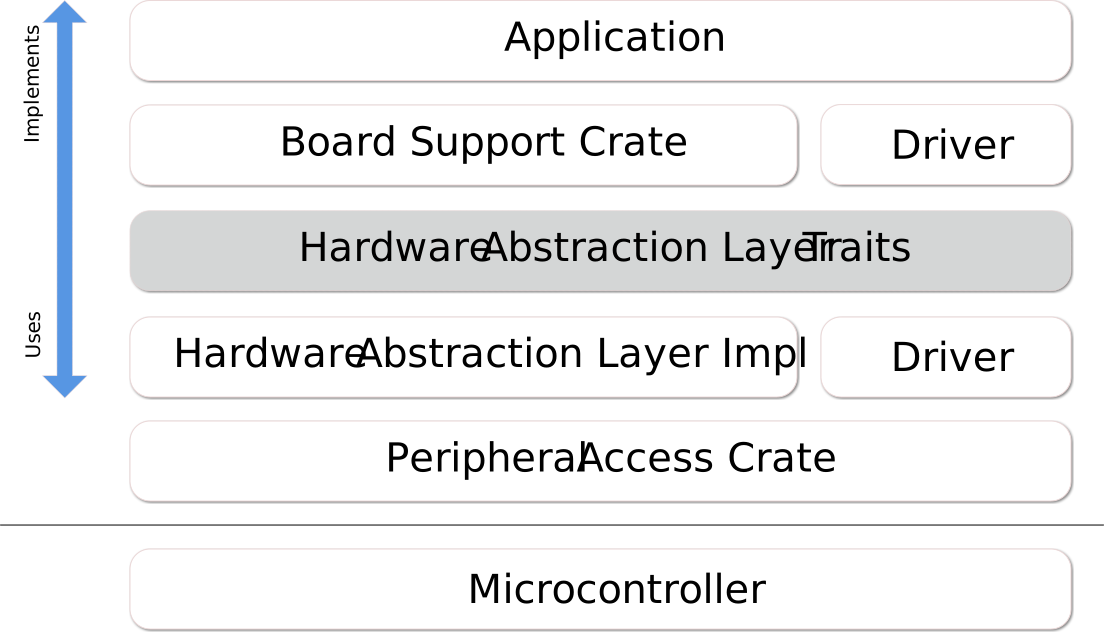
embedded-hal 中定義的一些 trait 包含:
- GPIO(輸入與輸出腳位)
- 序列通訊
- I2C
- SPI
- 計時器/倒數計時
- 類比訊號轉換
擁有 embedded-hal traits 以及實作並使用它們的套件,主要是為了控制複雜度。若一個應用程式同時要實作硬體周邊的使用、應用程式本身,以及可能的額外硬體驅動,很容易看出可重用性會非常有限。用數學表示,若 M 是周邊 HAL 實作數量,N 是驅動數量,若每個應用都重造輪子,最終會有 M*N 種實作;而使用 embedded-hal traits 提供的 API,實作複雜度會趨近 M+N。當然還有其他好處,例如因為 API 定義清楚且可直接使用,能減少試錯。
embedded-hal 的使用者
如上所述,HAL 有三種主要使用者:
HAL 實作
HAL 實作提供硬體與 HAL traits 使用者之間的介面。典型實作包含三部分:
- 一或多個硬體特定型別
- 用來建立並初始化該型別的函式,通常提供各種設定選項(速度、操作模式、使用腳位等)
- 該型別的一或多個 embedded-hal traits 的
traitimpl
這樣的 HAL 實作 可有不同形式:
- 透過低階硬體存取,例如暫存器
- 透過作業系統,例如在 Linux 使用
sysfs - 透過轉接層,例如用於單元測試的型別 mock
- 透過硬體轉接器的驅動程式,例如 I2C 多工器或 GPIO 擴充器
驅動程式
驅動程式為內部或外部元件提供一組自訂功能,該元件連接到實作 embedded-hal traits 的周邊。典型例子包括各種感測器(溫度、磁力計、加速度計、光)、顯示裝置(LED 陣列、LCD 顯示器)與致動器(馬達、發射器)。
驅動程式必須以實作 embedded-hal 某個 trait 的型別實例初始化,這由 trait bound 保證,並提供其自有型別實例與自訂方法集合,用來與所驅動的裝置互動。
應用程式
應用程式把各部分組合起來,確保達成所需功能。在不同系統間移植時,這部分需要最多的調整努力,因為應用程式必須透過 HAL 實作正確初始化實體硬體,而不同硬體的初始化方式可能差異很大。此外,使用者選擇也常扮演重要角色,因為元件可能實體連接到不同端子,硬體匯流排有時需要外部硬體配合設定,或是內部周邊的使用需要不同取捨(例如存在多個能力不同的計時器或周邊彼此衝突)。
並行
並行會在程式的不同部分可能於不同時間或不同順序執行時發生。在嵌入式情境中,這包括:
- 中斷處理器:在相關中斷發生時執行,
- 各種形式的多執行緒:微處理器會定期在程式的不同部分之間切換,
- 以及在某些系統中,多核心微處理器:每個核心都能在同一時間獨立執行程式的不同部分。
由於許多嵌入式程式需要處理中斷,並行遲早會出現,也正是許多細微且難解的錯誤出現之處。幸運的是,Rust 提供多種抽象與安全保證,協助我們寫出正確的程式碼。
無並行
嵌入式程式最簡單的並行就是沒有並行:軟體由單一主迴圈構成,持續運行,且完全沒有中斷。有時這非常適合手邊的問題!通常你的迴圈會讀取一些輸入、做一些處理,再輸出一些結果。
#[entry]
fn main() {
    let peripherals = setup_peripherals();
    loop {
        let inputs = read_inputs(&peripherals);
        let outputs = process(inputs);
        write_outputs(&peripherals, outputs);
    }
}
由於沒有並行,就不需要擔心程式各部分之間的資料共享或周邊存取同步。如果你可以採用這麼簡單的方法,這會是很棒的解決方案。
全域可變資料
與非嵌入式 Rust 不同,我們通常無法奢望建立堆積配置並把對該資料的參考傳給新建執行緒。相反地,我們的中斷處理器可能在任何時候被呼叫,必須知道如何存取我們正在使用的共享記憶體。在最低層,這代表我們必須擁有_靜態配置_的可變記憶體,讓中斷處理器與主程式碼都能參考。
在 Rust 中,這類 static mut 變數的讀寫永遠是不安全的,因為若不特別小心,你可能觸發資料競爭:對變數的存取途中被同樣會存取該變數的中斷打斷。
為了示範此行為如何造成程式中的細微錯誤,想像一個嵌入式程式會在每一秒內計算某個輸入訊號的上升沿(頻率計數器):
static mut COUNTER: u32 = 0;

#[entry]
fn main() -> ! {
    set_timer_1hz();
    let mut last_state = false;
    loop {
        let state = read_signal_level();
        if state && !last_state {
            // 危險 - 並不安全!可能造成資料競爭。
            unsafe { COUNTER += 1 };
        }
        last_state = state;
    }
}

#[interrupt]
fn timer() {
    unsafe { COUNTER = 0; }
}
每一秒,計時器中斷會把計數器設回 0。同時,主迴圈會持續量測訊號,並在看到低轉高時遞增計數器。我們必須用 unsafe 存取 COUNTER,因為它是 static mut,這代表我們向編譯器保證不會造成未定義行為。你能找出資料競爭嗎?COUNTER 的遞增_不_保證是原子操作——事實上,在多數嵌入式平台上,它會被拆成載入、遞增、儲存三步驟。如果中斷在載入之後、儲存之前觸發,回到中斷後會忽略重設為 0 的結果——因此該期間的轉換次數會被計兩次。
臨界區
那麼,我們能如何處理資料競爭?一個簡單的作法是使用_臨界區_,也就是停用中斷的情境。把 main 中對 COUNTER 的存取包在臨界區內,我們就能確定在完成遞增COUNTER 之前計時器中斷不會觸發:
static mut COUNTER: u32 = 0;

#[entry]
fn main() -> ! {
    set_timer_1hz();
    let mut last_state = false;
    loop {
        let state = read_signal_level();
        if state && !last_state {
            // 新的臨界區確保對 COUNTER 的同步存取
            cortex_m::interrupt::free(|_| {
                unsafe { COUNTER += 1 };
            });
        }
        last_state = state;
    }
}

#[interrupt]
fn timer() {
    unsafe { COUNTER = 0; }
}
在此例中,我們使用 cortex_m::interrupt::free,但其他平台也會有類似機制可在臨界區中執行程式碼。這等同於停用中斷、執行某段程式碼,然後再重新啟用中斷。
注意,我們不需要在計時器中斷內加入臨界區,原因有二:
- 將 0 寫入
COUNTER不會受競爭影響,因為我們沒有讀取它 - 反正也不會被
main執行緒打斷
若 COUNTER 由多個可能互相_搶占_的中斷處理器共享,則每一個也可能都需要臨界區。
這解決了當下問題,但我們仍需撰寫大量 unsafe 程式碼並小心推理,而且可能會不必要地使用臨界區。由於每個臨界區會暫停中斷處理,因此會帶來額外的程式碼大小成本,以及更高的中斷延遲與抖動(中斷可能需要更久才被處理,且等待時間更不穩定)。這是否是問題取決於你的系統,但一般而言我們希望避免它。
值得注意的是,臨界區雖然保證不會有中斷觸發,但在多核心系統上並不提供互斥保證!即使沒有中斷,其他核心也可能同時存取相同記憶體。如果你使用多核心,就需要更強的同步原語。
原子存取
在某些平台上,有特殊的原子指令,可為讀-改-寫操作提供保證。以 Cortex-M 為例:thumbv6(Cortex-M0、Cortex-M0+)僅提供原子載入與儲存指令,而 thumbv7(Cortex-M3 及以上)提供完整的 Compare and Swap(CAS)指令。這些 CAS 指令可作為粗暴停用所有中斷的替代方案:我們可嘗試遞增,大多時候會成功;若被中斷,它會自動重試整個遞增操作。這些原子操作即使跨多核心也安全。
use core::sync::atomic::{AtomicUsize, Ordering};

static COUNTER: AtomicUsize = AtomicUsize::new(0);

#[entry]
fn main() -> ! {
    set_timer_1hz();
    let mut last_state = false;
    loop {
        let state = read_signal_level();
        if state && !last_state {
            // 使用 `fetch_add` 以原子方式將 COUNTER 加 1
            COUNTER.fetch_add(1, Ordering::Relaxed);
        }
        last_state = state;
    }
}

#[interrupt]
fn timer() {
    // 使用 `store` 直接將 0 寫入 COUNTER
    COUNTER.store(0, Ordering::Relaxed)
}
此時 COUNTER 是安全的 static 變數。多虧 AtomicUsize 型別,COUNTER可在不中斷的情況下由中斷處理器與主執行緒安全地修改。若可行,這是更好的解決方案——但你的平台可能不支援。
關於 Ordering:它會影響編譯器與硬體可能重排序指令的方式,並且會影響快取可見性。假設目標是單核心平台,在此情況下 Relaxed 足夠且最有效率。更嚴格的排序會讓編譯器在原子操作周圍插入記憶體屏障;視你使用原子的目的而定,可能需要也可能不需要。原子模型的精確細節相當複雜,最好參考其他資料。
更多關於原子操作與排序的細節,請參考 nomicon。
抽象、Send 與 Sync
上述解法都不算理想。它們需要 unsafe 區塊,必須非常仔細地檢查,且不夠易用。我們在 Rust 中一定能做得更好!
我們可以把計數器抽象成安全的介面,讓程式其他地方都能安全使用。此例中我們會使用臨界區計數器,但用原子操作也能做出很相似的作法。
use core::cell::UnsafeCell;
use cortex_m::interrupt;

// 我們的計數器只是對 UnsafeCell<u32> 的包裝,這是 Rust 內部可變性的核心
// 透過內部可變性,我們可以讓 COUNTER 成為 `static` 而不是 `static mut`,但
// 仍可變更其計數值。
struct CSCounter(UnsafeCell<u32>);

const CS_COUNTER_INIT: CSCounter = CSCounter(UnsafeCell::new(0));

impl CSCounter {
    pub fn reset(&self, _cs: &interrupt::CriticalSection) {
        // 透過要求傳入 CriticalSection,我們知道必須
        // 在臨界區內操作,因此可以放心使用這個 unsafe 區塊(呼叫
        // UnsafeCell::get 所必需)。
        unsafe { *self.0.get() = 0 };
    }

    pub fn increment(&self, _cs: &interrupt::CriticalSection) {
        unsafe { *self.0.get() += 1 };
    }
}

// 允許 static CSCounter 所需,詳見下方說明。
unsafe impl Sync for CSCounter {}

// COUNTER 因使用內部可變性而不再是 `mut`;
// 因此存取它也不再需要 unsafe 區塊。
static COUNTER: CSCounter = CS_COUNTER_INIT;

#[entry]
fn main() -> ! {
    set_timer_1hz();
    let mut last_state = false;
    loop {
        let state = read_signal_level();
        if state && !last_state {
            // 這裡沒有 unsafe!
            interrupt::free(|cs| COUNTER.increment(cs));
        }
        last_state = state;
    }
}

#[interrupt]
fn timer() {
    // 我們仍需進入臨界區才能取得有效的 cs token,
    // 即便我們知道沒有其他中斷能搶占這個中斷。
    interrupt::free(|cs| COUNTER.reset(cs));

    // 如果真的想避免開銷,我們可以用 unsafe 產生假的 CriticalSection:
    // let cs = unsafe { interrupt::CriticalSection::new() };
}
我們把 unsafe 程式碼移到精心設計的抽象內部,現在應用程式碼不再含有任何 unsafe 區塊。
This design requires that the application pass a CriticalSection token in: these tokens are only safely generated by interrupt::free, so by requiring one be passed in, we ensure we are operating inside a critical section, without having to actually do the lock ourselves. This guarantee is provided statically by the compiler: there won’t be any runtime overhead associated with cs. If we had multiple counters, they could all be given the same cs, without requiring multiple nested critical sections.
This also brings up an important topic for concurrency in Rust: the Send and Sync traits. To summarise the Rust book, a type is Send when it can safely be moved to another thread, while it is Sync when it can be safely shared between multiple threads. In an embedded context, we consider interrupts to be executing in a separate thread to the application code, so variables accessed by both an interrupt and the main code must be Sync.
For most types in Rust, both of these traits are automatically derived for you by the compiler. However, because CSCounter contains an UnsafeCell, it is not Sync, and therefore we could not make a static CSCounter: static variables must be Sync, since they can be accessed by multiple threads.
To tell the compiler we have taken care that the CSCounter is in fact safe to share between threads, we implement the Sync trait explicitly. As with the previous use of critical sections, this is only safe on single-core platforms: with multiple cores, you would need to go to greater lengths to ensure safety.
Mutexes
We’ve created a useful abstraction specific to our counter problem, but there are many common abstractions used for concurrency.
One such synchronisation primitive is a mutex, short for mutual exclusion. These constructs ensure exclusive access to a variable, such as our counter. A thread can attempt to lock (or acquire) the mutex, and either succeeds immediately, or blocks waiting for the lock to be acquired, or returns an error that the mutex could not be locked. While that thread holds the lock, it is granted access to the protected data. When the thread is done, it unlocks (or releases) the mutex, allowing another thread to lock it. In Rust, we would usually implement the unlock using the Drop trait to ensure it is always released when the mutex goes out of scope.
Using a mutex with interrupt handlers can be tricky: it is not normally acceptable for the interrupt handler to block, and it would be especially disastrous for it to block waiting for the main thread to release a lock, since we would then deadlock (the main thread will never release the lock because execution stays in the interrupt handler). Deadlocking is not considered unsafe: it is possible even in safe Rust.
To avoid this behaviour entirely, we could implement a mutex which requires a critical section to lock, just like our counter example. So long as the critical section must last as long as the lock, we can be sure we have exclusive access to the wrapped variable without even needing to track the lock/unlock state of the mutex.
This is in fact done for us in the cortex_m crate! We could have written our counter using it:
use core::cell::Cell;
use cortex_m::interrupt::Mutex;

static COUNTER: Mutex<Cell<u32>> = Mutex::new(Cell::new(0));

#[entry]
fn main() -> ! {
    set_timer_1hz();
    let mut last_state = false;
    loop {
        let state = read_signal_level();
        if state && !last_state {
            interrupt::free(|cs|
                COUNTER.borrow(cs).set(COUNTER.borrow(cs).get() + 1));
        }
        last_state = state;
    }
}

#[interrupt]
fn timer() {
    // We still need to enter a critical section here to satisfy the Mutex.
    interrupt::free(|cs| COUNTER.borrow(cs).set(0));
}
We’re now using Cell, which along with its sibling RefCell is used to provide safe interior mutability. We’ve already seen UnsafeCell which is the bottom layer of interior mutability in Rust: it allows you to obtain multiple mutable references to its value, but only with unsafe code. A Cell is like an UnsafeCell but it provides a safe interface: it only permits taking a copy of the current value or replacing it, not taking a reference, and since it is not Sync, it cannot be shared between threads. These constraints mean it’s safe to use, but we couldn’t use it directly in a static variable as a static must be Sync.
So why does the example above work? The Mutex<T> implements Sync for any T which is Send — such as a Cell. It can do this safely because it only gives access to its contents during a critical section. We’re therefore able to get a safe counter with no unsafe code at all!
This is great for simple types like the u32 of our counter, but what about more complex types which are not Copy? An extremely common example in an embedded context is a peripheral struct, which generally is not Copy. For that, we can turn to RefCell.
Sharing Peripherals
Device crates generated using svd2rust and similar abstractions provide safe access to peripherals by enforcing that only one instance of the peripheral struct can exist at a time. This ensures safety, but makes it difficult to access a peripheral from both the main thread and an interrupt handler.
To safely share peripheral access, we can use the Mutex we saw before. We’ll also need to use RefCell, which uses a runtime check to ensure only one reference to a peripheral is given out at a time. This has more overhead than the plain Cell, but since we are giving out references rather than copies, we must be sure only one exists at a time.
Finally, we’ll also have to account for somehow moving the peripheral into the shared variable after it has been initialised in the main code. To do this we can use the Option type, initialised to None and later set to the instance of the peripheral.
use core::cell::RefCell;
use cortex_m::interrupt::{self, Mutex};
use stm32f4::stm32f405;

static MY_GPIO: Mutex<RefCell<Option<stm32f405::GPIOA>>> =
    Mutex::new(RefCell::new(None));

#[entry]
fn main() -> ! {
    // Obtain the peripheral singletons and configure it.
    // This example is from an svd2rust-generated crate, but
    // most embedded device crates will be similar.
    let dp = stm32f405::Peripherals::take().unwrap();
    let gpioa = &dp.GPIOA;

    // Some sort of configuration function.
    // Assume it sets PA0 to an input and PA1 to an output.
    configure_gpio(gpioa);

    // Store the GPIOA in the mutex, moving it.
    interrupt::free(|cs| MY_GPIO.borrow(cs).replace(Some(dp.GPIOA)));
    // We can no longer use `gpioa` or `dp.GPIOA`, and instead have to
    // access it via the mutex.

    // Be careful to enable the interrupt only after setting MY_GPIO:
    // otherwise the interrupt might fire while it still contains None,
    // and as-written (with `unwrap()`), it would panic.
    set_timer_1hz();
    let mut last_state = false;
    loop {
        // We'll now read state as a digital input, via the mutex
        let state = interrupt::free(|cs| {
            let gpioa = MY_GPIO.borrow(cs).borrow();
            gpioa.as_ref().unwrap().idr.read().idr0().bit_is_set()
        });

        if state && !last_state {
            // Set PA1 high if we've seen a rising edge on PA0.
            interrupt::free(|cs| {
                let gpioa = MY_GPIO.borrow(cs).borrow();
                gpioa.as_ref().unwrap().odr.modify(|_, w| w.odr1().set_bit());
            });
        }
        last_state = state;
    }
}

#[interrupt]
fn timer() {
    // This time in the interrupt we'll just clear PA0.
    interrupt::free(|cs| {
        // We can use `unwrap()` because we know the interrupt wasn't enabled
        // until after MY_GPIO was set; otherwise we should handle the potential
        // for a None value.
        let gpioa = MY_GPIO.borrow(cs).borrow();
        gpioa.as_ref().unwrap().odr.modify(|_, w| w.odr1().clear_bit());
    });
}
That’s quite a lot to take in, so let’s break down the important lines.
static MY_GPIO: Mutex<RefCell<Option<stm32f405::GPIOA>>> =
    Mutex::new(RefCell::new(None));
Our shared variable is now a Mutex around a RefCell which contains an Option. The Mutex ensures we only have access during a critical section, and therefore makes the variable Sync, even though a plain RefCell would not be Sync. The RefCell gives us interior mutability with references, which we’ll need to use our GPIOA. The Option lets us initialise this variable to something empty, and only later actually move the variable in. We cannot access the peripheral singleton statically, only at runtime, so this is required.
interrupt::free(|cs| MY_GPIO.borrow(cs).replace(Some(dp.GPIOA)));Inside a critical section we can call borrow() on the mutex, which gives us a reference to the RefCell. We then call replace() to move our new value into the RefCell.
interrupt::free(|cs| {
    let gpioa = MY_GPIO.borrow(cs).borrow();
    gpioa.as_ref().unwrap().odr.modify(|_, w| w.odr1().set_bit());
});
Finally, we use MY_GPIO in a safe and concurrent fashion. The critical section prevents the interrupt firing as usual, and lets us borrow the mutex. The RefCell then gives us an &Option<GPIOA>, and tracks how long it remains borrowed - once that reference goes out of scope, the RefCell will be updated to indicate it is no longer borrowed.
Since we can’t move the GPIOA out of the &Option, we need to convert it to an &Option<&GPIOA> with as_ref(), which we can finally unwrap() to obtain the &GPIOA which lets us modify the peripheral.
If we need a mutable reference to a shared resource, then borrow_mut and deref_mut should be used instead. The following code shows an example using the TIM2 timer.
use core::cell::RefCell;
use core::ops::DerefMut;
use cortex_m::interrupt::{self, Mutex};
use cortex_m::asm::wfi;
use stm32f4::stm32f405;

static G_TIM: Mutex<RefCell<Option<Timer<stm32::TIM2>>>> =
	Mutex::new(RefCell::new(None));

#[entry]
fn main() -> ! {
    let mut cp = cm::Peripherals::take().unwrap();
    let dp = stm32f405::Peripherals::take().unwrap();

    // Some sort of timer configuration function.
    // Assume it configures the TIM2 timer, its NVIC interrupt,
    // and finally starts the timer.
    let tim = configure_timer_interrupt(&mut cp, dp);

    interrupt::free(|cs| {
        G_TIM.borrow(cs).replace(Some(tim));
    });

    loop {
        wfi();
    }
}

#[interrupt]
fn timer() {
    interrupt::free(|cs| {
        if let Some(ref mut tim)) =  G_TIM.borrow(cs).borrow_mut().deref_mut() {
            tim.start(1.hz());
        }
    });
}
Whew! This is safe, but it is also a little unwieldy. Is there anything else we can do?
RTIC
One alternative is the RTIC framework, short for Real Time Interrupt-driven Concurrency. It enforces static priorities and tracks accesses to static mut variables (“resources”) to statically ensure that shared resources are always accessed safely, without requiring the overhead of always entering critical sections and using reference counting (as in RefCell). This has a number of advantages such as guaranteeing no deadlocks and giving extremely low time and memory overhead.
The framework also includes other features like message passing, which reduces the need for explicit shared state, and the ability to schedule tasks to run at a given time, which can be used to implement periodic tasks. Check out the documentation for more information!
Real Time Operating Systems
Another common model for embedded concurrency is the real-time operating system (RTOS). While currently less well explored in Rust, they are widely used in traditional embedded development. Open source examples include FreeRTOS and ChibiOS. These RTOSs provide support for running multiple application threads which the CPU swaps between, either when the threads yield control (called cooperative multitasking) or based on a regular timer or interrupts (preemptive multitasking). The RTOS typically provide mutexes and other synchronisation primitives, and often interoperate with hardware features such as DMA engines.
At the time of writing, there are not many Rust RTOS examples to point to, but it’s an interesting area so watch this space!
Multiple Cores
It is becoming more common to have two or more cores in embedded processors, which adds an extra layer of complexity to concurrency. All the examples using a critical section (including the cortex_m::interrupt::Mutex) assume the only other execution thread is the interrupt thread, but on a multi-core system that’s no longer true. Instead, we’ll need synchronisation primitives designed for multiple cores (also called SMP, for symmetric multi-processing).
These typically use the atomic instructions we saw earlier, since the processing system will ensure that atomicity is maintained over all cores.
Covering these topics in detail is currently beyond the scope of this book, but the general patterns are the same as for the single-core case.
集合
最終你會想在程式中使用動態資料結構(亦即集合)。std 提供一組常見集合:Vec、String、HashMap 等。std 中實作的所有集合都使用全域動態記憶體配置器(亦即堆積)。
由於 core 定義上不含記憶體配置,因此這些實作在那裡不可用,但可在隨編譯器提供的 alloc 套件中找到。
如果你需要集合,堆積配置的實作並非唯一選擇。你也可以使用_固定容量_集合;其中一種實作可見於 heapless 套件。
在本節中,我們會探索並比較這兩種實作。
使用 alloc
alloc 套件隨標準 Rust 發行版一同提供。要匯入此套件,你可以直接 use 它,不需要 在 Cargo.toml 中宣告相依。
#![feature(alloc)]

extern crate alloc;

use alloc::vec::Vec;
要能使用任何集合,你首先需要用 global_allocator 屬性宣告程式所使用的全域配置器。你選擇的配置器必須實作 GlobalAlloc trait。
為了完整性並盡量讓本節自足,我們會實作一個簡單的指標遞增(bump pointer)配置器並將其作為全域配置器。然而,我們_強烈_建議你在程式中使用 crates.io 上久經考驗的配置器,而不是此配置器。
// 指標遞增配置器實作

use core::alloc::{GlobalAlloc, Layout};
use core::cell::UnsafeCell;
use core::ptr;

use cortex_m::interrupt;

// 適用於*單核心*系統的指標遞增配置器
struct BumpPointerAlloc {
    head: UnsafeCell<usize>,
    end: usize,
}

unsafe impl Sync for BumpPointerAlloc {}

unsafe impl GlobalAlloc for BumpPointerAlloc {
    unsafe fn alloc(&self, layout: Layout) -> *mut u8 {
        // `interrupt::free` 是臨界區,讓我們的配置器可安全
        // 在中斷內使用
        interrupt::free(|_| {
            let head = self.head.get();
            let size = layout.size();
            let align = layout.align();
            let align_mask = !(align - 1);

            // 將起點移到下一個對齊邊界
            let start = (*head + align - 1) & align_mask;

            if start + size > self.end {
                // 空指標代表記憶體不足(OOM)
                ptr::null_mut()
            } else {
                *head = start + size;
                start as *mut u8
            }
        })
    }

    unsafe fn dealloc(&self, _: *mut u8, _: Layout) {
        // 此配置器從不釋放記憶體
    }
}

// 全域記憶體配置器的宣告
// 注意:使用者必須確保記憶體區域 `[0x2000_0100, 0x2000_0200]`
// 未被程式的其他部分使用
#[global_allocator]
static HEAP: BumpPointerAlloc = BumpPointerAlloc {
    head: UnsafeCell::new(0x2000_0100),
    end: 0x2000_0200,
};
除了選擇全域配置器之外,使用者還必須使用_不穩定_的 alloc_error_handler 屬性來定義如何處理記憶體不足(OOM)錯誤。
#![feature(alloc_error_handler)]

use cortex_m::asm;

#[alloc_error_handler]
fn on_oom(_layout: Layout) -> ! {
    asm::bkpt();

    loop {}
}
當上述一切就緒後,使用者終於可以使用 alloc 中的集合。
#[entry]
fn main() -> ! {
    let mut xs = Vec::new();

    xs.push(42);
    assert!(xs.pop(), Some(42));

    loop {
        // ..
    }
}
如果你用過 std 套件的集合,這些會很熟悉,因為實作完全相同。
使用 heapless
heapless 不需要任何設定,因為其集合不依賴全域記憶體配置器。只要 use 其集合並直接建立實例即可:
// heapless 版本:v0.4.x
use heapless::Vec;
use heapless::consts::*;

#[entry]
fn main() -> ! {
    let mut xs: Vec<_, U8> = Vec::new();

    xs.push(42).unwrap();
    assert_eq!(xs.pop(), Some(42));
    loop {}
}
你會注意到這些集合與 alloc 中的集合有兩個差異。
第一,你必須事先宣告集合容量。heapless 集合不會重新配置,且容量固定;容量是集合型別簽名的一部分。在此例中,我們宣告 xs 容量為 8 個元素,也就是這個向量最多只能容納 8 個元素。這會在型別簽名中以 U8 表示(見typenum)。
第二,push 與許多其他方法會回傳 Result。由於 heapless 集合容量固定,所有插入元素的操作都有可能失敗。API 透過回傳 Result 來反映此問題,以表示操作是否成功。相較之下,alloc 集合會在堆積上重新配置以擴增容量。
截至 v0.4.x 版本,所有 heapless 集合都將元素內嵌存放。這意味著像 let x = heapless::Vec::new(); 這樣的操作會在堆疊上配置集合,但也可以將集合配置在 static 變數上,甚至放在堆積上(Box<Vec<_, _>>)。
取捨
在選擇可在堆積配置、可搬移的集合與固定容量集合時,請記住以下重點。
記憶體不足與錯誤處理
使用堆積配置時,記憶體不足總是有可能發生,且可能出現在集合需要成長的任何地方:例如所有 alloc::Vec.push 都可能引發 OOM。因此某些操作可能會_隱含_失敗。有些 alloc 集合提供 try_reserve 方法,讓你在擴充集合時檢查可能的 OOM 狀況,但你必須主動使用它們。
若你只使用 heapless 集合,且不把記憶體配置器用於其他用途,那麼 OOM 就不可能發生。取而代之,你必須逐案處理集合容量耗盡的情況。也就是說,你必須處理像 Vec.push 這類方法回傳的_所有_ Result。
OOM 失敗可能比在 heapless::Vec.push 回傳的所有 Result 上做 unwrap 更難除錯,因為觀察到的失敗位置可能_不_等於問題原因的位置。例如,如果配置器幾乎耗盡,即使 vec.reserve(1) 也可能觸發 OOM,原因可能是其他集合在洩漏記憶體(安全 Rust 也可能發生記憶體洩漏)。
記憶體使用
推論堆積配置集合的記憶體用量很困難,因為長生命週期集合的容量可在執行期變動。有些操作可能會隱含地重新配置集合並增加記憶體用量,有些集合提供像 shrink_to_fit 的方法,可能降低集合的記憶體使用量——最終是否實際縮減配置仍取決於配置器。此外,配置器可能還需處理記憶體碎片化,這會增加_表觀_記憶體用量。
另一方面,若你只使用固定容量集合、將大多數放在 static 變數中,並為呼叫堆疊設定最大大小,那麼連結器會在你嘗試使用超過實體可用記憶體時偵測到。
此外,堆疊上配置的固定容量集合會被 -Z emit-stack-sizes 旗標回報,這表示分析堆疊使用量的工具(如 stack-sizes)會將它們納入分析。
然而,固定容量集合_無法_縮小,這可能導致裝載率(集合大小與容量的比例)低於可搬移集合所能達到的程度。
最壞執行時間(WCET)
如果你在打造時間敏感或硬即時的應用程式,那麼你會非常在意程式各部分的最壞執行時間。
alloc 集合可以重新配置,因此可能增長集合的操作,其 WCET 也包含重新配置所需的時間,而這又取決於集合的_執行期_容量。這使得像 alloc::Vec.push 這樣的操作難以確定 WCET,因為它取決於使用的配置器與執行期容量。
另一方面,固定容量集合從不重新配置,因此所有操作都有可預測的執行時間。例如,heapless::Vec.push 以常數時間執行。
易用性
alloc 需要設定全域配置器,而 heapless 不需要。然而,heapless 需要你為每個實例化的集合選擇容量。
alloc 的 API 幾乎對每位 Rust 開發者都很熟悉。heapless 的 API 嘗試緊密模仿 alloc API,但因為明確的錯誤處理,它永遠不可能完全相同——有些開發者可能覺得明確的錯誤處理過於冗長或太繁瑣。
設計模式
This chapter aims to collect various useful design patterns for embedded Rust.
HAL 設計模式
This is a set of common and recommended patterns for writing hardware abstraction layers (HALs) for microcontrollers in Rust. These patterns are intended to be used in addition to the existing Rust API Guidelines when writing HALs for microcontrollers.
HAL Design Patterns Checklist
- Naming (crate aligns with Rust naming conventions)
- The crate is named appropriately (C-CRATE-NAME)
- Interoperability (crate interacts nicely with other library functionality)
- Wrapper types provide a destructor method (C-FREE)
- HALs reexport their register access crate (C-REEXPORT-PAC)
- Types implement the
embedded-haltraits (C-HAL-TRAITS)
- Predictability (crate enables legible code that acts how it looks)
- Constructors are used instead of extension traits (C-CTOR)
- GPIO Interfaces (GPIO Interfaces follow a common pattern)
- Pin types are zero-sized by default (C-ZST-PIN)
- Pin types provide methods to erase pin and port (C-ERASED-PIN)
- Pin state should be encoded as type parameters (C-PIN-STATE)
命名
The crate is named appropriately (C-CRATE-NAME)
HAL crates should be named after the chip or family of chips they aim to support. Their name should end with -hal to distinguish them from register access crates. The name should not contain underscores (use dashes instead).
互通性
Wrapper types provide a destructor method (C-FREE)
Any non-Copy wrapper type provided by the HAL should provide a free method that consumes the wrapper and returns back the raw peripheral (and possibly other objects) it was created from.
The method should shut down and reset the peripheral if necessary. Calling new with the raw peripheral returned by free should not fail due to an unexpected state of the peripheral.
If the HAL type requires other non-Copy objects to be constructed (for example I/O pins), any such object should be released and returned by free as well. free should return a tuple in that case.
For example:
#![allow(unused)]
fn main() {
pub struct TIMER0;
pub struct Timer(TIMER0);

impl Timer {
    pub fn new(periph: TIMER0) -> Self {
        Self(periph)
    }

    pub fn free(self) -> TIMER0 {
        self.0
    }
}
}
HALs reexport their register access crate (C-REEXPORT-PAC)
HALs can be written on top of svd2rust-generated PACs, or on top of other crates that provide raw register access. HALs should always reexport the register access crate they are based on in their crate root.
A PAC should be reexported under the name pac, regardless of the actual name of the crate, as the name of the HAL should already make it clear what PAC is being accessed.
Types implement the embedded-hal traits (C-HAL-TRAITS)
Types provided by the HAL should implement all applicable traits provided by the embedded-hal crate.
Multiple traits may be implemented for the same type.
可預測性
Constructors are used instead of extension traits (C-CTOR)
All peripherals to which the HAL adds functionality should be wrapped in a new type, even if no additional fields are required for that functionality.
Extension traits implemented for the raw peripheral should be avoided.
Methods are decorated with #[inline] where appropriate (C-INLINE)
The Rust compiler does not by default perform full inlining across crate boundaries. As embedded applications are sensitive to unexpected code size increases, #[inline] should be used to guide the compiler as follows:
- All “small” functions should be marked
#[inline]. What qualifies as “small” is subjective, but generally all functions that are expected to compile down to single-digit instruction sequences qualify as small. - Functions that are very likely to take constant values as parameters should be marked as
#[inline]. This enables the compiler to compute even complicated initialization logic at compile time, provided the function inputs are known.
Recommendations for GPIO Interfaces
Pin types are zero-sized by default (C-ZST-PIN)
GPIO Interfaces exposed by the HAL should provide dedicated zero-sized types for each pin on every interface or port, resulting in a zero-cost GPIO abstraction when all pin assignments are statically known.
Each GPIO Interface or Port should implement a split method returning a struct with every pin.
Example:
#![allow(unused)]
fn main() {
pub struct PA0;
pub struct PA1;
// ...

pub struct PortA;

impl PortA {
    pub fn split(self) -> PortAPins {
        PortAPins {
            pa0: PA0,
            pa1: PA1,
            // ...
        }
    }
}

pub struct PortAPins {
    pub pa0: PA0,
    pub pa1: PA1,
    // ...
}
}
Pin types provide methods to erase pin and port (C-ERASED-PIN)
Pins should provide type erasure methods that move their properties from compile time to runtime, and allow more flexibility in applications.
Example:
#![allow(unused)]
fn main() {
/// Port A, pin 0.
pub struct PA0;

impl PA0 {
    pub fn erase_pin(self) -> PA {
        PA { pin: 0 }
    }
}

/// A pin on port A.
pub struct PA {
    /// The pin number.
    pin: u8,
}

impl PA {
    pub fn erase_port(self) -> Pin {
        Pin {
            port: Port::A,
            pin: self.pin,
        }
    }
}

pub struct Pin {
    port: Port,
    pin: u8,
    // (these fields can be packed to reduce the memory footprint)
}

enum Port {
    A,
    B,
    C,
    D,
}
}
Pin state should be encoded as type parameters (C-PIN-STATE)
Pins may be configured as input or output with different characteristics depending on the chip or family. This state should be encoded in the type system to prevent use of pins in incorrect states.
Additional, chip-specific state (eg. drive strength) may also be encoded in this way, using additional type parameters.
Methods for changing the pin state should be provided as into_input and into_output methods.
Additionally, with_{input,output}_state methods should be provided that temporarily reconfigure a pin in a different state without moving it.
The following methods should be provided for every pin type (that is, both erased and non-erased pin types should provide the same API):
-
pub fn into_input<N: InputState>(self, input: N) -> Pin<N> -
pub fn into_output<N: OutputState>(self, output: N) -> Pin<N> -
pub fn with_input_state<N: InputState, R>( &mut self, input: N, f: impl FnOnce(&mut PA1<N>) -> R, ) -> R -
pub fn with_output_state<N: OutputState, R>(
    &mut self,
    output: N,
    f: impl FnOnce(&mut PA1<N>) -> R,
) -> R
Pin state should be bounded by sealed traits. Users of the HAL should have no need to add their own state. The traits can provide HAL-specific methods required to implement the pin state API.
Example:
#![allow(unused)]
fn main() {
use std::marker::PhantomData;
mod sealed {
    pub trait Sealed {}
}

pub trait PinState: sealed::Sealed {}
pub trait OutputState: sealed::Sealed {}
pub trait InputState: sealed::Sealed {
    // ...
}

pub struct Output<S: OutputState> {
    _p: PhantomData<S>,
}

impl<S: OutputState> PinState for Output<S> {}
impl<S: OutputState> sealed::Sealed for Output<S> {}

pub struct PushPull;
pub struct OpenDrain;

impl OutputState for PushPull {}
impl OutputState for OpenDrain {}
impl sealed::Sealed for PushPull {}
impl sealed::Sealed for OpenDrain {}

pub struct Input<S: InputState> {
    _p: PhantomData<S>,
}

impl<S: InputState> PinState for Input<S> {}
impl<S: InputState> sealed::Sealed for Input<S> {}

pub struct Floating;
pub struct PullUp;
pub struct PullDown;

impl InputState for Floating {}
impl InputState for PullUp {}
impl InputState for PullDown {}
impl sealed::Sealed for Floating {}
impl sealed::Sealed for PullUp {}
impl sealed::Sealed for PullDown {}

pub struct PA1<S: PinState> {
    _p: PhantomData<S>,
}

impl<S: PinState> PA1<S> {
    pub fn into_input<N: InputState>(self, input: N) -> PA1<Input<N>> {
        todo!()
    }

    pub fn into_output<N: OutputState>(self, output: N) -> PA1<Output<N>> {
        todo!()
    }

    pub fn with_input_state<N: InputState, R>(
        &mut self,
        input: N,
        f: impl FnOnce(&mut PA1<N>) -> R,
    ) -> R {
        todo!()
    }

    pub fn with_output_state<N: OutputState, R>(
        &mut self,
        output: N,
        f: impl FnOnce(&mut PA1<N>) -> R,
    ) -> R {
        todo!()
    }
}

// Same for `PA` and `Pin`, and other pin types.
}
給嵌入式 C 開發者的提示
本章收錄各種可能對有經驗的嵌入式 C 開發者有用的提示,以便開始撰寫 Rust。其中會特別強調你在 C 中習以為常的事,在 Rust 中有何不同。
預處理器
在嵌入式 C 中,預處理器常被用於各種用途,例如:
- 使用
#ifdef於編譯期選擇程式碼區塊 - 編譯期的陣列大小與計算
- 用巨集簡化常見模式(避免函式呼叫開銷)
Rust 沒有預處理器,因此這些用例多半以不同方式處理。在本節其餘部分,我們會介紹多種預處理器的替代方案。
編譯期程式碼選擇
在 Rust 中,最接近 #ifdef ... #endif 的是 Cargo features。它們比 C 預處理器更正式:每個 crate 會明確列出所有可能的 feature,且只能是開或關。當你把某個 crate 列為相依時會啟用 feature,而且 feature 是可累加的:若相依樹中任何 crate 為另一個 crate 啟用 feature,該 crate 的所有使用者都會啟用該 feature。
例如,你可能有個 crate 提供訊號處理基礎元件。每個元件可能需要額外編譯時間或宣告大型常數表,而你希望避免。你可以在 Cargo.toml 為每個元件宣告一個 Cargo feature:
[features]
FIR = []
IIR = []
然後在程式碼中使用 #[cfg(feature="FIR")] 來控制要包含哪些內容。
#![allow(unused)]
fn main() {
/// 在你的頂層 lib.rs 中

#[cfg(feature="FIR")]
pub mod fir;

#[cfg(feature="IIR")]
pub mod iir;
}
你也可以在 feature _未_啟用時包含程式碼區塊,或在某些 feature 組合啟用或未啟用時包含程式碼。
此外,Rust 提供多種自動設定的條件可用,例如 target_arch 可依架構選擇不同程式碼。關於條件式編譯支援的完整細節,請參考 Rust 參考文件中的條件式編譯 章節。
條件式編譯只會套用到下一個敘述或區塊。若某個區塊在目前作用域無法使用,就需要多次使用 cfg 屬性。值得注意的是,多數情況下更好的作法是直接包含所有程式碼,讓編譯器在最佳化時移除死碼:對你與使用者都更簡單,且通常編譯器能很好地移除未使用的程式碼。
編譯期大小與計算
Rust 支援 const fn,其函式可保證在編譯期求值,因此可用於需要常數的地方,例如陣列大小。它可與上述 feature 一起使用,例如:
#![allow(unused)]
fn main() {
const fn array_size() -> usize {
    #[cfg(feature="use_more_ram")]
    { 1024 }
    #[cfg(not(feature="use_more_ram"))]
    { 128 }
}

static BUF: [u32; array_size()] = [0u32; array_size()];
}
這些功能自 Rust 1.31 起才進入穩定版,因此文件仍較少。撰寫本書時,const fn 可用的功能也相當有限;未來 Rust 版本預期會擴充 const fn 允許的內容。
巨集
Rust 提供非常強大的巨集系統。C 的預處理器幾乎直接操作原始碼文字,而 Rust 巨集系統在更高層級運作。Rust 的巨集有兩種:巨集範例(macros by example) 與 程序式巨集(procedural macros)。前者較簡單且最常見,看起來像函式呼叫,能展開成完整的表達式、敘述、項目或樣式。程序式巨集更複雜,但可對 Rust 語言進行極其強大的擴展:它們可將任意 Rust語法轉換成新的 Rust 語法。
一般而言,若你原本會用 C 預處理器巨集,應先看看巨集範例是否能完成任務。它們可在你的 crate 中定義,並輕鬆供自己的 crate 使用或匯出給其他使用者。請注意,因為它們必須展開成完整的表達式、敘述、項目或樣式,所以某些 C 預處理器巨集的用法無法使用,例如展開成變數名稱的一部分,或清單中不完整的一組項目。
和 Cargo features 一樣,也值得考慮是否真的需要巨集。許多情況下,一般函式更容易理解,且會被內聯成與巨集相同的程式碼。#[inline] 與 #[inline(always)] 屬性 可提供更多控制,但也需小心——編譯器會在適當時自動內聯同一 crate 的函式,若強制內聯不恰當,反而可能降低效能。
完整說明 Rust 巨集系統超出本提示頁的範圍,建議參考 Rust 文件以了解完整細節。
建置系統
多數 Rust crate 以 Cargo 建置(雖非必須)。這解決了傳統建置系統的許多難題。不過,你可能希望自訂建置流程。Cargo 提供 build.rs 腳本 來達成此目的。這些是可依需求與 Cargo 建置系統互動的 Rust 腳本。
建置腳本的常見用途包括:
- 提供建置時資訊,例如將建置日期或 Git 提交雜湊值靜態嵌入可執行檔
- 依選擇的 feature 或其他邏輯在建置時產生連結器腳本
- 變更 Cargo 建置設定
- 加入額外要連結的靜態函式庫
目前沒有後置建置腳本的支援,而你可能曾用它來自動從建置物件產生二進位檔或輸出建置資訊。
交叉編譯
使用 Cargo 作為建置系統也能簡化交叉編譯。多數情況下只需告訴 Cargo --target thumbv6m-none-eabi,並在 target/thumbv6m-none-eabi/debug/myapp 找到合適的可執行檔。
對於 Rust 尚未原生支援的平台,你需要自行為該目標建置 libcore。在這類平台上,可使用 Xargo 作為 Cargo 的替代,為你自動建置 libcore。
疊代器與陣列存取
在 C 中,你可能習慣以索引直接存取陣列:
int16_t arr[16];
int i;
for(i=0; i<sizeof(arr)/sizeof(arr[0]); i++) {
    process(arr[i]);
}
在 Rust 中這是反模式:索引存取可能較慢(因為需要邊界檢查),也可能阻礙各種編譯器最佳化。這點很重要,值得重申:Rust 會對手動索引陣列進行越界檢查以保證記憶體安全,而 C 則會愉快地索引到陣列之外。
改用疊代器:
let arr = [0u16; 16];
for element in arr.iter() {
    process(*element);
}
疊代器提供了你在 C 中必須手動實作的一系列強大功能,例如串接、拉鍊化、枚舉、找最小/最大值、加總等。疊代器方法也可串接,讓資料處理程式碼非常易讀。
更多細節請參考手冊中的疊代器與Iterator 文件。
參考與指標
在 Rust 中確實有指標(稱為裸指標),但只在特定情況下使用,因為解參考它們一律被視為 unsafe——Rust 無法對指標背後的內容提供一貫的保證。
在多數情況下,我們會改用_參考_(以 & 表示),或_可變參考_(以 &mut 表示)。參考的行為類似指標,可解參考以存取底層值,但它們是 Rust 所有權系統的關鍵:Rust 嚴格保證在任何時刻對同一個值只能有一個可變參考,或 多個不可變參考。
實務上這代表你必須更謹慎考慮是否真的需要對資料進行可變存取:在 C 中預設可變且需明確標示 const,在 Rust 中則相反。
仍可能使用裸指標的情況之一是直接與硬體互動(例如將緩衝區指標寫入 DMA 周邊暫存器)。它們也被所有周邊存取套件在底層使用,以允許讀寫記憶體對映暫存器。
易變存取
在 C 中,單一變數可標記為 volatile,告訴編譯器該變數的值可能在存取之間改變。易變變數在嵌入式情境中常用於記憶體對映暫存器。
在 Rust 中,不是將變數標記為 volatile,而是使用特定方法進行易變存取:core::ptr::read_volatile 與core::ptr::write_volatile。這些方法接受 *const T 或 *mut T(如上所述的_裸指標_),並執行易變讀寫。
例如,在 C 中你可能會寫:
volatile bool signalled = false;

void ISR() {
    // 表示中斷已發生
    signalled = true;
}

void driver() {
    while(true) {
        // 睡眠直到收到訊號
        while(!signalled) { WFI(); }
        // 重設已通知的指示
        signalled = false;
        // 執行先前等待中斷的任務
        run_task();
    }
}
在 Rust 中等效作法是在每次存取時使用易變方法:
static mut SIGNALLED: bool = false;

#[interrupt]
fn ISR() {
    // 表示中斷已發生
    //(在實際程式碼中,你應考慮更高階的原語,
    //  例如原子型別)。
    unsafe { core::ptr::write_volatile(&mut SIGNALLED, true) };
}

fn driver() {
    loop {
        // 睡眠直到收到訊號
        while unsafe { !core::ptr::read_volatile(&SIGNALLED) } {}
        // 重設已通知的指示
        unsafe { core::ptr::write_volatile(&mut SIGNALLED, false) };
        // 執行先前等待中斷的任務
        run_task();
    }
}
程式碼範例中有幾點值得注意:
- 我們可以將
&mut SIGNALLED傳給需要*mut T的函式,因為&mut T會自動轉換為*mut T(*const T亦同) - 由於
read_volatile/write_volatile是unsafe函式,我們需要使用unsafe區塊。確保安全使用是程式設計者的責任:詳情請參考這些方法的文件。
通常不需要在程式中直接呼叫這些函式,因為高階函式庫會替你處理。對記憶體對映周邊而言,周邊存取套件會自動實作易變存取;對並行原語則有更好的抽象可用(參見並行章節)。
打包與對齊型別
在嵌入式 C 中,常見做法是告訴編譯器某變數必須有特定位元組對齊,或某個結構體必須打包而非對齊,通常是為了滿足特定硬體或通訊協定需求。
在 Rust 中,這由結構體或聯合體上的 repr 屬性控制。預設表現形式不保證版面配置,因此不應用於與硬體或 C 互通的程式碼。編譯器可能會重新排序結構體成員或插入填充,且行為可能在未來 Rust 版本中改變。
struct Foo {
    x: u16,
    y: u8,
    z: u16,
}

fn main() {
    let v = Foo { x: 0, y: 0, z: 0 };
    println!("{:p} {:p} {:p}", &v.x, &v.y, &v.z);
}

// 0x7ffecb3511d0 0x7ffecb3511d4 0x7ffecb3511d2
// 注意為了改善打包,順序已改為 x、z、y。
為了確保與 C 互通的版面配置,使用 repr(C):
#[repr(C)]
struct Foo {
    x: u16,
    y: u8,
    z: u16,
}

fn main() {
    let v = Foo { x: 0, y: 0, z: 0 };
    println!("{:p} {:p} {:p}", &v.x, &v.y, &v.z);
}

// 0x7fffd0d84c60 0x7fffd0d84c62 0x7fffd0d84c64
// 順序保持不變,且版面配置不會隨時間改變。
// `z` 需 2 位元組對齊,因此 `y` 與 `z` 之間存在 1 位元組填充。
若要確保打包表示,使用 repr(packed):
#[repr(packed)]
struct Foo {
    x: u16,
    y: u8,
    z: u16,
}

fn main() {
    let v = Foo { x: 0, y: 0, z: 0 };
    // 參考必須永遠對齊,因此要檢查結構體欄位位址時,
    // 我們使用 `std::ptr::addr_of!()` 取得裸指標,
    // 而不是直接列印 `&v.x`。
    let px = std::ptr::addr_of!(v.x);
    let py = std::ptr::addr_of!(v.y);
    let pz = std::ptr::addr_of!(v.z);
    println!("{:p} {:p} {:p}", px, py, pz);
}

// 0x7ffd33598490 0x7ffd33598492 0x7ffd33598493
// `y` 與 `z` 之間未插入填充,因此 `z` 現在未對齊。
注意,使用 repr(packed) 也會把型別對齊設為 1。
最後,若要指定特定對齊方式,使用 repr(align(n)),其中 n 是對齊到的位元組數(且必須為 2 的冪):
#[repr(C)]
#[repr(align(4096))]
struct Foo {
    x: u16,
    y: u8,
    z: u16,
}

fn main() {
    let v = Foo { x: 0, y: 0, z: 0 };
    let u = Foo { x: 0, y: 0, z: 0 };
    println!("{:p} {:p} {:p}", &v.x, &v.y, &v.z);
    println!("{:p} {:p} {:p}", &u.x, &u.y, &u.z);
}

// 0x7ffec909a000 0x7ffec909a002 0x7ffec909a004
// 0x7ffec909b000 0x7ffec909b002 0x7ffec909b004
// 兩個實例 `u` 與 `v` 被放在 4096 位元組對齊的位置,
// 從位址末尾的 `000` 可看出。
注意,我們可將 repr(C) 與 repr(align(n)) 結合以取得對齊且相容 C 的配置。不得將 repr(align(n)) 與 repr(packed) 結合,因為 repr(packed) 會把對齊設為 1。repr(packed) 型別也不得包含 repr(align(n)) 型別。
關於型別配置的更多細節,請參考 Rust 參考文件的 type layout 章節。
其他資源
互通性
Interoperability between Rust and C code is always dependent on transforming data between the two languages. For this purpose, there is a dedicated module in the stdlib called std::ffi.
std::ffi provides type definitions for C primitive types, such as char, int, and long. It also provides some utility for converting more complex types such as strings, mapping both &str and String to C types that are easier and safer to handle.
As of Rust 1.30, functionalities of std::ffi are available in either core::ffi or alloc::ffi depending on whether or not memory allocation is involved. The cty crate and the cstr_core crate also offer similar functionalities.
| Rust type | Intermediate | C type |
|---|---|---|
String | CString | char * |
&str | CStr | const char * |
() | c_void | void |
u32 or u64 | c_uint | unsigned int |
| etc | … | … |
A value of a C primitive type can be used as one of the corresponding Rust type and vice versa, since the former is simply a type alias of the latter. For example, the following code compiles on platforms where unsigned int is 32-bit long.
fn foo(num: u32) {
    let c_num: c_uint = num;
    let r_num: u32 = c_num;
}
Interoperability with other build systems
A common requirement for including Rust in your embedded project is combining Cargo with your existing build system, such as make or cmake.
We are collecting examples and use cases for this on our issue tracker in issue #61.
Interoperability with RTOSs
Integrating Rust with an RTOS such as FreeRTOS or ChibiOS is still a work in progress; especially calling RTOS functions from Rust can be tricky.
We are collecting examples and use cases for this on our issue tracker in issue #62.
在 Rust 中用點 C
Using C or C++ inside of a Rust project consists of two major parts:
- Wrapping the exposed C API for use with Rust
- Building your C or C++ code to be integrated with the Rust code
As C++ does not have a stable ABI for the Rust compiler to target, it is recommended to use the C ABI when combining Rust with C or C++.
Defining the interface
Before consuming C or C++ code from Rust, it is necessary to define (in Rust) what data types and function signatures exist in the linked code. In C or C++, you would include a header (.h or .hpp) file which defines this data. In Rust, it is necessary to either manually translate these definitions to Rust, or use a tool to generate these definitions.
First, we will cover manually translating these definitions from C/C++ to Rust.
Wrapping C functions and Datatypes
Typically, libraries written in C or C++ will provide a header file defining all types and functions used in public interfaces. An example file may look like this:
/* File: cool.h */
typedef struct CoolStruct {
    int x;
    int y;
} CoolStruct;

void cool_function(int i, char c, CoolStruct* cs);
When translated to Rust, this interface would look as such:
/* File: cool_bindings.rs */
#[repr(C)]
pub struct CoolStruct {
    pub x: cty::c_int,
    pub y: cty::c_int,
}

extern "C" {
    pub fn cool_function(
        i: cty::c_int,
        c: cty::c_char,
        cs: *mut CoolStruct
    );
}
Let’s take a look at this definition one piece at a time, to explain each of the parts.
#[repr(C)]
pub struct CoolStruct { ... }
By default, Rust does not guarantee order, padding, or the size of data included in a struct. In order to guarantee compatibility with C code, we include the #[repr(C)] attribute, which instructs the Rust compiler to always use the same rules C does for organizing data within a struct.
pub x: cty::c_int,
pub y: cty::c_int,
Due to the flexibility of how C or C++ defines an int or char, it is recommended to use primitive data types defined in cty, which will map types from C to types in Rust.
extern "C" { pub fn cool_function( ... ); }This statement defines the signature of a function that uses the C ABI, called cool_function. By defining the signature without defining the body of the function, the definition of this function will need to be provided elsewhere, or linked into the final library or binary from a static library.
    i: cty::c_int,
    c: cty::c_char,
    cs: *mut CoolStruct
Similar to our datatype above, we define the datatypes of the function arguments using C-compatible definitions. We also retain the same argument names, for clarity.
We have one new type here, *mut CoolStruct. As C does not have a concept of Rust’s references, which would look like this: &mut CoolStruct, we instead have a raw pointer. As dereferencing this pointer is unsafe, and the pointer may in fact be a null pointer, care must be taken to ensure the guarantees typical of Rust when interacting with C or C++ code.
Automatically generating the interface
Rather than manually generating these interfaces, which may be tedious and error prone, there is a tool called bindgen which will perform these conversions automatically. For instructions of the usage of bindgen, please refer to the bindgen user’s manual, however the typical process consists of the following:
- Gather all C or C++ headers defining interfaces or datatypes you would like to use with Rust.
- Write a
bindings.hfile, which#include "..."’s each of the files you gathered in step one. - Feed this
bindings.hfile, along with any compilation flags used to compile your code intobindgen. Tip: useBuilder.ctypes_prefix("cty")/--ctypes-prefix=ctyandBuilder.use_core()/--use-coreto make the generated code#![no_std]compatible. bindgenwill produce the generated Rust code to the output of the terminal window. This output may be piped to a file in your project, such asbindings.rs. You may use this file in your Rust project to interact with C/C++ code compiled and linked as an external library. Tip: don’t forget to use thectycrate if your types in the generated bindings are prefixed withcty.
建置您的 C/C++ 程式碼
As the Rust compiler does not directly know how to compile C or C++ code (or code from any other language, which presents a C interface), it is necessary to compile your non-Rust code ahead of time.
For embedded projects, this most commonly means compiling the C/C++ code to a static archive (such as cool-library.a), which can then be combined with your Rust code at the final linking step.
If the library you would like to use is already distributed as a static archive, it is not necessary to rebuild your code. Just convert the provided interface header file as described above, and include the static archive at compile/link time.
If your code exists as a source project, it will be necessary to compile your C/C++ code to a static library, either by triggering your existing build system (such as make, CMake, etc.), or by porting the necessary compilation steps to use a tool called the cc crate. For both of these steps, it is necessary to use a build.rs script.
Rust build.rs build scripts
A build.rs script is a file written in Rust syntax, that is executed on your compilation machine, AFTER dependencies of your project have been built, but BEFORE your project is built.
The full reference may be found here. build.rs scripts are useful for generating code (such as via bindgen), calling out to external build systems such as Make, or directly compiling C/C++ through use of the cc crate.
Triggering external build systems
For projects with complex external projects or build systems, it may be easiest to use std::process::Command to “shell out” to your other build systems by traversing relative paths, calling a fixed command (such as make library), and then copying the resulting static library to the proper location in the target build directory.
While your crate may be targeting a no_std embedded platform, your build.rs executes only on machines compiling your crate. This means you may use any Rust crates which will run on your compilation host.
Building C/C++ code with the cc crate
For projects with limited dependencies or complexity, or for projects where it is difficult to modify the build system to produce a static library (rather than a final binary or executable), it may be easier to instead utilize the cc crate, which provides an idiomatic Rust interface to the compiler provided by the host.
In the simplest case of compiling a single C file as a dependency to a static library, an example build.rs script using the cc crate would look like this:
fn main() {
    cc::Build::new()
        .file("src/foo.c")
        .compile("foo");
}
The build.rs is placed at the root of the package. Then cargo build will compile and execute it before the build of the package. A static archive named libfoo.a is generated and placed in the target directory.
在 C 中用點 Rust
Using Rust code inside a C or C++ project mostly consists of two parts.
- Creating a C-friendly API in Rust
- Embedding your Rust project into an external build system
Apart from cargo and meson, most build systems don’t have native Rust support. So you’re most likely best off just using cargo for compiling your crate and any dependencies.
Setting up a project
Create a new cargo project as usual.
There are flags to tell cargo to emit a systems library, instead of its regular rust target. This also allows you to set a different output name for your library, if you want it to differ from the rest of your crate.
[lib]
name = "your_crate"
crate-type = ["cdylib"]      # Creates dynamic lib
# crate-type = ["staticlib"] # Creates static lib
Building a C API
Because C++ has no stable ABI for the Rust compiler to target, we use C for any interoperability between different languages. This is no exception when using Rust inside of C and C++ code.
#[no_mangle]
The Rust compiler mangles symbol names differently than native code linkers expect. As such, any function that Rust exports to be used outside of Rust needs to be told not to be mangled by the compiler.
extern "C"
By default, any function you write in Rust will use the Rust ABI (which is also not stabilized). Instead, when building outwards facing FFI APIs we need to tell the compiler to use the system ABI.
Depending on your platform, you might want to target a specific ABI version, which are documented here.
Putting these parts together, you get a function that looks roughly like this.
#[no_mangle]
pub extern "C" fn rust_function() {

}
Just as when using C code in your Rust project you now need to transform data from and to a form that the rest of the application will understand.
Linking and greater project context.
So then, that’s one half of the problem solved. How do you use this now?
This very much depends on your project and/or build system
cargo will create a my_lib.so/my_lib.dll or my_lib.a file, depending on your platform and settings. This library can simply be linked by your build system.
However, calling a Rust function from C requires a header file to declare the function signatures.
Every function in your Rust-ffi API needs to have a corresponding header function.
#[no_mangle]
pub extern "C" fn rust_function() {}
would then become
void rust_function();
etc.
There is a tool to automate this process, called cbindgen which analyses your Rust code and then generates headers for your C and C++ projects from it.
At this point, using the Rust functions from C is as simple as including the header and calling them!
#include "my-rust-project.h"
rust_function();
未分類主題
Optimizations: the speed size tradeoff
Everyone wants their program to be super fast and super small but it’s usually not possible to have both characteristics. This section discusses the different optimization levels that rustc provides and how they affect the execution time and binary size of a program.
No optimizations
This is the default. When you call cargo build you use the development (AKA dev) profile. This profile is optimized for debugging so it enables debug information and does not enable any optimizations, i.e. it uses -C opt-level = 0.
At least for bare metal development, debuginfo is zero cost in the sense that it won’t occupy space in Flash / ROM so we actually recommend that you enable debuginfo in the release profile – it is disabled by default. That will let you use breakpoints when debugging release builds.
[profile.release]
# symbols are nice and they don't increase the size on Flash
debug = true
No optimizations is great for debugging because stepping through the code feels like you are executing the program statement by statement, plus you can print stack variables and function arguments in GDB. When the code is optimized, trying to print variables results in $0 = <value optimized out> being printed.
The biggest downside of the dev profile is that the resulting binary will be huge and slow. The size is usually more of a problem because unoptimized binaries can occupy dozens of KiB of Flash, which your target device may not have – the result: your unoptimized binary doesn’t fit in your device!
Can we have smaller, debugger friendly binaries? Yes, there’s a trick.
Optimizing dependencies
There’s a Cargo feature named profile-overrides that lets you override the optimization level of dependencies. You can use that feature to optimize all dependencies for size while keeping the top crate unoptimized and debugger friendly.
Beware that generic code can sometimes be optimized alongside the crate where it is instantiated, rather than the crate where it is defined. If you create an instance of a generic struct in your application and find that it pulls in code with a large footprint, it may be that increasing the optimisation level of the relevant dependencies has no effect.
Here’s an example:
# Cargo.toml
[package]
name = "app"
# ..

[profile.dev.package."*"] # +
opt-level = "z" # +
Without the override:
$ cargo size --bin app -- -A
app  :
section               size        addr
.vector_table         1024   0x8000000
.text                 9060   0x8000400
.rodata               1708   0x8002780
.data                    0  0x20000000
.bss                     4  0x20000000
With the override:
$ cargo size --bin app -- -A
app  :
section               size        addr
.vector_table         1024   0x8000000
.text                 3490   0x8000400
.rodata               1100   0x80011c0
.data                    0  0x20000000
.bss                     4  0x20000000
That’s a 6 KiB reduction in Flash usage without any loss in the debuggability of the top crate. If you step into a dependency then you’ll start seeing those <value optimized out> messages again but it’s usually the case that you want to debug the top crate and not the dependencies. And if you do need to debug a dependency then you can use the profile-overrides feature to exclude a particular dependency from being optimized. See example below:
# ..

# don't optimize the `cortex-m-rt` crate
[profile.dev.package.cortex-m-rt] # +
opt-level = 0 # +

# but do optimize all the other dependencies
[profile.dev.package."*"]
codegen-units = 1 # better optimizations
opt-level = "z"
Now the top crate and cortex-m-rt are debugger friendly!
Optimize for speed
As of 2018-09-18 rustc supports three “optimize for speed” levels: opt-level = 1, 2 and 3. When you run cargo build --release you are using the release profile which defaults to opt-level = 3.
Both opt-level = 2 and 3 optimize for speed at the expense of binary size, but level 3 does more vectorization and inlining than level 2. In particular, you’ll see that at opt-level equal to or greater than 2 LLVM will unroll loops. Loop unrolling has a rather high cost in terms of Flash / ROM (e.g. from 26 bytes to 194 for a zero this array loop) but can also halve the execution time given the right conditions (e.g. number of iterations is big enough).
Currently there’s no way to disable loop unrolling in opt-level = 2 and 3 so if you can’t afford its cost you should optimize your program for size.
Optimize for size
As of 2018-09-18 rustc supports two “optimize for size” levels: opt-level = "s" and "z". These names were inherited from clang / LLVM and are not too descriptive but "z" is meant to give the idea that it produces smaller binaries than "s".
If you want your release binaries to be optimized for size then change the profile.release.opt-level setting in Cargo.toml as shown below.
[profile.release]
# or "z"
opt-level = "s"
These two optimization levels greatly reduce LLVM’s inline threshold, a metric used to decide whether to inline a function or not. One of Rust principles are zero cost abstractions; these abstractions tend to use a lot of newtypes and small functions to hold invariants (e.g. functions that borrow an inner value like deref, as_ref) so a low inline threshold can make LLVM miss optimization opportunities (e.g. eliminate dead branches, inline calls to closures).
When optimizing for size you may want to try increasing the inline threshold to see if that has any effect on the binary size. The recommended way to change the inline threshold is to append the -C inline-threshold flag to the other rustflags in .cargo/config.toml.
# .cargo/config.toml
# this assumes that you are using the cortex-m-quickstart template
[target.'cfg(all(target_arch = "arm", target_os = "none"))']
rustflags = [
  # ..
  "-C", "inline-threshold=123", # +
]
What value to use? As of 1.29.0 these are the inline thresholds that the different optimization levels use:
opt-level = 3uses 275opt-level = 2uses 225opt-level = "s"uses 75opt-level = "z"uses 25
You should try 225 and 275 when optimizing for size.
Performing math functionality with #[no_std]
If you want to perform math related functionality like calculating the squareroot or the exponential of a number and you have the full standard library available, your code might look like this:
//! Some mathematical functions with standard support available

fn main() {
    let float: f32 = 4.82832;
    let floored_float = float.floor();

    let sqrt_of_four = floored_float.sqrt();

    let sinus_of_four = floored_float.sin();

    let exponential_of_four = floored_float.exp();
    println!("Floored test float {} to {}", float, floored_float);
    println!("The square root of {} is {}", floored_float, sqrt_of_four);
    println!("The sinus of four is {}", sinus_of_four);
    println!(
        "The exponential of four to the base e is {}",
        exponential_of_four
    )
}
Without standard library support, these functions are not available. An external crate like libm can be used instead. The example code would then look like this:
#![no_main]
#![no_std]

use panic_halt as _;

use cortex_m_rt::entry;
use cortex_m_semihosting::{debug, hprintln};
use libm::{exp, floorf, sin, sqrtf};

#[entry]
fn main() -> ! {
    let float = 4.82832;
    let floored_float = floorf(float);

    let sqrt_of_four = sqrtf(floored_float);

    let sinus_of_four = sin(floored_float.into());

    let exponential_of_four = exp(floored_float.into());
    hprintln!("Floored test float {} to {}", float, floored_float).unwrap();
    hprintln!("The square root of {} is {}", floored_float, sqrt_of_four).unwrap();
    hprintln!("The sinus of four is {}", sinus_of_four).unwrap();
    hprintln!(
        "The exponential of four to the base e is {}",
        exponential_of_four
    )
    .unwrap();
    // exit QEMU
    // NOTE do not run this on hardware; it can corrupt OpenOCD state
    // debug::exit(debug::EXIT_SUCCESS);

    loop {}
}
If you need to perform more complex operations like DSP signal processing or advanced linear algebra on your MCU, the following crates might help you
附錄 A:詞彙表
嵌入式生態系充滿各種協定、硬體元件與廠商特有的事物,且都有各自的術語與縮寫。本詞彙表嘗試列出它們,並提供理解它們的指引。
BSP
板級支援套件(Board Support Crate)提供為特定開發板設定好的高階介面。它通常依賴 HAL 套件。更詳細的說明可參考記憶體對映暫存器頁面,或觀看更廣泛概覽的這段影片。
FPU
浮點運算單元。僅執行浮點數運算的「數學處理器」。
HAL
硬體抽象層(Hardware Abstraction Layer)套件提供對微控制器功能與周邊的開發者友善介面。它通常建立在周邊存取套件(PAC)之上,也可能實作embedded-hal 套件中的 traits。更詳細的說明可參考記憶體對映暫存器頁面,或觀看更廣泛概覽的這段影片。
I2C
有時稱為 I²C 或 Inter-IC。這是一種用於單一積體電路內硬體通訊的協定。詳見這裡。
PAC
周邊存取套件(Peripheral Access Crate)提供對微控制器周邊的存取。它是較底層的套件之一,通常直接由提供的 SVD 產生,常用工具為 svd2rust。硬體抽象層通常會依賴此套件。更詳細的說明可參考記憶體對映暫存器頁面,或觀看更廣泛概覽的這段影片。
SPI
序列周邊介面。詳見這裡。
SVD
System View Description 是一種 XML 檔案格式,用於描述程式設計者對微控制器裝置的視角。詳見 ARM CMSIS 文件網站。
UART
通用非同步收發器。詳見這裡。
USART
通用同步與非同步收發器。詳見這裡。