Logo

Getting started

  • Tutorial
  • 增添文件專案
  • 熱門文件工具
  • 範例專案

專案設定與組態

  • Configuration file overview
  • Configuration file reference
  • Read the Docs Addons
  • Account authentication methods
  • Automation rules
  • How to create reproducible builds

Build process

  • Build process overview
  • Build process customization
  • Git integration (GitHub, GitLab, Bitbucket)
  • 拉取請求預覽
  • 建置失敗通知
  • 環境變數概覽
  • 環境變數參考

託管文件

  • Versions
  • 子專案
  • 在地化與國際化
  • URL versioning schemes
  • 自訂域名
  • URL path prefixes
  • 文件通知
  • Canonical URLs
  • Content Delivery Network (CDN) and caching
  • Sitemap support
  • 404 Not Found pages
  • robots.txt support
  • llms.txt support

閱讀文件

  • Offline formats (PDF, ePub, HTML)
  • Visual diff
  • 連結預覽
    • 啟用連結預覽
    • Troubleshooting link previews
  • How to embed content from your documentation
  • Server side search
  • 搜尋查詢語法
  • 飛出式選單

維護專案

  • Redirects
  • Traffic analytics
  • Search analytics
  • Security logs
  • 狀態徽章
  • How to structure your documentation
  • Best practices for linking to your documentation
  • Security considerations for documentation pages
  • Main content detection
  • AI agent skills
  • Custom script

Business features

  • Business hosting
  • Organizations
  • 單一登入(SSO)
  • Sharing private documentation
  • 如何管理您的訂閱
  • Privacy levels

操作指南

  • 專案設定與組態
  • Build process
  • Upgrading and maintaining projects
  • Content, themes and SEO
  • Security and access
  • 帳號管理
  • 最佳實踐
  • Troubleshooting problems

Reference

  • Public REST API
  • 常見問題集
  • 變更日誌
  • 關於 Read the Docs
  • 開發者文件
  • Read the Docs 網站
Read the Docs user documentation
  • 連結預覽
  • Edit on GitHub

連結預覽

Link previews allows you to see the content of the link you are about to click when you hover over it. This gives you the ability to quickly preview where a link points, so you can keep your context while reading but learn more from other resources.
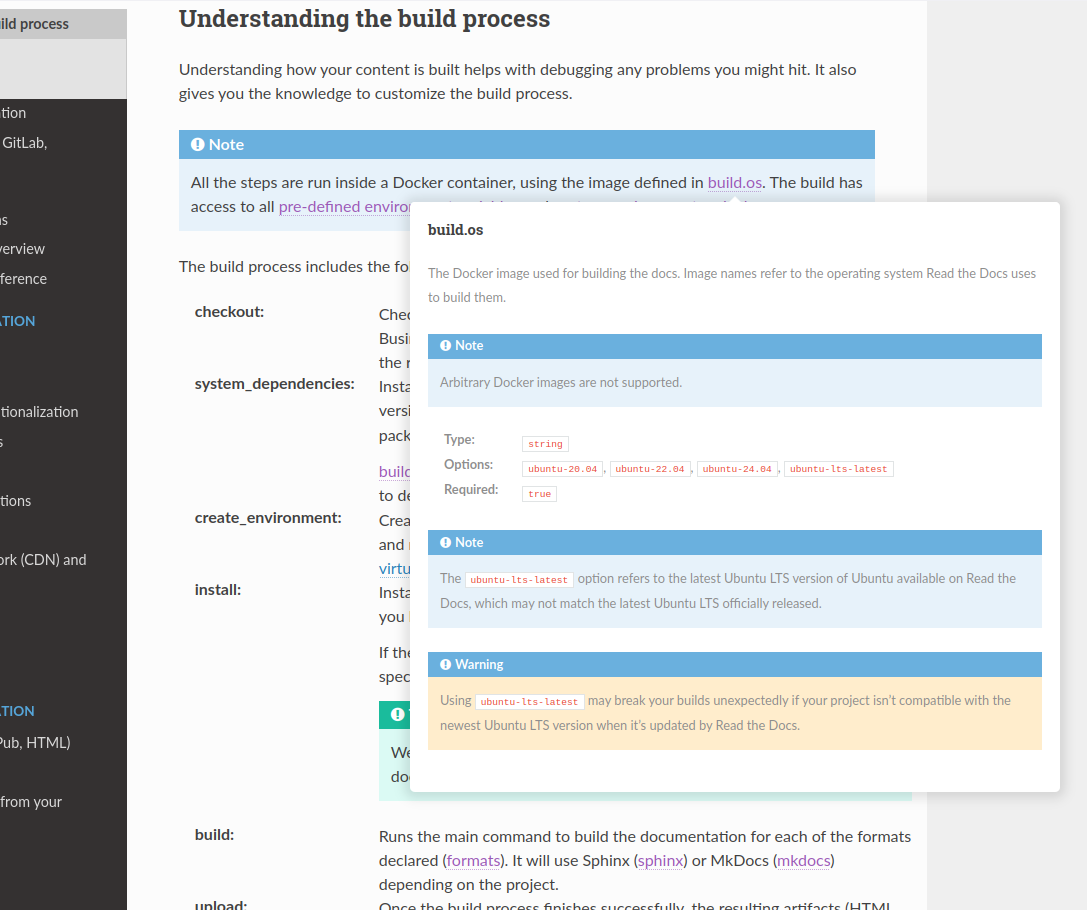
_images/addons-link-previews.png

Example of link previews addon

Link previews will only be generated for internal links--links that point to pages within your documentation site. No link previews will be generated for links to external sites or links that appear outside of the primary content of the documentation page (eg. nav bars).

You can see an example of a link preview by hovering over the following link: Addons.

啟用連結預覽

  1. Go to the new dashboard.

  2. Click on a project name.

  3. Go to Settings, then in the left bar, go to Addons.

  4. Go to Link previews and check Enabled.

  5. Save your settings -- a rebuild of your project isn't required!

Troubleshooting link previews

We perform some heuristic to detect the documentation tool used to generate the page based on its HTML structure. This auto-detection may fail, resulting in the content rendered inside the popup being incorrect. If you are experiencing this, you can specify the CSS selector for the main content in Settings > Addons > Advanced. See Detection logic for how this content is detected and guidance on choosing a good selector. You can also open an issue in the addons repository so we improve our heuristic.

Link previews won't be generated if JavaScript is not enabled in your web browser or if all cookies are blocked.

Previous Next

© Copyright Read the Docs, Inc & contributors.

Built with Sphinx using a theme provided by Read the Docs.